Chapter 2 · The building blocks: model, tools, instructions, memory and state
The five building blocks of an agent: model, tools, instructions, memory and state, how to design tools a model can call, and context engineering.
Goal: by the end of this chapter you can take the loop of Chapter 1 apart into its five blocks, say what each one is responsible for and what breaks when it is weak, choose a model for an agent with a measurement rather than a feeling, design a tool a model will actually call correctly, write instructions that behave like architecture rather than like a wish list, give an agent the right kind of memory for the right length of time, keep its state so that a run can be resumed, and decide, token by token, what belongs in the context window. Every choice comes with its trade-offs, a way to test whether it was right, and what tends to go wrong in production.
Chapter 1 drew the agent as a loop: context in, decision out, tool runs, observation back, repeat. That picture is right but it hides the engineering. When you build a real agent you are making five separate kinds of decision, and when one fails in production you need to know which of the five it was. This chapter calls them the building blocks.
The five building blocks and what flows between them. Instructions and retrieved memory are assembled, with the history, into the context the model reads on every turn; the model emits a tool call; the tool acts on the environment and returns an observation; the loop keeps the state (which step, what plan, which call is pending, how much budget is left, which errors have happened) and decides whether to call the model again.
Each block owns one question.
Block
The question it answers
Made of
Typical failure when it is weak or missing
Model
"Given all this, what should happen next?"
an LLM behind an API or on your own hardware
wrong tool, wrong arguments, misread observation, gives up or loops
Tools
"How does the decision become an effect in the world?"
functions with a name, a description and a schema
the model cannot act, acts on the wrong thing, or drowns in the result
Instructions
"What is this agent for, and what must it never do?"
the system prompt: role, rules, formats, examples, stop conditions
drifts off task, ignores constraints, output that no parser accepts
Memory
"What does the agent know from before this turn, this run, or earlier runs?"
the context window, a scratchpad, a store it reads and writes
repeats work, forgets the user's constraint, contradicts itself
State
"Where in the task is the loop, and can it pick up where it left off?"
a small object: step, plan, pending call, budget, errors, status
cannot resume after a crash, retries blindly, never knows it is done
Two of these are easy to confuse, and the confusion causes real bugs. Memory is knowledge: what the agent has learned or been told. State is control: where the loop is in the task. "The user prefers mornings" is memory. "We are at step 4, the email tool just failed once, and there are four steps of budget left" is state. A system that keeps only memory cannot resume a crashed run safely; a system that keeps only state cannot remember what it was told. Section 2.6 draws the line in detail.
The blocks are connected by one artefact: the context the model receives on each turn. Instructions go in first and stay fixed. Tool definitions go in so the model knows what it may call. Memory contributes whatever was retrieved. The history of the run so far, including every observation, is appended. The last observation is the newest thing in it. The model reads all of that and writes one decision. This is why Section 2.7 on context engineering sits at the end of the chapter: it is where the other four blocks meet, and it is the budget they all draw on.
Chapter 1 gave the arithmetic of why reliability compounds across steps. This chapter is about the levers that raise per-step reliability, and almost all of them live in these blocks: a model that calls tools correctly, tools that are hard to misuse, instructions that remove ambiguity, memory that puts the right fact in front of the model, and state that makes a failed step recoverable rather than fatal.
A team designing an agent should argue about these before writing a line:
Which block are we weakest at, and how would we know? Most teams assume the model is the weak block and reach for a bigger one. In the production write-ups of Chapter 1, the weak blocks were tools (LinkedIn's malformed payloads) and instructions and verification (the MAST taxonomy). My view: instrument every block in the trace before you upgrade any of them.
Do we need all five? A single-turn classifier needs a model and instructions. A workflow with tools needs no agent state. Adding a block you do not need adds a place to fail. My view: start with model, tools and instructions, add memory when the task outlives one context, add explicit state when runs are long enough to crash.
Who owns each block? In a team, the prompt is often owned by product, the tools by backend engineers, the model choice by a platform team, and memory by nobody. My view: give each block an owner and an eval, or the unowned one will be where the incidents come from.
What is the unit of change? A change to a tool description changes the model's behaviour as surely as a change to the prompt. My view: version all five blocks together, as one release, and test them together.
The model is the only block that reasons, and it is also the only block you did not write. You choose it, you cannot debug it, and you can only measure it. Choosing well therefore means knowing what to measure.
A model that is excellent at writing essays can be mediocre inside a loop. The agent asks it a narrower question many times over: read this growing context, pick one of these tools, fill in these arguments exactly, or decide that no tool is needed. The factors that matter are different from the ones on a general benchmark.
Factor
What it means for an agent
How to measure it on your task
Capability on the task
can it do the hard reasoning steps at all (plan, diagnose, synthesise)?
a labelled set of the hard steps, scored by a rubric or a checker
Tool-call reliability
does it pick the right tool, with valid arguments, when it should, and no tool when it should not?
tool-selection accuracy, argument accuracy and refusal rate on a labelled set (below)
Latency
the loop multiplies it: ten steps at 3 s is 30 s before any tool time
p50 and p95 per call, measured with your real prompt length
Cost
the loop multiplies it too, and the context grows every step
cost per task over a sample of real runs, not per call
Context window
can one run fit, or will you need compaction (Section 2.7)?
the largest context your traces reach, with headroom
Structured-output support
can it be made to emit valid JSON every time, so your parser never breaks?
parse-failure rate over a thousand calls
Open-weight versus API
control over data, hosting and version pinning against convenience and the frontier of capability
a decision about data residency, cost at volume and operations, not a benchmark
The usual shape of the trade-off between three classes of model, sketched qualitatively. Capability and tool-call reliability tend to rise with size; speed, cost and control fall. The sketch is not a measurement: the only numbers that matter are the ones from a per-step evaluation on your own tasks.
The ability to call a function correctly is a trained skill, and it varies more between models than general fluency does. The Gorilla paper from Berkeley, in May 2023, was the first to measure it carefully.
The same group turned the measurement into a public benchmark, the Berkeley Function-Calling Leaderboard.
The router: a small model for routine steps, a large one for hard ones#
Most steps of most agents are routine. Reading a tool result and deciding to call the obvious next tool, extracting a field, reformatting an answer: a small model does these as well as a large one, several times faster and at a fraction of the cost. A few steps are hard: making the plan, recovering from an unexpected error, choosing between two tools whose purposes overlap. The router pattern sends each step to the model that fits it.
A router inside the loop sends routine steps (formatting, extraction, an obvious tool choice) to a small model and hard steps (planning, recovery, ambiguous tool choice) to a large one, with an escalation path when the small model fails a check. A per-step evaluation set, labelled routine or hard, decides where the line goes.
One model for every step
Router: small for routine, large for hard
Pros
one thing to evaluate, version and reason about; no routing errors
most steps cheap and fast; the large model is paid for only where it changes the outcome
Cons
every step pays the price of the hardest step
two models to evaluate and version; a wrong route is a silent quality loss; the router itself can be the weak step
When to pick it
early, always; and whenever the step mix is mostly hard
when traces show that most steps are routine and cost or latency is what blocks shipping
How to tell it was right
the per-step eval passes at the required rate
the per-step eval passes at the same rate as the single large model, at lower cost; the escalation rate is low and stable
Production failure
cost or latency too high to serve
the small model drifts after a version change and the router does not notice; escalations spike after a prompt edit
Should we pick the model first or the tools first? The model is the most visible choice, but tool-call reliability depends on the tool set. My view: design the tools and the eval set first, then let the eval choose the model; otherwise you choose a model for tools you will redesign.
Is a bigger model ever the wrong fix? Yes: when the failure is a vague tool description or a missing stop condition, a bigger model reads the same ambiguity more cleverly and still guesses. My view: upgrade the model only after the trace shows the step was reasoned well and still wrong.
How do we handle model version changes? Vendors retire and replace models; open weights do not change under you but need operations. My view: pin versions explicitly, treat an upgrade as a release with the full eval, and never let "latest" into production.
Open weights or API? The honest answer depends on volume, data rules and the team's operations capacity. My view: start on an API to learn what the task needs; move the routine steps to an open-weight model only when the per-step eval proves parity and the volume pays for the operations.
A model can only produce text. Everything an agent does happens through a tool, and the mechanism by which text becomes an action is what vendors call function calling (or tool use). Because the model never runs anything itself, tools are the boundary where your code, your permissions and your safety checks live. They are also, in the experience of every team that has published about it, the block most worth engineering carefully.
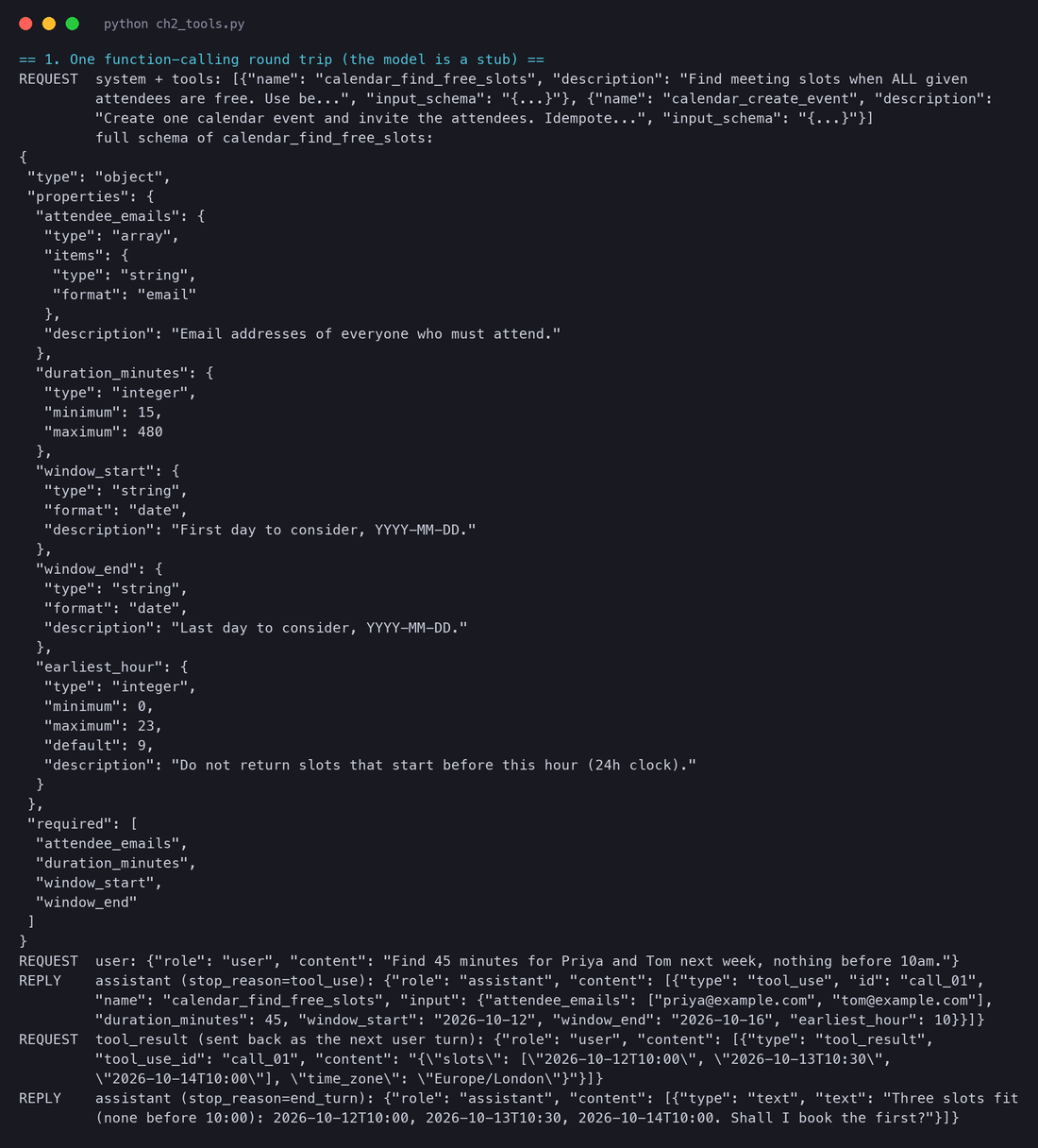
One function-calling round trip. The request carries the system prompt, the tool definitions and the user turn; the model replies with a structured tool call and a stop reason that says so; your code validates the arguments and runs the function; the result goes back as a tool-result turn; the model replies with text or with another call. Steps one to four repeat while the model keeps asking for tools, and the whole exchange is the context the next call sees.
The script ch2_tools.py prints the exact messages of one round trip for the meeting-scheduling example that runs through this chapter. The model is a stub (a function that returns what a real model would be expected to return at each point), so the script runs with no API key; the tool definition and the message shapes are real.
Four things in that output are the whole mechanism. The tool definitions travel in the request, so they cost input tokens on every turn. The model's reply is not text but a tool_use block with an id, a name and an input object that matches the schema. Your code, not the model, runs find_free_slots, and it is your code that could refuse, log, rate-limit or ask a human first. The result goes back as a tool_result tied to the id, and the model's next reply is ordinary text because it decided it was done.
Chapter 1 introduced Toolformer as the paper that showed tool use can be learned rather than prompted. Its first figure is worth a second look here, because it shows what a tool call is from the model's point of view: a piece of text, in a fixed format, inserted exactly where the information is needed.
Scale came next. The ToolLLM paper (July 2023) asked what happens when the tool set is not four tools but thousands.
The most useful engineering guidance on this is Anthropic's September 2025 post "Writing effective tools for agents", which came out of optimising the company's own internal tools against evaluations. Its five principles are a checklist; this section reads them one at a time and adds the trade-offs.
1. Choose which tools to build, and do not build the rest.
2. Namespace the tools.
3. Return meaningful context, not raw payloads.
4. Make responses token-efficient.
5. Prompt-engineer the descriptions.
Anthropic's December 2024 post "Building effective agents" made the same point from the other direction a year earlier, in an appendix on what it calls the agent-computer interface.
A tool the model will misuse next to a tool it can use. The good tool has a namespaced name, a description that says when to use it and what it returns, unambiguous argument names, a bounded return size, an error message that says what to do next, no side effects and safe retries. The bad tool forces the model to guess the argument, read forty thousand tokens to find one row, and cannot tell a failure from an empty answer.
Until late 2024 every team wired its tools into its agent by hand, and every tool vendor shipped a different integration for every agent product. The Model Context Protocol (MCP), released by Anthropic in November 2024 and since adopted widely, standardises the wire: a server exposes tools (and two other things) over a protocol; any host that speaks MCP can use them.
The participants of the Model Context Protocol as its documentation describes them. The host (your agent, an IDE, a desktop application) creates one client per server; each server exposes tools, resources and prompts over JSON-RPC, locally over standard input and output or remotely over HTTP; the host lists the tools from every client and puts their definitions into the model's context.
Hand-written tool wrappers
MCP servers
Pros
full control of names, descriptions, return shapes and error text; no protocol overhead; trivial to test
reuse of hundreds of existing servers; one integration per host, not per tool; dynamic discovery; standard annotations for destructive or open-world tools
Cons
every tool is bespoke work; every agent product needs its own integration
you inherit the server author's names, descriptions and return sizes; many servers wrap endpoints one-to-one, exactly the anti-pattern above; tool definitions from many servers can flood the context
When to pick it
a small, stable tool set you own, where every description is tuned on your eval
many systems to connect, especially third-party ones; or you are shipping tools for other people's agents
How to tell it was right
tool-selection and argument accuracy on your eval; return sizes within budget
the same metrics, measured with the servers connected; plus the context cost of the loaded definitions
Production failure
a wrapper silently drifts from the API it wraps
a server update renames a tool or changes a return shape and your prompt's tool guidance is now wrong; a server with sixty tools pushes your definitions past the attention budget
The context cost of many servers is real and measured. Anthropic's November 2025 post on code execution with MCP describes an agent that, instead of loading every tool definition, writes code that discovers tools as files and calls them from a sandbox.
Three numbers, all from a labelled set of real requests.
Tool-selection accuracy: did the model pick the labelled tool (or correctly pick none)? Report it per tool as well as overall; one badly described tool can hide behind a good average.
Argument correctness: schema-valid and semantically right. Schema validity is free; semantic correctness needs the label to contain the expected arguments.
Trajectory length: how many tool calls did the task take against the labelled minimum? Extra calls mean the tools do not match how the task decomposes, or the returns do not contain what the next step needs.
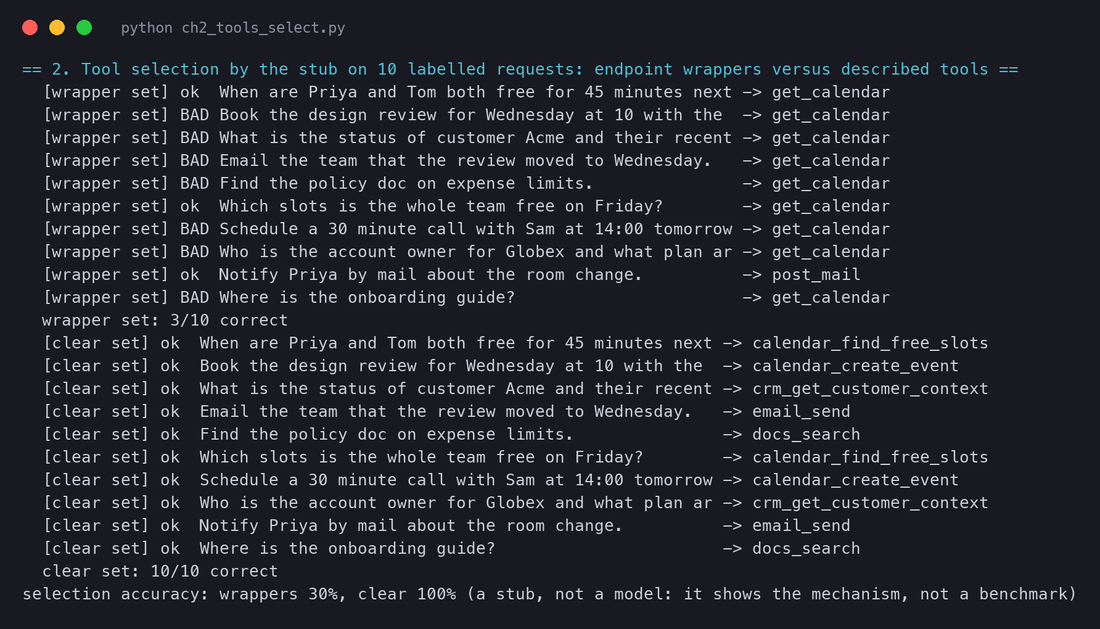
The second half of ch2_tools.py shows the mechanism of the first metric with a deliberately simple stub: a chooser that picks the tool whose name and description share the most words with the request.
Read the 30% against 100% for what it is: the output of a word-overlap stub, not a model's score. What it demonstrates is why descriptions matter. The wrapper set (GET /calendar, POST /mail) shares almost no vocabulary with how people ask for things, so the chooser has nothing to match and falls back on the first tool. The described set names the service, the verb and the words a user would use. A real model is far better than a word count at bridging that gap, but it bridges it with the same material, and the gap is what your eval measures.
One tool per endpoint or one tool per task? Endpoint wrappers are quick to generate and map to documentation you already have; task-shaped tools need design and an eval. My view: generate the wrappers to learn the domain, then replace the ones on the hot path with consolidated, task-shaped tools, and measure the trajectory length drop.
How many tools is too many? There is no fixed number; the symptom is selection accuracy falling and deliberation rising. My view: if a human engineer cannot say which tool to use in a given situation without thinking, the model cannot either; past a dozen or two, load tools per step rather than all at once.
MCP or in-house? MCP buys reach and costs control. My view: use MCP for everything you do not own and would otherwise integrate badly; write your own tools for the five that decide whether your agent works, and tune their descriptions on your eval.
Should tools be forgiving or strict? A forgiving tool (accepts "next Monday") raises step success now; a strict one (requires an ISO date) raises it permanently by making the ambiguity visible. My view: strict schemas with helpful error messages; the model learns from the error on the next turn, and the trace shows you where the schema should change.
Who approves a destructive tool? The annotation says destructive; something must act on it. My view: the loop, not the model, checks annotations and routes destructive calls to the approval step of Chapter 1's level 2; never trust the model to ask permission on its own.
2.4 Instructions: the system prompt as architecture#
The system prompt is usually written last, by whoever is closest to the demo, and then grows by accretion as each incident adds a sentence. Treated that way it becomes the least reliable block in the system. Treated as architecture, it is the cheapest place to raise per-step reliability, because every word in it is read on every turn.
The six sections of an agent's system prompt, each with an example line and the production smell that appears when it is missing: role and goal (the agent does adjacent tasks nobody asked for), hard constraints (the guardrail lives only in people's heads), tool guidance (the right tool called in the wrong order), output format (a parser that breaks every third run), stop conditions (loops that never end) and canonical examples (edge cases listed as rules instead of shown).
Role and goal. One or two sentences: what the agent is, who it serves, and what finishing looks like. The goal matters more than the role; "your job ends when the invitation has been sent" prevents more drift than three paragraphs of persona.
Hard constraints. The rules that must hold whatever the user says: never book before 10:00, never email outside the company, ask before deleting. These are the first line of guardrails (Chapter 9), and they belong in the prompt and in code, because the prompt is a request and code is a guarantee.
Tool guidance. When to use which tool and in what order; when to use none. The tool descriptions say what each tool does; the prompt says how they fit together for this task ("find free slots before creating an event; prefer one filtered search to many broad ones").
Output format. What the final answer must look like, so that the code that reads it never guesses. For an agent, the final answer is often a structured object, and the format section is a schema.
Stop conditions. When the agent is done, how many steps it may take, and what to do when a tool fails repeatedly. Chapter 1 showed "unaware of termination conditions" as one of the most common multi-agent failures; the fix starts here.
Canonical examples. Two or three short transcripts of a good run, chosen for diversity rather than coverage.
more control; edge cases handled; less dependence on the model's defaults
fewer tokens on every turn; fewer internal contradictions; easier to test and reason about; lets a capable model use its judgement
Cons
tokens paid on every step; rules conflict with each other and with tool descriptions; later rules get lost in the middle (Section 2.7); nobody knows which sentence does what
relies on the model doing the sensible thing; edge cases surface in production
When to pick it
a regulated task with hard rules; a weaker model that needs them; a stable task whose edge cases are known
early, always; a capable model; a task where the right action depends on judgement
How to tell it was right
the eval passes and removing any paragraph makes it fail (otherwise the paragraph is dead weight)
the eval passes; the failure analysis finds no cluster that a sentence would fix
Production failure
a new rule added after an incident silently contradicts an old one; cost creep
a long tail of unhandled cases, each handled by a hot-fix sentence until the prompt is long anyway
The practical rules are the ones you already use for code. Store the prompt as a file, not a string buried in a function. Review changes as diffs. Run the eval set in CI on every change, and gate the release on it (Chapter 7 builds that gate). Log the prompt version in every trace, so a regression can be traced to the edit that caused it. And remove sentences as readily as you add them: the eval that justified a sentence should be re-run without it from time to time, because models change and the sentence may now be noise.
How much should the prompt know about the tools? Too little and the model uses them in the wrong order; too much and the prompt duplicates the descriptions and drifts. My view: tool descriptions say what; the prompt says when and in what order, in one short section.
Should hard constraints be in the prompt if they are also in code? Both. The prompt tells the model what to avoid so it does not waste steps proposing it; the code stops it when the prompt fails. My view: never only in the prompt.
Who edits the prompt? Product people understand the task; engineers understand the loop. My view: anyone can propose, in a pull request, with the eval run attached; nobody edits in production.
Can we trust a vendor's prompting guide? Their advice is tuned for their models and changes with each release. My view: adopt the structure (sections, altitude, canonical examples), and test the specifics on your eval.
2.5 Memory: what the agent remembers and for how long#
A model remembers nothing between calls. Everything an agent "remembers" is engineering: something your code kept and put back in front of the model. The design questions are what to keep, where, and for how long, and the right answers differ by kind of information.
Left: the three places memory lives. The context window is seen directly by the model and paid for on every turn; the working memory is a scratchpad the agent writes for itself during a run; the long-term store lives outside the context, across runs, and is written to and retrieved from. Right: the three kinds of memory, episodic (what happened), semantic (facts) and procedural (how to), each with an example.
The second axis comes from cognitive science and has been adopted by agent frameworks because it tells you what to store where.
Memory type
Cost
Staleness
Privacy
Retrieval errors
Typical store
Short-term (context)
highest: paid on every turn, grows every step
none: it is the present
contained in the run
none: the model sees all of it, though attention fades (Section 2.7)
the message list
Working (scratchpad)
low: a few hundred tokens per turn
low: rewritten by the agent as it goes
contained in the run
low: small and structured
a notes field, a plan object, a notes file
Long-term episodic
storage cheap; retrieval has a token cost per item
high: events age; outcomes get superseded
highest: records of real people's interactions, with retention obligations
retrieving an irrelevant or outdated episode misleads the agent
vector store over summaries, logs with embeddings
Long-term semantic
storage cheap; retrieval modest
medium: facts change and must be corrected, not appended
medium: user profiles are personal data
retrieving a contradicted fact; two versions of the same fact
key-value by entity, a profile table, a knowledge base
Long-term procedural
low: a few rules
low to medium: rules outlive the reason for them
low
a learned rule that was wrong propagates to every run
the prompt; a rules file the agent may edit under review
The research: a memory stream, and an operating system#
The Generative Agents paper (April 2023) is where the modern memory architecture for agents was written down.
The paper's retrieval function is a small formula worth knowing, because every "which memories should go into the prompt" decision ends up looking like it.
The retrieval function of Generative Agents on four illustrative memories. Each gets a recency score, an importance score assigned when it was stored, and a relevance score to the current situation; the paper sums them with equal weights, and the top-ranked memories that fit in the context go into the prompt. The two highlighted memories are selected; the recent but trivial ones are not. Values are illustrative.
Six months later, MemGPT (October 2023) gave the problem its most useful analogy.
The operating-system analogy of MemGPT. The fixed-size context window is main memory, holding the system instructions, a working context of facts the model chose to keep, and a queue of recent messages; recall storage (the full searchable history) and archival storage (filed documents and notes) are disk. The model pages information in and out by calling memory functions when the loop warns it of memory pressure.
Memory in production: compaction, notes, sub-agents#
Anthropic's context-engineering post names three techniques its own long-running agents use, and they map exactly onto the ladder.
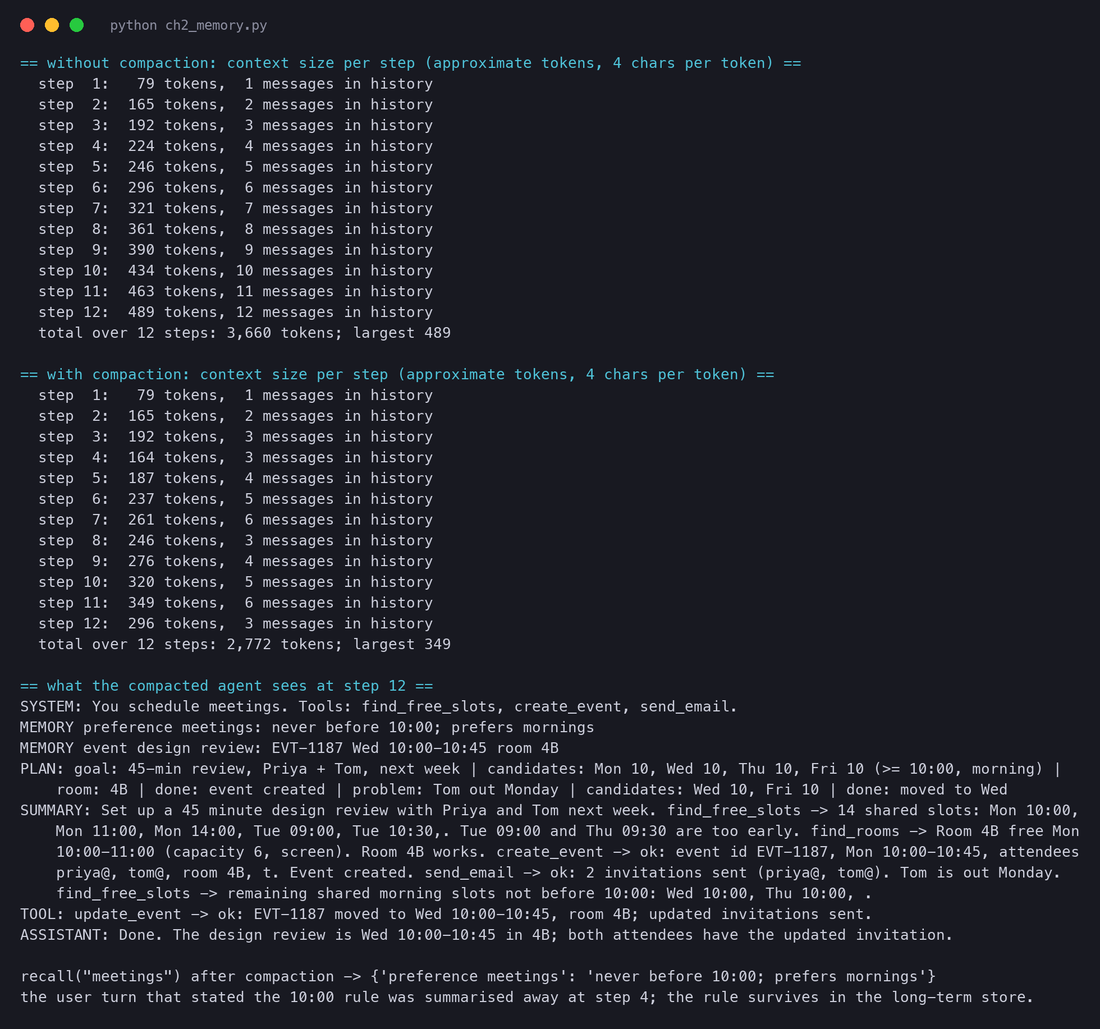
The script ch2_memory.py implements the ladder in miniature: a history (short-term), a scratchpad (working), a key-value store (long-term), and a summariser stub that compacts the history every four steps by keeping the first ninety characters of each old message (a real system would ask the model to summarise). It replays twelve steps of the meeting task and prints the approximate context size per step, with and without compaction. Token counts use the rule of thumb of about four characters per token; they are an approximation, not a tokenizer.
python
# code/agents/ch2_memory.py (abridged; the summariser is a stub and the token count is chars // 4)class Memory: def __init__(self, compact_every=4, keep_last=2): self.history, self.scratch, self.store = [], [], {} # short-term, working, long-term def remember(self, key, value): self.store[key] = value # long-term: survives compaction def recall(self, query): return {k: v for k, v in self.store.items() if any(w in k for w in query.split())} def note(self, line): self.scratch.append(line) # working memory: the running plan def add(self, role, content, step): self.history.append({'role': role, 'content': content}) if step % self.compact_every == 0: # compaction: old turns -> one summary old, recent = self.history[:-self.keep_last], self.history[-self.keep_last:] summary = ' '.join(m['content'][:90] for m in old if m['role'] != 'summary') self.history = [{'role': 'summary', 'content': summary}] + recent def context(self, query): # what the model would see this turn return '\n'.join(['SYSTEM: ...'] + [f'MEMORY {k}: {v}' for k, v in self.recall(query).items()] + ['PLAN: ' + ' | '.join(self.scratch)] + [f'{m["role"]}: {m["content"]}' for m in self.history])
Approximate context size per step of the twelve-step toy run, with and without compaction every four steps. The compacted run drops at steps 4, 8 and 12 and ends about forty percent smaller; over twelve steps it sends about a quarter fewer tokens. The numbers are from the four-characters-per-token approximation in ch2_memory.py.
Two things to notice. The saving is modest at twelve steps (3,660 against 2,772 tokens) because the run is short; Section 2.7 shows what happens at thirty. More important is the last two lines of the output: the user's rule "never before 10:00" was stated at step 1, compacted away at step 4, and is still available at step 12 because it was also written to the long-term store. Without that write, the agent would have booked Tue 09:00 at step 10 with a clear conscience. The summariser kept the first ninety characters of each message, which happened to include the rule in this run; a real summariser might not. Memory that matters must not depend on what a summary happens to keep.
What is worth storing long-term? Everything is cheap to store and expensive to retrieve wrongly. My view: store semantic facts about the user by key, episodic summaries only where a past outcome changes a future decision, and procedural rules only under human review.
Should the model decide what to remember, or should code? MemGPT lets the model decide; a profile table lets code decide. My view: let the model propose, and have code (or a reviewer) accept, for anything that will influence future runs for other people.
How aggressively should we compact? Aggressive compaction saves money and loses facts. My view: tune for recall first (plant facts and check they survive), then trim; clear tool results before you summarise anything a user said.
What do we owe the user about their memory? Episodic and semantic memory are records of a person. My view: show them what is stored, let them delete it, and set retention before launch, because the first deletion request will come after.
Is a vector store the default? It is the default in tutorials, not in production. My view: a key-value profile and a notes file cover most agents; add similarity search when you have many unstructured memories and a measured retrieval problem.
Memory is what the agent knows. State is where it is: which step, what it planned to do, which call is in flight, how much budget is left, what has gone wrong. Confusing the two produces agents that cannot be resumed, retried or inspected. Keeping state explicitly produces agents that can.
The state object of a meeting-scheduling run over four steps: the current step, the plan with progress marks, the pending tool call, the budget left, the errors so far and the status. Each step ends with a checkpoint, so a crashed run resumes from the last one instead of starting again; the pending call is recorded so a retry is deliberate, and the email tool must be idempotent or the second attempt invites everyone twice.
Why does the pending call matter? Suppose the process dies between sending the email and recording the result. On resume, the state says "pending: send_email". The loop now has a choice: run it again (safe only if the tool is idempotent), check whether it happened (if the tool offers a way), or ask a person. Without the pending field, the loop does not even know there is a question. Chapter 1's account of Anthropic's research system mentioned exactly this: the team added "the ability to resume from where an error occurred rather than restart", and used deployments that let in-flight agents finish on the old version. Both are state engineering.
An agent loop can be drawn as a graph: nodes are steps (call the model, run a tool, ask for approval, summarise), edges are transitions, and the state object travels along the edges. Frameworks such as LangGraph make this explicit, and attach persistence to it.
Free-running loop
Explicit state machine (graph)
Pros
simplest possible code; the model has full freedom; new tools need no graph change
every possible transition is visible and testable; approval steps, retries and compaction are nodes, not special cases; checkpointing falls out of the design
Cons
hard to resume; hard to insert an approval step; the only budget is a step counter; behaviour is wherever the model took it
more code and more concepts; the graph can over-constrain a capable model; frameworks bring their own abstractions and upgrades
When to pick it
prototypes; short runs (a handful of steps) where restarting is cheap
runs long enough to crash or to need approval; regulated actions; anything that must resume
How to tell it was right
runs finish within budget and nobody needs to resume one
resumed runs complete at the same rate as fresh ones; approval steps are hit exactly when the graph says; no duplicate side effects after retries
Production failure
a deploy kills in-flight runs; a timeout retries a write; nobody can say what step a stuck run is on
the graph does not allow the step the task needed; checkpoints grow unbounded; two versions of the graph disagree about a checkpoint's shape
Where does the plan live, memory or state? It is both: the plan's content is working memory, its progress is state. My view: keep the plan text in the scratchpad and the progress marks in the state object, so compaction never erases where you are.
Framework or your own loop? A graph framework gives you checkpointing and approval nodes on day one and a dependency on day two. My view: write the free loop first to understand the task, then adopt a graph (your own or a framework's) the moment you need to resume or to pause for a human.
How much should the model see of the state? Showing it the budget ("3 steps left") improves stopping; showing it the whole state invites it to reason about plumbing. My view: show the budget and the errors, hide the rest.
Retry or ask? After a crash with a pending write, retrying is fast and asking is safe. My view: retry only idempotent calls automatically; route everything else to a person, and make the trace show which happened.
2.7 Context engineering: the art of what to put in the window#
Every block in this chapter ends up as tokens in one place: the context the model reads on this turn. The model sees nothing else. It does not see your database, your notes file, your tool implementations or your intentions; it sees the window. Context engineering is deciding what goes into that window at each step, and it is the discipline that ties the five blocks together.
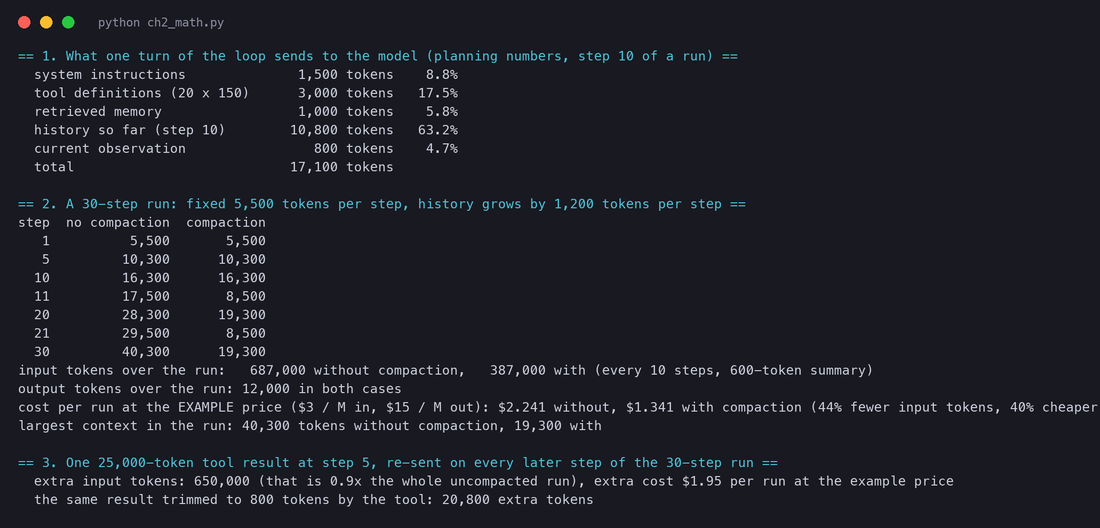
The context of one turn as a budget bar at step 10 of a run, using the planning numbers in ch2_math.py: 1,500 tokens of instructions, 3,000 of tool definitions (twenty tools at about 150 each), 1,000 of retrieved memory, 10,800 of history and 800 for the current observation, 17,100 in all. The history already dominates and grows every step; the fixed parts are paid for on every call.
The numbers in the figure are planning numbers, not measurements: the point is the shape. At step 10 the history is already 63% of the turn, and it grows by about 1,200 tokens per step (a model turn of about 400 tokens plus an observation of about 800). The instructions and tool definitions, 4,500 tokens here, are paid on every single call whether or not the step needs them. The retrieved memory is small only because somebody made it so.
Why the window's hard limit is not the real limit#
Models with very long windows exist, and the temptation is to treat the limit as the budget. Two findings say otherwise. The first is from Stanford and Berkeley, in July 2023.
The second finding is the one Anthropic's post calls context rot: as the number of tokens in the window increases, the model's ability to recall information from it decreases, so that context "must be treated as a finite resource with diminishing marginal returns". The post's explanation is architectural: attention relates every token to every other, and models have seen far more short sequences than long ones in training, so precision at long range is a "performance gradient rather than a hard cliff".
The script ch2_math.py runs the budget forward for thirty steps, with and without compaction every ten steps (the history replaced by a 600-token summary plus the last two turns), at the same example price as Chapter 1: $3 per million input tokens and $15 per million output tokens, round numbers for the arithmetic and not a quote from any provider.
Input tokens sent on each step of a thirty-step run. Without compaction the context grows linearly to 40,300 tokens at step 30 and the run sends 687,000 input tokens in all; with compaction every ten steps the context never exceeds 19,300 and the run sends 387,000. At the example price the run costs $2.24 against $1.34, about forty percent less.
Without compaction
Compaction every 10 steps
Context at step 1
5,500
5,500
Context at step 11
17,500
8,500
Context at step 30
40,300
19,300
Input tokens over the run
687,000
387,000
Output tokens over the run
12,000
12,000
Cost at the example price
$2.24
$1.34
Three readings of the table. First, compaction cut input tokens by 44% and cost by 40% in a thirty-step run, and the saving grows with length because the uncompacted cost is quadratic in the number of steps (each step re-sends everything before it). Second, the largest context halved, from 40,300 to 19,300, which matters for attention as much as for money. Third, the output tokens did not change: compaction is about what the model reads, not what it writes.
The third part of the script is the single most useful number in this chapter for a tool designer. One tool that returns 25,000 tokens at step 5 (a log dump, a full table, a whole document) and is then carried in the history for the remaining 26 steps adds 650,000 input tokens to the run, almost as much as the entire uncompacted run without it, and about $1.95 at the example price. The same tool trimmed to 800 tokens of relevant lines adds 20,800. That is the token-efficiency principle of Section 2.3 with a price on it, and it is why a response cap is a cost control.
Compaction and summarisation: how to do it without losing the plot#
Compaction is the first lever and the one most likely to do quiet damage. The rules that keep it safe:
Clear tool results first. Once a tool result has been read and acted on, the raw payload rarely matters again; the decision it led to is in the next model turn. Clearing old tool results is nearly lossless and often the only compaction you need.
Keep the user's words verbatim as long as possible. Constraints and goals come from the user; a summary of them is a paraphrase by the model, and the paraphrase is where "never before 10:00" becomes "prefers mornings".
Write the things that must survive into working memory before compacting. The scratchpad is re-inserted whole after compaction; the history is not.
Give the summariser a recall-first prompt and test it on real traces. Plant facts, compact, ask. Only trim the prompt once nothing planted goes missing.
Keep the last few turns verbatim. Recency bias is your friend here: the newest observation and the model's last thought are where the next decision comes from.
Checkpoint before compacting. If the summary turns out to have dropped something, the checkpoint lets you rebuild from the full history.
How big should the budget be? Below the window by a wide margin, and set by measured accuracy, not by the vendor's maximum. My view: find the context length at which your per-step eval starts to slip, and set the budget below it.
Compaction, notes or sub-agents? All three work; they fit different tasks. My view (following the post): compaction for conversational tasks, notes for milestone-driven work, sub-agents for parallel exploration; and tool-result clearing in every case.
Should retrieved documents go at the start or the end? The U-curve says both ends are read well and the middle is not. My view: instructions at the start, retrieved material and the live plan near the end, just before the newest observation; and test the order on your eval, because models differ.
Who pays for the tool definitions? They are paid on every turn by every run. My view: load per step when the catalogue is large, and treat definition tokens as a line item on the cost dashboard.
2.8 Putting the blocks together: the meeting example#
One task, traced block by block. The request: "Set up a 45-minute design review with Priya and Tom next week. I prefer mornings but never before 10:00. Send the invitations."
The meeting-scheduling run traced block by block over five steps: what the instructions contributed, what memory recalled or stored, what the model decided, which tool ran and what the state recorded. At step 4 the invitation to Tom bounces; at step 5 the agent recovers, and the 10:00 rule, by then compacted out of the history, is recovered from long-term memory.
Step
Instructions
Memory
Model
Tools
State
1
role: scheduler; constraint: not before 10:00; stop: when invitations are sent
recalls the user's stored preference for mornings; writes the goal to the scratchpad; stores the 10:00 rule
reads the request, writes a plan: find slots, check a room, book, invite
none yet
step 1 of 8, plan set, budget 8 steps
2
tool guidance: find slots before booking
notes the candidate slots at or after 10:00
calls calendar_find_free_slots with earliest_hour=10
returns 14 shared slots in a bounded list
pending call recorded, then cleared with the result
3
output format: event id in the summary
notes room 4B
calls find_rooms, then calendar_create_event with an idempotency key
event EVT-1187 created for Monday 10:00
step 3 of 8; event id stored in state
4
constraint: only company addresses
stores "Tom out on Monday" as a fact
reads the tool result: invitations sent, but an auto-reply says Tom is out Monday; decides to move
email_send returns ok plus the bounce text in the result (not a silent success)
errors: 1; status: needs retry
5
stop: when the invitations are sent
recalls the 10:00 rule from the store (the user's sentence was compacted at step 4)
chooses Wednesday 10:00 from the remaining slots; calls update_event
event moved, updated invitations sent
step 5 of 8; done; final checkpoint
Every step used all five blocks, and the two moments where the run could have gone wrong were both block failures averted by design. At step 4 a tool that returned "sent" without the bounce text would have ended the run with Tom absent: a tools failure (success on failure). At step 5 an agent that relied on the history alone would have had no 10:00 rule, because compaction had summarised the user's sentence away: a memory failure. The code in ch2_memory.py shows the second case literally.
Huge tool return (find_free_slots returns every calendar entry)
step 2 observation of twenty thousand tokens; the plan from step 1 is "lost in the middle" by step 4
observation size spike; later contradictions
a cap and filters in the tool; tool-result clearing
Vague instruction (no stop condition)
after the invitations are sent, the agent "improves" the event, adds an agenda, emails again
steps continue after the goal; budget exhausted
an explicit done condition in the prompt and the loop
No state (free loop, no checkpoint)
the process restarts after step 3 and books a second event, then sends duplicate invitations
two event ids in the side-effect log; no record of the pending call
checkpoint after every step; record pending calls; idempotency keys
Weak model (routine model on the hard step)
at step 4 it reads the bounce as success, or retries the same email
the reasoning line ignores the auto-reply text
route recovery steps to the large model; make the tool put the error first in its result
Notice what the table does not say: "use a bigger model" appears once, as the last row, and only after five rows that a bigger model would not have fixed.
Your agent has 40 tools from four MCP servers, and tool-selection accuracy on your eval fell from 94% to 81% when the fourth server was added. List three remedies (namespacing, per-step tool loading, consolidation), the pros and cons of each, and the measurement that would tell you which one worked.
Design the send_email tool for the meeting agent as a full definition: name, description, schema, return shape, error messages, idempotency and annotations. Then write the three eval cases you would use to test it, including one where the right answer is not to call it.
A team proposes a router: a small model for every step, escalating to a large one when the small model's own confidence is below a threshold. Argue both sides: what does this save, what can go silently wrong, and what per-step eval would you insist on before shipping it?
Your compaction prompt summarises the history every 15 steps. Plant five facts at steps 2, 5, 8, 11 and 14 and design the questions you would ask at step 30 to measure recall. Which facts would you expect to survive, which would you move to the long-term store or the scratchpad, and why?
Re-run the thirty-step arithmetic of Section 2.7 for your own agent: your instruction length, your tool count, your observed observation size and your provider's prices. At what step does the uncompacted context cross your practical budget, and what is the cost of the single largest tool result in your traces re-sent for the rest of the run?
An agent is assembled from five blocks: the model reasons, the tools act, the instructions shape, the memory remembers and the state says where the loop is. Each has its own failure modes and its own eval; when a run fails, find the block before you change anything.
Choose the model by measurement on your own tasks: tool-call accuracy, argument accuracy, refusal rate, latency p50 and p95, cost per task, parse-failure rate. Public leaderboards shortlist; your labelled set decides. Even the best models miss a quarter of the public benchmark's cases.
A router (small model for routine steps, large for hard ones) can cut cost and latency, at the price of two models to evaluate and a silent failure mode when the route is wrong. Build the per-step eval set first.
A tool is a name, a description and a JSON schema; the model emits a structured call, your code runs it and returns the result as a message. Design tools as interfaces: namespaced names, when-to-use descriptions, unambiguous arguments, bounded returns, errors that say what to do, idempotent writes, declared side effects. Consolidate endpoint wrappers into task-shaped tools.
MCP standardises how tools, resources and prompts are exposed to a host; it buys reach and costs control. Loading every tool definition into every turn does not scale; load what the step needs.
The system prompt is architecture: role and goal, hard constraints, tool guidance, output format, stop conditions and a few canonical examples, written at the right altitude, versioned and tested as code.
Memory lives in three places (the context, a scratchpad, a store) and holds three kinds of thing (episodic, semantic, procedural). Generative Agents gave the retrieval formula (recency, importance, relevance); MemGPT gave the paging analogy; production systems use compaction, structured notes and sub-agents.
State is control, not knowledge: step, plan progress, pending call, budget, errors, status. Checkpoint it after every step, record pending calls, and make writes idempotent, or a retry will do the task twice.
The model sees only the context. Budget it: fixed parts are paid every turn, the history grows every step, and attention fades in the middle long before the window is full. In the thirty-step example, compaction every ten steps cut input tokens by 44% and cost by 40%; one uncapped 25,000-token tool result cost almost as much as the whole run.
In the meeting example, the two near-failures were a tool that could have hidden an error and a memory that could have lost a constraint. "Use a bigger model" fixed neither.
Charles Packer, Sarah Wooders, Kevin Lin, Vivian Fang, Shishir G. Patil, Ion Stoica, Joseph E. Gonzalez. MemGPT: Towards LLMs as Operating Systems. arXiv October 2023.
Fanjia Yan, Huanzhi Mao, Charlie Cheng-Jie Ji, Tianjun Zhang, Shishir G. Patil, Ion Stoica, Joseph E. Gonzalez. Berkeley Function-Calling Leaderboard. Gorilla blog, UC Berkeley, last updated 19 August 2024; and the live leaderboard (V4, updated 12 April 2026 at the time of writing).
Model Context Protocol. Architecture overview. modelcontextprotocol.io documentation, protocol version 2026-07-28.
LangChain. Persistence. LangGraph documentation, accessed October 2026.
Code for this chapter
code/agents/ch2_tools.py: one function-calling round trip with a real JSON schema and a stubbed model, and the tool-selection comparison on ten labelled requests; outputs in results/ch2_tools_stdout.txt and results/ch2_tools_select_stdout.txt.
code/agents/ch2_memory.py: the fifty-line memory with a scratchpad, a summariser stub and a key-value store, with context sizes per step; results in results/ch2_memory.json.
code/agents/ch2_math.py: the context budget, the thirty-step run with and without compaction, and the cost of one oversized tool result; results in results/ch2_math.json.
With the blocks in hand, Chapter 3 asks how a single agent should think between tool calls. It reads ReAct closely (the interleaving of thought, action and observation that Chapter 1 introduced), then plan-and-execute (write the whole plan first, then carry it out), reflection and self-critique (Reflexion's verbal memory of failures), and tree search over possible next steps, and for each pattern it asks the questions this chapter asked of the blocks: what it costs in tokens and steps, when it is the right choice, what the papers measured, and how to tell from a trace that it is working.