# NVIDIA GPUs: Every Architecture and Every Product, with Today's Prices
Author: Ishwar Jangid
Canonical URL: https://ishwarj.com/writings/nvidia-gpus-every-architecture-and-product/
Updated: 2026-11-24
Source: https://github.com/ishwar6/ishwar-books/blob/main/content/writings/nvidia-gpus-every-architecture-and-product.md
You open a shop page to buy a graphics card and see "RTX 5070 Ti". A cloud page offers an "H100" by the hour. A paper says its model was trained on "A100s". A news story says "Blackwell" is sold out and "Rubin" is next.
These are not seven different things. They are two kinds of name. **Blackwell** and **Rubin** are names of chip designs. **RTX 5070 Ti**, **H100** and **A100** are names of products made from those designs. Once you can tell the two apart, the whole NVIDIA range fits on one page.
The prices need the same care. On 23 November 2026 the cheapest RTX 5090 in a US shop costs more than **$6,000**. Its list price is $1,999. The price that matters is the one you pay, so this piece leads with the **street price** of every product. The list price sits next to it for comparison.
> [!TIP] The whole idea in one minute
> An **architecture** is one chip design with a scientist's name: Ampere (2020), Ada Lovelace (2022), Hopper (2022), Blackwell (2024), Rubin (2026). NVIDIA cuts each design to many sizes and sells them as **product families**. GeForce is for home and RTX PRO is for work. Letter-and-number cards such as H100 and B200 are for data centers, and Jetson is for robots. The first digits or the first letter of a product name tell you its architecture. For AI work, read two numbers first: the **memory on the card** (VRAM) and its **memory bandwidth**.
## One design, many products
About every two years NVIDIA makes a new chip design and names it after a scientist. It builds that design as a small chip, a middle chip and a very large chip, and each chip goes into several products.
[Figure: One architecture, Blackwell, is sold as five product families: GeForce RTX 50, RTX PRO, data center GPUs, DGX Spark and Jetson.. See it at https://ishwarj.com/writings/nvidia-gpus-every-architecture-and-product/]
One architecture, many products. The same Blackwell design is cut to different sizes and sold to gamers, professionals, data centers and robot builders.
Two things come with a new architecture. The first is a new **manufacturing process**: smaller transistors, so more of them fit on a chip and each uses less power. The second is new **abilities**, such as special cores for AI maths. An old card cannot get those abilities through a software update, because they are built into the silicon.
## The timeline, from 2006 to 2026
[Figure: A table of NVIDIA GPU architectures from Tesla in 2006 to Rubin in 2026, with the first year, well-known products and what was new in each.. See it at https://ishwarj.com/writings/nvidia-gpus-every-architecture-and-product/]
Every NVIDIA architecture since 2006. Blue rows are the three you meet most in shops and clouds today. Orange rows are made for data centers only.
You do not need all twelve rows. Four moments explain today's range.
**2006, Tesla: the GPU learns general code.** With this architecture NVIDIA released **CUDA**, a way to write normal programs for a GPU, not only pictures. Every later AI library sits on CUDA. This is the main reason NVIDIA hardware is the default choice for AI today.
**2017, Volta: cores made for AI.** Volta added **Tensor Cores**. A Tensor Core multiplies small tables of numbers in one step, which is the operation a neural network repeats billions of times. The Volta card V100 became the standard GPU of AI research for three years.
> [!DEFINITION] Tensor Core
> A part of the chip that multiplies matrices (tables of numbers) directly, much faster than the general cores. Each architecture since Volta makes them faster and teaches them smaller number formats: 16-bit, then 8-bit in Hopper, then 4-bit in Blackwell. Smaller numbers mean more work per second and per watt.
**2018, Turing: the name changes from GTX to RTX.** Turing added **RT Cores** for ray tracing, a way to draw light that follows real rays. It also brought DLSS, where a neural network on the Tensor Cores makes a low-resolution picture sharp. Cards with these cores are called **RTX**. The older name **GTX** means a card without them.
**2022, the road splits.** Until then, one architecture served both games and data centers. In 2022 NVIDIA released two: **Ada Lovelace** for games, workstations and small servers, and **Hopper** for the largest AI servers only. No Hopper game card exists. Blackwell in 2024 joined the two roads again, and Rubin in 2026 has so far shipped only for data centers.
## The three architectures you meet most
### Ampere (2020)
Ampere is the oldest architecture still in wide use. Its home products are the **GeForce RTX 30** series. Its workstation cards are the **RTX A** series, where the RTX A6000 has 48 GB. Its data center cards are the **A100** and **A10**. Many papers from 2020 to 2023 report results on the A100, which has 40 GB or 80 GB of memory.
Ampere is also inside the **Jetson Orin** boards for robots, which are still sold new. So an architecture from 2020 can be in a product you buy today.
### Ada Lovelace (2022) and Hopper (2022)
Ada Lovelace gave the **GeForce RTX 40** series, the **RTX Ada** workstation cards and two popular server cards. The **L4** is small, uses 72 watts and has 24 GB. The **L40S** has 48 GB and is a common choice for serving models. Ada added frame generation, where the card invents whole frames between the real ones.
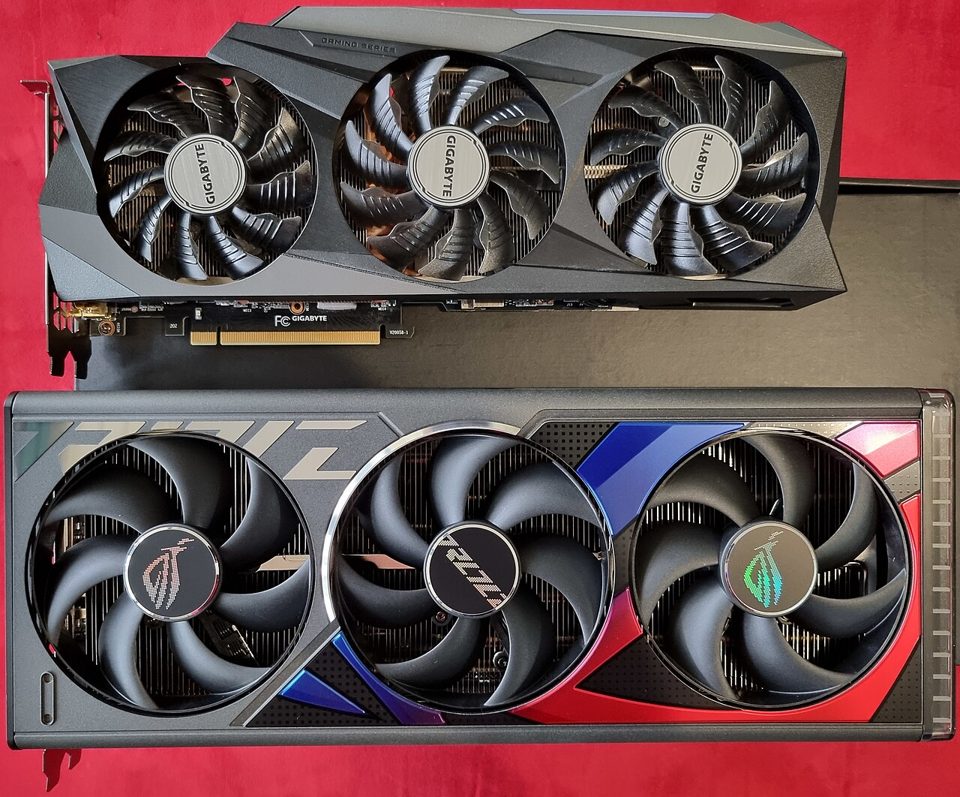
An RTX 3090 (top, Ampere) and an RTX 4090 (bottom, Ada Lovelace). Both have 24 GB. The top tier grew with each generation. Photo: Benlisquare, CC BY-SA 4.0, Wikimedia Commons.
Hopper gave the **H100** (80 GB) and, in 2024, the **H200** (141 GB). The H100 is the card behind the large language models of 2023 and 2024. Hopper's Tensor Cores can compute with 8-bit numbers, which roughly doubles the speed of some training work against 16-bit.
### Blackwell (2024)
Blackwell is the current architecture in shops. It covers every family in the figure above. They are **GeForce RTX 50**, **RTX PRO**, the data center cards **B200** and **B300**, the small **DGX Spark** computer and the **Jetson AGX Thor** robot board.
Its data center cards are much larger than before. The B200 has about 180 GB of memory and uses about 1,000 watts. Blackwell's Tensor Cores add 4-bit numbers. A faster version, **Blackwell Ultra** (the B300, with 288 GB), followed in 2025.
### Rubin (2026), and what comes after
Rubin is the newest architecture. One Rubin GPU has 288 GB of a newer, faster memory type called HBM4, explained below. It comes with a new NVIDIA processor named **Vera**. Reports in November 2026 agree that Rubin systems have started to ship to a few clouds, and disagree on how fast the volume will grow. No Rubin card for games has been announced. NVIDIA's public roadmap names **Rubin Ultra** next, then an architecture called **Feynman**.
## How to read a product name
### GeForce: the number tells you two things
[Figure: How to read the name GeForce RTX 5070 Ti: GeForce is the family, RTX means ray tracing and AI cores, 50 is the generation, 70 is the tier and Ti is a small step up.. See it at https://ishwarj.com/writings/nvidia-gpus-every-architecture-and-product/]
How to read a card name. The first digits give the generation, and so the architecture. The last two digits give the tier inside that generation.
A GeForce name has a generation and a tier. In **RTX 5070**, "50" is the generation, which is Blackwell, and "70" is the tier. A higher tier in the same generation is always faster and almost always has more memory.
Three suffixes appear after the number. **Ti** is a faster version of the same tier. **Super** is a refresh sold about a year later. **Laptop GPU** marks a version for notebooks.
> [!WARNING] A laptop card is not the desktop card
> The laptop RTX 5090 has 24 GB of memory and uses a smaller chip than the desktop RTX 5090, which has 32 GB. The names match, the hardware does not. Compare laptop cards only with other laptop cards.
The tier only compares cards inside one generation. An RTX 4090 from 2022 is still faster than an RTX 5070 from 2025. The largest chip of an old generation beats the middle chip of a new one.
### Data center: the letter tells you the architecture
Data center cards have a letter and a number. The letter is the first letter of the architecture, and a larger number is a larger card.
| Name | Architecture | Memory | What people use it for |
|---|---|---|---|
| T4 | Turing | 16 GB | Cheap serving of small models, video |
| A10, A100 | Ampere | 24 GB, 40 or 80 GB | Older training and serving |
| L4, L40S | Ada **L**ovelace | 24 GB, 48 GB | Serving, image models, fine-tuning |
| H100, H200 | Hopper | 80 GB, 141 GB | Training and serving large models |
| B200, B300 | Blackwell | about 180 GB, 288 GB | The largest models of 2025 and 2026 |
A second prefix, **G**, means the GPU is joined to an NVIDIA processor named Grace on one board. So a **GB200** is Grace plus Blackwell GPUs, and a **GB300** is Grace plus Blackwell Ultra GPUs. The name **NVL72** after it means a full rack with 72 GPUs wired together to work as one machine.
### Workstation: the architecture is written in the name
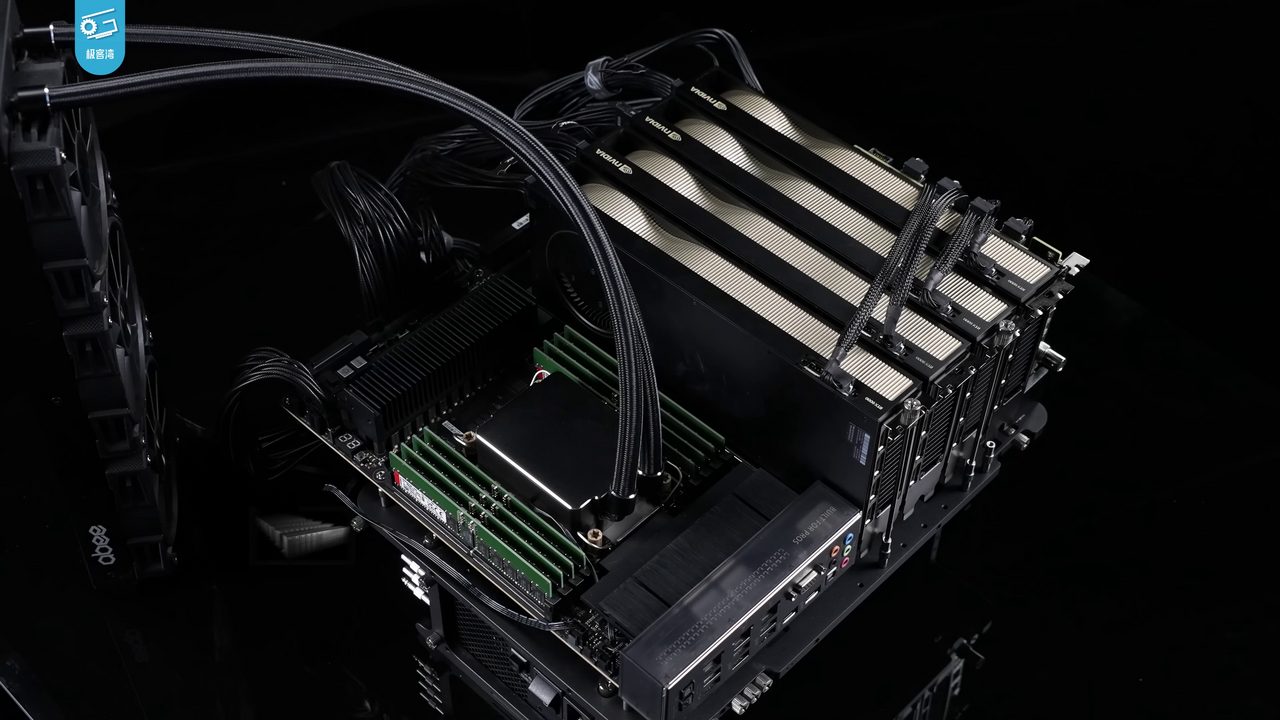
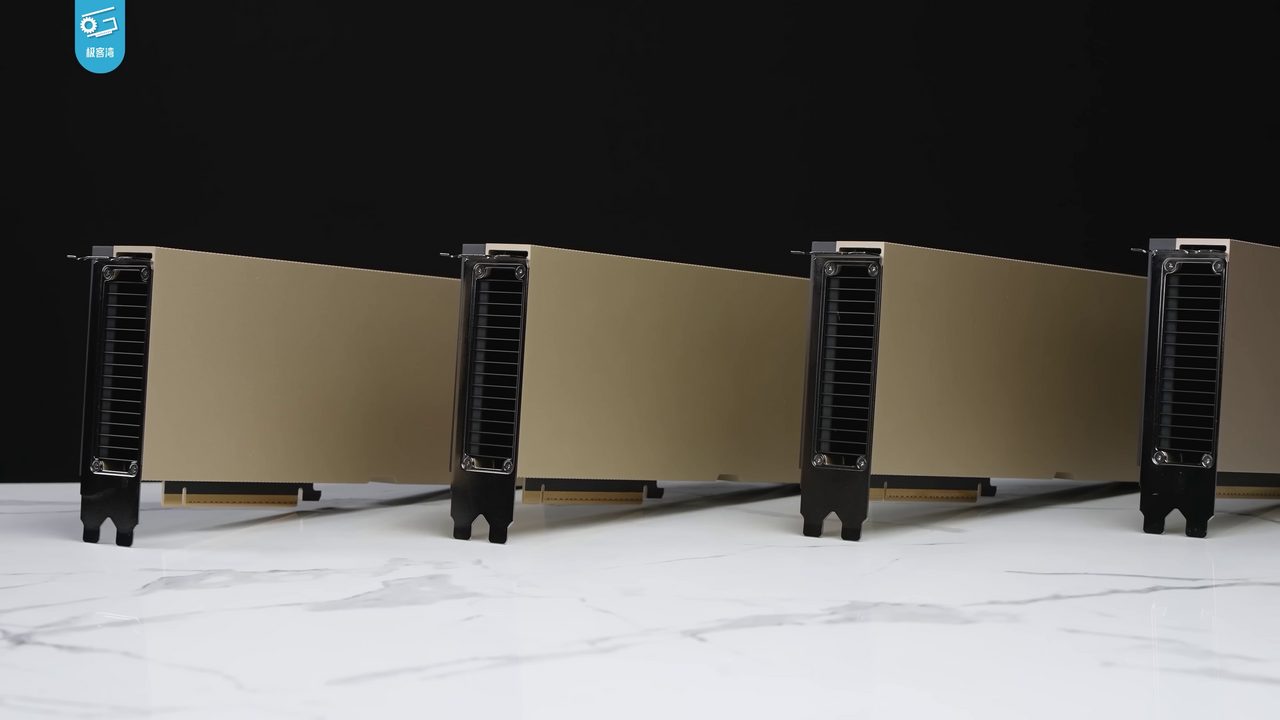
Workstation cards were called **Quadro** until 2020. Since then the architecture appears in the name itself. **RTX A6000** is Ampere, **RTX 6000 Ada** is Ada Lovelace and **RTX PRO 6000 Blackwell** is Blackwell. These cards use the same chips as GeForce cards, with much more memory and certified drivers. Their shape lets four of them sit side by side.
## The product map
[Figure: A map of NVIDIA products by where they live: laptop, home PC, workstation, desk box, server, full rack, and robot or car.. See it at https://ishwarj.com/writings/nvidia-gpus-every-architecture-and-product/]
The whole product range by where the GPU lives. Memory grows as you go down from a laptop to a server.
**GeForce** is for home computers. Most people who play games or run a small model at home buy one of these. The current range goes from the RTX 5050 (8 GB) to the RTX 5090 (32 GB).
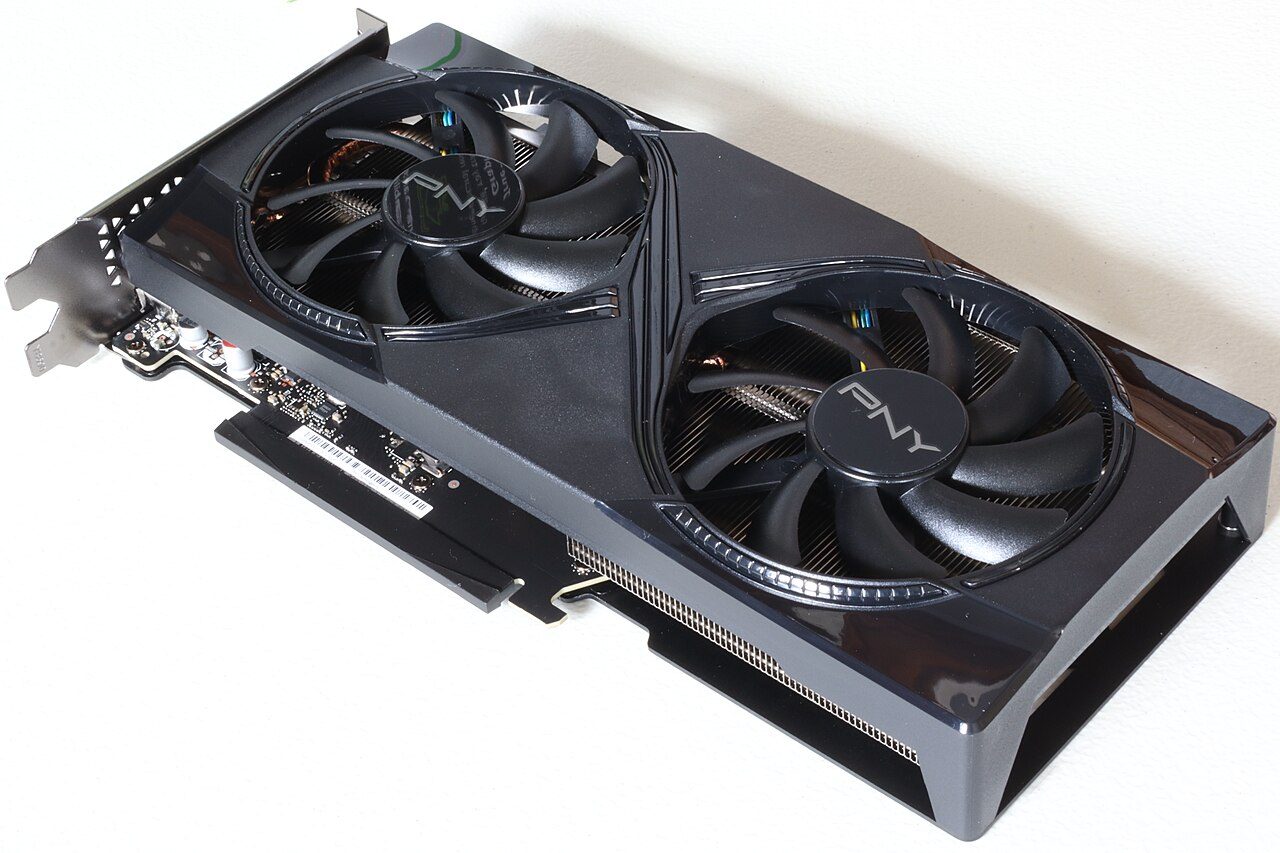
A home card: the GeForce RTX 5060 Ti with 16 GB. NVIDIA makes the chip, and board makers such as PNY build the card around it. Photo: FreeMediaKid!, CC BY-SA 4.0, Wikimedia Commons.
**RTX PRO** is for people who work on one machine: engineers, film studios, researchers. The RTX PRO 6000 Blackwell has 96 GB, three times the memory of the RTX 5090, on a similar chip.
Four RTX 6000 Ada workstation cards in one machine. Each has 48 GB and a slim shape with one fan at the end, so they fit side by side. Photo: Geekerwan, CC BY 3.0, Wikimedia Commons.
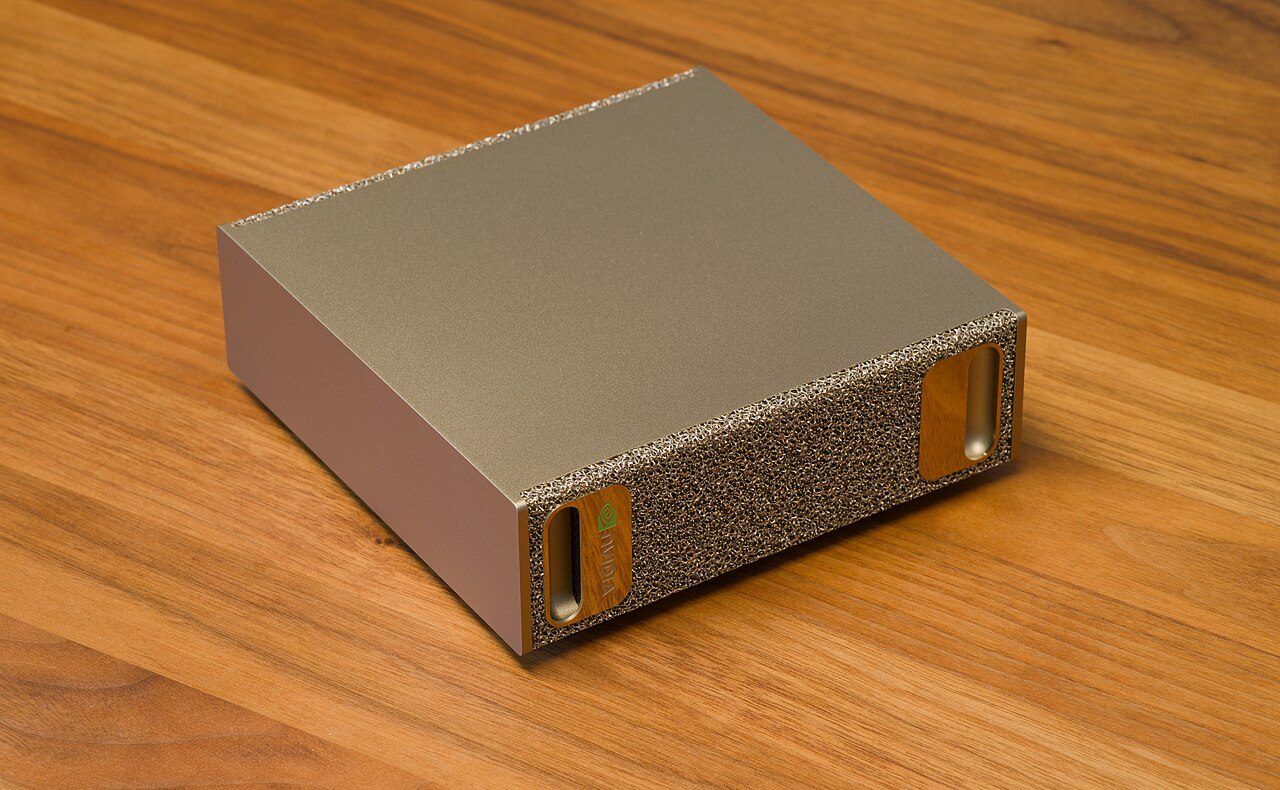
**DGX Spark** is a small box, about the size of a book, with a Blackwell GPU and a processor on one chip. They share 128 GB of memory. It is slower than a large card, but it can load models that no home card can hold. **DGX Station** is its larger brother for a desk.
The DGX Spark: a whole AI computer in a box that fits in one hand. Photo: Daniel Lu (dllu), CC BY-SA 4.0, Wikimedia Commons.
**Data center cards** sit in servers, usually eight to a server. You cannot put one in a home PC: they have no fan and need a server's airflow or liquid cooling. Most people never buy one. They rent one by the hour from a cloud.
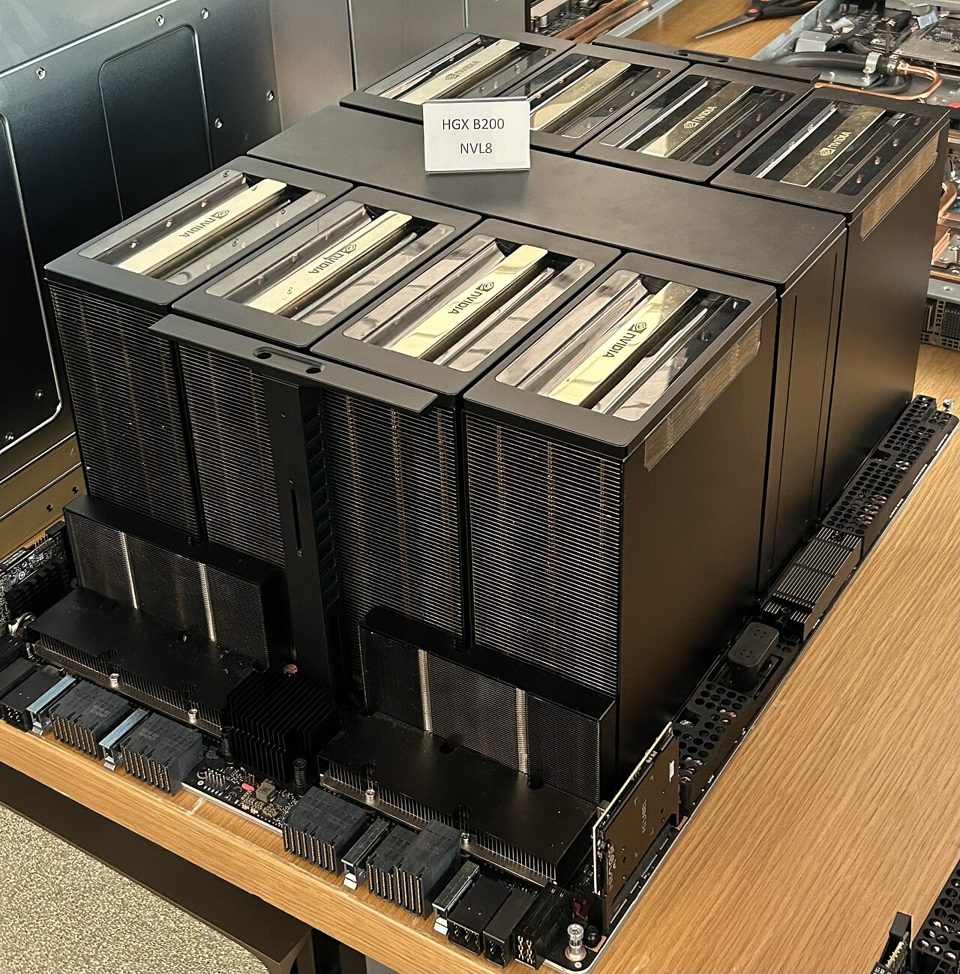
H100 cards. They have no fans: the server pushes air through them. Photo: Geekerwan, CC BY 3.0, Wikimedia Commons.Eight B200 GPUs on one board, the inside of a B200 server. Photo: Pokiiri, CC BY-SA 4.0, Wikimedia Commons.
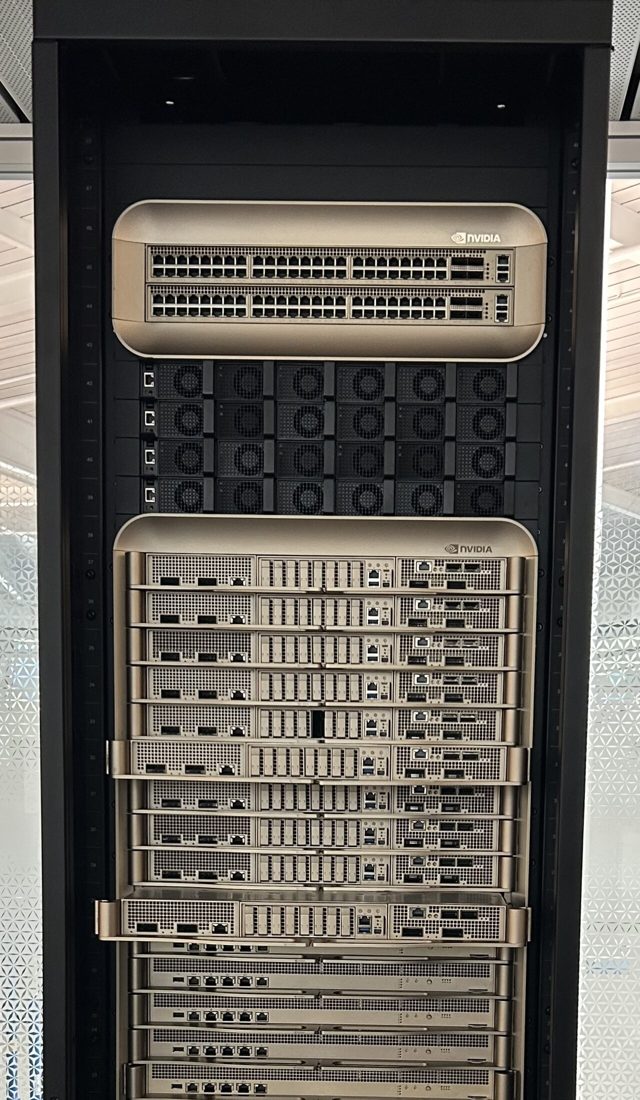
**Racks** such as the GB300 NVL72 are sold whole. One rack holds 72 GPUs and 36 processors, is cooled by liquid and draws about as much power as a hundred homes. Companies that train the largest models buy thousands of them.
A GB200 rack with 72 Blackwell GPUs and 36 Grace processors, cooled by liquid. It is sold as one machine. Photo: Pokiiri, CC BY-SA 4.0, Wikimedia Commons.
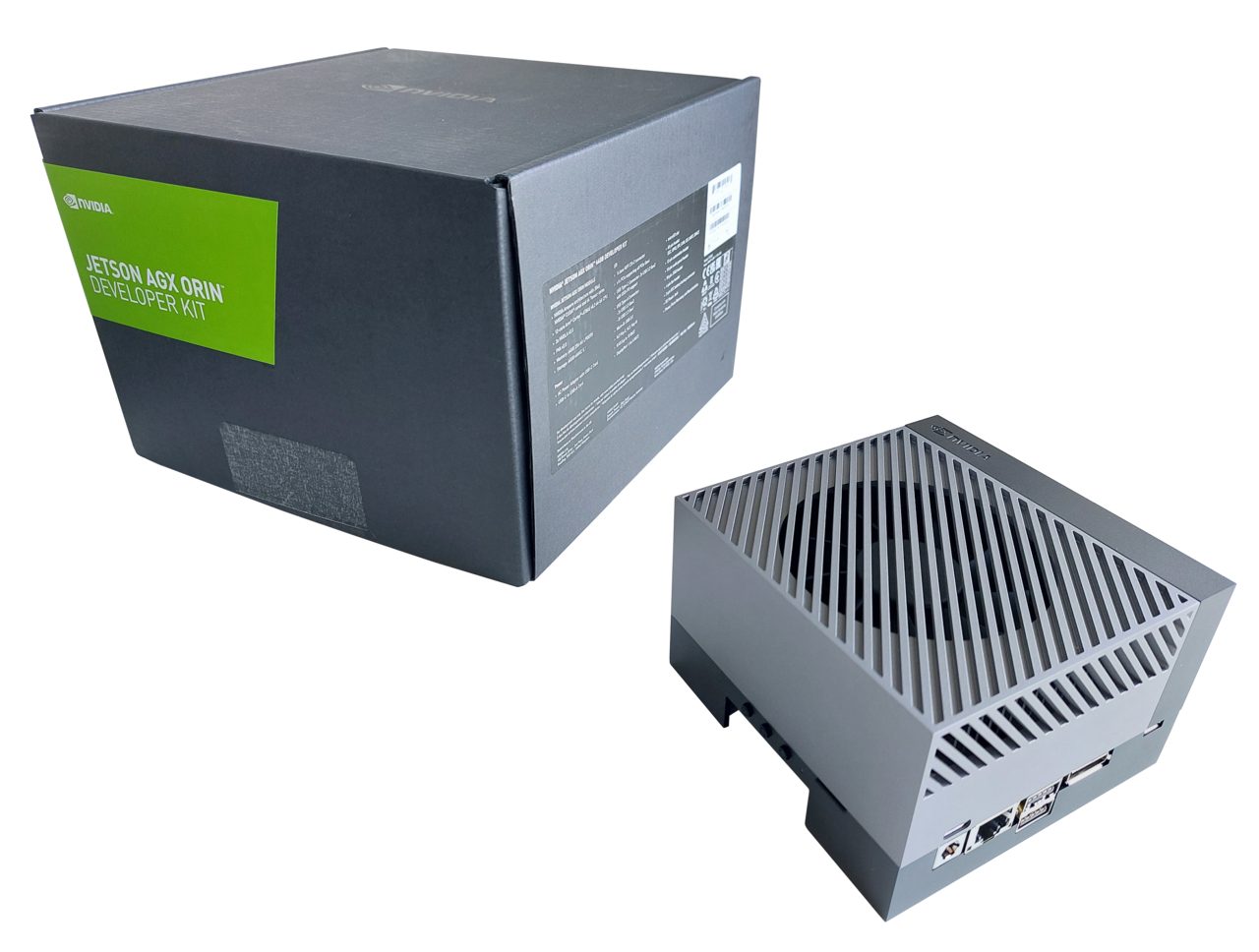
**Jetson** is a small board with a GPU, a processor and memory, for robots, drones and cameras. **DRIVE** is the same idea for cars.
The Jetson AGX Orin developer kit, a complete computer for a robot. Photo: Auledas, CC BY 4.0, Wikimedia Commons.
## Four words on every spec sheet
A spec sheet for a GPU uses four terms again and again: SM, VRAM, HBM and memory bandwidth. Together they tell you how much work a card does and how large a model it holds.
### SM: the unit a GPU is built from
A GPU is not one large processor. It is one small processing block copied many times. NVIDIA calls that block a **streaming multiprocessor**, or SM.
> [!DEFINITION] SM (streaming multiprocessor)
> One block of a GPU chip. It holds a group of general cores (the "CUDA cores"), a few Tensor Cores for matrix maths, its own small fast memory and a scheduler. A bigger chip of the same architecture is the same SM, copied more times.
| GPU | Architecture | SMs | CUDA cores in one SM | CUDA cores in total |
|---|---|---|---|---|
| A100 | Ampere | 108 | 64 | 6,912 |
| RTX 4090 | Ada Lovelace | 128 | 128 | 16,384 |
| H100 | Hopper | 132 | 128 | 16,896 |
| RTX 5090 | Blackwell | 170 | 128 | 21,760 |
This table explains the product range. Inside one architecture, a higher tier is mostly the same SM copied more times, with more memory beside it. A new architecture changes what one SM can do. One SM of the RTX 5090 has 128 CUDA cores, 4 Tensor Cores and 1 RT Core.
Do not compare core counts between architectures. The A100 has fewer than half the CUDA cores of the RTX 4090. It still trains larger models, because it has 80 GB of memory against 24 GB. The site's [GPU Programming](https://ishwarj.com/books/gpu-programming) book shows how code runs on an SM.
### VRAM and RAM
A computer with a graphics card has two separate memories.
| | RAM | VRAM |
|---|---|---|
| Where it sits | On the motherboard, next to the CPU | On the graphics card, next to the GPU chip |
| Who uses it | The CPU and every program | Only the GPU |
| Typical size at home | 16 to 64 GB | 8 to 32 GB |
| Can you add more later | Yes | No, it is soldered to the card |
> [!DEFINITION] VRAM
> The memory on the graphics card itself. The GPU can only compute on data that is in VRAM. To use a model, the computer copies its weights from the disk into VRAM once, and they stay there.
So 64 GB of RAM does not help a card with 8 GB of VRAM. If a model does not fit in VRAM, software can keep part of it in RAM and run that part on the CPU. It works, and it is many times slower.
Two products break this rule. The **DGX Spark** and the **Jetson** boards have one pool of memory that the CPU and the GPU share. That is why a DGX Spark can give 128 GB to a model when no home card has more than 32 GB.
[Figure: A bar chart of the memory on one GPU, from 8 gigabytes on an RTX 5060 to 288 gigabytes on a B300.. See it at https://ishwarj.com/writings/nvidia-gpus-every-architecture-and-product/]
Memory on one GPU. For AI work this number matters more than any other, because a model must fit in it.
### GDDR and HBM: two kinds of VRAM
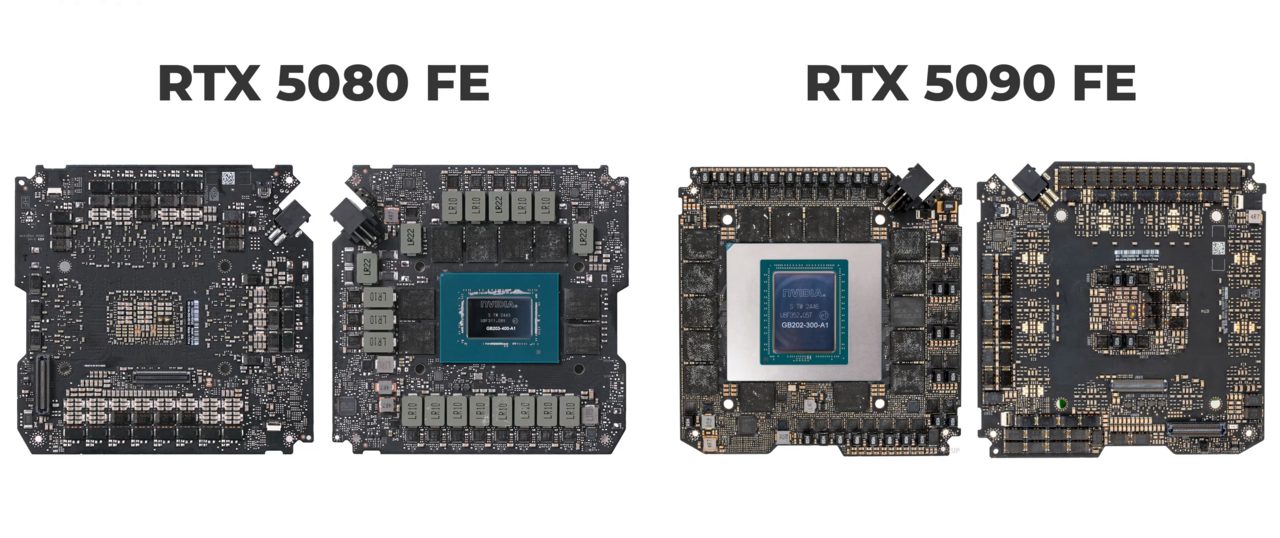
Home and workstation cards use **GDDR** memory: flat chips soldered around the GPU chip. The RTX 50 cards use the newest kind, GDDR7.
The boards of the RTX 5080 and RTX 5090 without their coolers. The large square is the GPU chip. The small black rectangles around it are the GDDR7 memory chips: that is the VRAM. Photo: Geekerwan, CC BY 3.0, Wikimedia Commons.
> [!DEFINITION] HBM (high-bandwidth memory)
> Memory chips stacked on top of each other, with thousands of vertical wires through the stack, placed right beside the GPU chip. The many short wires let far more data move each second than GDDR can. Data center GPUs use HBM.
Each generation of HBM is faster. The A100 uses HBM2e, the H100 uses HBM3, the H200 and B200 use HBM3e and Rubin uses HBM4. HBM is hard to make, and the whole AI industry wants it. It is one reason a data center card costs so much more than a home card.
### Memory bandwidth
> [!DEFINITION] Memory bandwidth
> How many gigabytes the GPU chip can read from its VRAM in one second, written GB/s. VRAM size says how much data the card holds. Bandwidth says how fast the chip can reach that data.
Think of VRAM as a warehouse and of bandwidth as the width of its door. A large warehouse with a narrow door holds a lot and serves it slowly.
[Figure: A bar chart of memory bandwidth, from 273 gigabytes per second on a DGX Spark to about 7,700 on a B200.. See it at https://ishwarj.com/writings/nvidia-gpus-every-architecture-and-product/]
Memory bandwidth, with the memory type in brackets. Every card with HBM is above every card with GDDR. Data center values are for the server versions; the B200 is given as 7,700 or 8,000 GB/s, depending on the source.
The DGX Spark is the clearest case. It holds 128 GB, four times an RTX 5090, and its bandwidth is 273 GB/s, less than a sixth of the RTX 5090. It can load very large models and it runs them slowly.
## What this means for a language model
Two questions decide if a card is good for a language model. Does the model fit, and how fast does it write?
### Does it fit: VRAM
The weights of a model take a fixed space. At 16-bit precision, one billion weights need 2 GB. Most people at home run models compressed to 4 bits, which need about 0.6 GB for one billion weights. Keep about a fifth of the VRAM free for the conversation itself. The site's piece on the [KV cache](https://ishwarj.com/writings/llm-inference-2-kv-cache) explains that part.
With those two rules, the VRAM of a card gives the largest model it runs.
| VRAM | Cards | Largest model at 4 bits | Largest model at 16 bits |
|---|---|---|---|
| 8 GB | RTX 5050, RTX 5060 | about 10 billion weights | about 3 billion |
| 12 GB | RTX 5070 | about 16 billion | about 5 billion |
| 16 GB | RTX 5060 Ti, RTX 5070 Ti, RTX 5080 | about 21 billion | about 6 billion |
| 24 GB | RTX 3090, RTX 4090, L4 | about 32 billion | about 10 billion |
| 32 GB | RTX 5090 | about 43 billion | about 13 billion |
| 48 GB | L40S, RTX PRO 5000 | about 64 billion | about 19 billion |
| 80 GB | H100 | about 107 billion | about 32 billion |
| 96 GB | RTX PRO 6000 Blackwell | about 128 billion | about 38 billion |
This is why the RTX 5060 Ti with 16 GB is a common first card for AI at home. It is also why an old RTX 3090 with 24 GB still sells for more than a new RTX 5070 Ti.
### How fast it writes: bandwidth
A language model writes one token (a word piece) at a time. For each token, the GPU reads every weight of the model once. So the bandwidth sets a ceiling on speed:
$$
\text{tokens per second} \le \frac{\text{memory bandwidth}}{\text{size of the weights}}
$$
Take a model with 8 billion weights at 4 bits, which is about 5 GB.
| Card | Bandwidth | Ceiling for the 5 GB model |
|---|---|---|
| DGX Spark | 273 GB/s | about 55 tokens per second |
| RTX 5060 Ti | 448 GB/s | about 90 |
| RTX 5070 | 672 GB/s | about 134 |
| RTX 5080 | 960 GB/s | about 192 |
| RTX 5090 | 1,792 GB/s | about 358 |
| H100 | 3,350 GB/s | about 670 |
These are ceilings from the formula, not measurements. Real speed is lower, because the chip also has to compute. The order of the cards is what the table teaches. It also shows why the RTX 5080 and the RTX 5060 Ti are not equal for AI. Both have 16 GB and hold the same models, and the RTX 5080 has about twice the bandwidth.
A server works in a different way. It answers many people in one pass over the weights, so one read of the weights produces many tokens. That is why an H100 in a cloud serves thousands of tokens per second in total. The site's series explains it from [prefill and decode](https://ishwarj.com/writings/llm-inference-1-prefill-and-decode) to [serving with vLLM](https://ishwarj.com/writings/llm-inference-3-vllm).
### Training and fine-tuning
Training needs much more VRAM than running. The card must also hold the gradients and the optimizer's numbers, which are several times the size of the weights. Fine-tuning a small part of a model, a method called LoRA, needs far less. It works on a 16 GB or 24 GB card for models of a few billion weights. Training a large model from zero is done on racks of H100, B200 or newer GPUs, wired together. The site's piece on [more than one GPU](https://ishwarj.com/writings/llm-inference-7-beyond-one-gpu) covers that wiring.
## What it costs today
> [!WARNING] Read this before the tables
> All prices are in US dollars for the United States, read on **23 November 2026** from public price trackers and reports. GPU prices in 2026 are far above list price and still rising. One quarterly report measured an average of 44% above list, with a rise of about 35% in three months. The reports name two causes, the high price of memory chips and the demand from AI. Trackers disagree with each other, so each cell gives a range. Check a live shop page before you buy.
> [!DEFINITION] List price and street price
> The **street price** is what a shop charges today for a card that is in stock. It is the price you pay, so it comes first in every table here. The **list price** (MSRP) is the price NVIDIA announced at launch. In a shortage the two can be far apart.
[Figure: A bar chart on a log scale of the street price to buy one NVIDIA product in November 2026, from a Jetson Orin Nano Super kit at 399 dollars to an H100 at about 30,000 dollars.. See it at https://ishwarj.com/writings/nvidia-gpus-every-architecture-and-product/]
The street price ladder in November 2026: what one product costs in a US shop today, not its list price. The scale is logarithmic: each step to the right is a multiplication, not an addition.
### GeForce RTX 50 (Blackwell), new
| Card | Memory | Street price, Nov 2026 | List price |
|---|---|---|---|
| RTX 5050 | 8 GB | **about $420** | $249 |
| RTX 5060 | 8 GB | **about $450** | $299 |
| RTX 5060 Ti | 16 GB | **about $760 to $770** | $429 |
| RTX 5070 | 12 GB | **about $900** | $549 |
| RTX 5070 Ti | 16 GB | **about $1,120 to $1,400** | $749 |
| RTX 5080 | 16 GB | **about $2,000** | $999 |
| RTX 5090 | 32 GB | **about $6,250 to $9,400** | $1,999 |
The RTX 5090 row is not a mistake. NVIDIA has not changed its list price of $1,999, but the lowest in-stock price found by different trackers in November runs from $6,249.99 to $9,400. Reports say board makers plan more rises this month.
### Older GeForce cards, used
| Card | Architecture | Memory | Used street price, Nov 2026 | List price at launch |
|---|---|---|---|---|
| RTX 3060 | Ampere | 12 GB | **about $335 to $355** | $329 |
| RTX 4070 | Ada Lovelace | 12 GB | **about $600 to $700** | $599 |
| RTX 3090 | Ampere | 24 GB | **about $1,600 to $1,750** | $1,499 |
| RTX 4090 | Ada Lovelace | 24 GB | **about $2,800 to $3,400** | $1,599 |
A used RTX 3060 costs more today than it did new in 2021. A used RTX 4090 costs about twice its launch price.
### Workstation cards and small AI computers
| Product | Memory | Street price, Nov 2026 | List price at launch |
|---|---|---|---|
| RTX PRO 4000 Blackwell | 24 GB | no current tracker found | $1,546 |
| RTX PRO 4500 Blackwell | 32 GB | no current tracker found | $2,623 |
| RTX PRO 5000 Blackwell | 48 GB | **about $6,000** (tracker of August 2026) | $4,569 |
| RTX PRO 6000 Blackwell | 96 GB | **about $15,000 to $18,000** | $8,565 |
| DGX Spark, 64 GB | 64 GB shared | **$4,999** | new in October 2026 |
| DGX Spark, 128 GB | 128 GB shared | **$6,950** | $3,999 |
| Jetson Orin Nano Super kit | 8 GB shared | **$399** | $249 |
| Jetson AGX Orin kit | 64 GB shared | **$3,499** | not checked |
| Jetson AGX Thor kit | 128 GB shared | **$5,499** | not checked |
For the two cheaper RTX PRO cards I found only the launch prices, so the street price is empty and not guessed. The Jetson AGX prices come from one source.
### Data center GPUs: buy or rent
Few people buy these, so two prices matter: the price of a card and the price of one hour.
| GPU | Architecture | To buy | To rent, per GPU-hour |
|---|---|---|---|
| T4 | Turing | not found | about $0.54 to $0.59 |
| L4 | Ada Lovelace | about $3,750 (used) | about $0.70 to $0.84 |
| A10 | Ampere | not found | about $1.32 |
| L40S | Ada Lovelace | not found | about $1.50 to $1.60 |
| A100 80 GB | Ampere | not found | about $1.94 |
| H100 | Hopper | about $25,000 to $40,000 | median $3.90 |
| H200 | Hopper | about $30,000 to $40,000 | median $4.80 |
| B200 | Blackwell | sold in systems | median $6.90 |
| B300 | Blackwell Ultra | sold in systems | about $7.98 to $9.50 |
| GB300 NVL72 | Blackwell Ultra | a full rack, millions of dollars | about $4.25 to $18.00 |
| Vera Rubin | Rubin | not public | reserved contracts only |
[Figure: A bar chart on a log scale of cloud rental prices per GPU-hour, from a T4 at about 0.55 dollars to a B300 at about 8 dollars.. See it at https://ishwarj.com/writings/nvidia-gpus-every-architecture-and-product/]
Renting one GPU for one hour in a cloud. Old architectures stay cheap; each new one costs more per hour and does much more work in that hour.
Rental prices spread widely. For the H100 alone, published offers run from about $1.30 to more than $12 per hour. A small marketplace and a large cloud sell different levels of service. The table gives the median of on-demand offers where an index publishes one.
> [!TIP] Buy or rent
> One H100 at $30,000 equals about 7,700 hours of renting at $3.90, which is 320 days of use without a pause. If you need a large GPU for a few weeks of experiments, rent. If a card will run day and night for years, and you have the power and cooling, buying can cost less.
## Which one is for you
For games, pick by the tier and your screen. The 60 tier is for a 1080p screen, the 70 tier for 1440p and the 80 and 90 tiers for 4K.
For learning AI at home, pick by memory. With 8 GB you can run small models, and an RTX 5050 costs about $420. With 16 GB you can run most open models in compressed form and fine-tune small ones. The cheapest 16 GB card is the RTX 5060 Ti at about $760. With 24 GB or 32 GB you have room for larger models and longer conversations. A used RTX 3090 with 24 GB costs about $1,600 to $1,750. An RTX 5090 with 32 GB costs more than $6,000.
To learn without buying anything, a free Colab notebook gives you a T4 with 16 GB. The site ran a full serving engine on one: [vLLM on a free Colab T4](https://ishwarj.com/writings/llm-inference-8-vllm-on-colab).
For a model that needs more than 32 GB on your own desk, the choices are an RTX PRO card or a DGX Spark. An RTX PRO 6000 with 96 GB costs about $15,000 to $18,000, and a DGX Spark with 128 GB costs $6,950. The Spark has more memory per dollar and is slower. For anything larger, rent an H100, H200 or B200 by the hour.
## What this page cannot tell you
These prices will be out of date soon. They rose by about a third in the three months before this page was written, and nobody knows if they will keep rising or fall. The trackers also measure different things: one reports the lowest in-stock price, another a median of asking prices. I did not buy any of these products, and I did not verify a price on NVIDIA's own shop page.
The memory figure for the B200 depends on the source. NVIDIA's eight-GPU system lists 1,440 GB in total, which is 180 GB for each GPU, and some reports give 192 GB.
> [!TAKEAWAYS]
> - An **architecture** (Ampere, Ada Lovelace, Hopper, Blackwell, Rubin) is a chip design. A **product** (RTX 5070, H100, Jetson Thor) is one size of that design in one package.
> - In a GeForce name, the first digits are the generation and the last two are the tier. In a data center name, the first letter is the architecture.
> - Product families tell you where the GPU lives: GeForce at home, RTX PRO at work, letter cards in servers, Jetson in robots.
> - An **SM** is the block a GPU is built from. A bigger card is the same SM copied more times.
> - For AI, read the **VRAM** first: it decides which models run at all. Then read the **memory bandwidth**: it sets how fast a model writes.
> - **HBM** is the stacked, fast memory of data center cards. Home cards use GDDR.
> - The **street price** is the price you pay. In November 2026 it is far above the list price, so plan with the street price and its date.