# The Data Engine and SA-1B

Author: Ishwar Jangid
Canonical URL: https://ishwarj.com/papers/sam/part-4-data-engine-and-sa-1b/
Updated: 2026-10-17
Source: https://github.com/ishwar6/ishwar-books/blob/main/content/papers/sam/part-4-data-engine-and-sa-1b.md


SAM learned from 1.1 billion masks, and SAM drew almost all of them itself. This part shows how a model can make its own training data, how the team checked that data, and what the data contains. We also rebuild the machine that drew the masks, with the released model, on two photos.

## Why a data engine {§4}

> [!PAPER] · §4 · page 5
> [![The opening of Section 4: segmentation masks are not abundant on the internet, so the team built a data engine with three stages: model-assisted manual annotation, semi-automatic, and fully automatic](https://ishwarj.com/img/papers/sam/p4-engine-intro.pngp4-engine-intro.png)](/img/papers/sam/p4-engine-intro.png)
>
> **What it says:** "As segmentation masks are not abundant on the internet, we built a data engine to enable the collection of our 1.1B mask dataset, SA-1B." The engine has three stages: "a model-assisted manual annotation stage", "a semi-automatic stage", and "a fully automatic stage in which our model generates masks without annotator input".
>
> **What it means:**
>
> Language models learn from text that people already wrote, and the web has trillions of words of it. Nobody puts masks on the web. A photo on a website has no outline of each object. So the team had to make the masks.
>
> Drawing masks by hand is slow, so the team used the model to help. At first, the model helps a person. Later, the person helps the model. At the end, the model works alone. Each stage makes more masks, and the masks train a better model for the next stage.

> [!DEFINITION] Data engine
> A loop that makes training data with the help of the model that the data trains. The model proposes masks, people accept or correct them, the corrected masks train a better model, and the better model proposes better masks. Part 1 called this "model-in-the-loop" annotation.

Part 1 gave the three stages in short. The picture below collects every number that Section 4 gives for them.

<figure class="fig"><svg viewBox="0 0 780 340" role="img" aria-label="The three stages of the data engine. Stage 1, assisted-manual: 120 thousand images, 4.3 million masks, 34 to 14 seconds per mask, 20 to 44 masks per image, 6 retrains. Stage 2, semi-automatic: 180 thousand images, 5.9 million new masks, 34 seconds per mask, 44 to 72 masks per image, 5 retrains. Stage 3, fully automatic: 11 million images, 1.1 billion masks, about 100 per image."><defs><marker id="ah" viewBox="0 0 10 10" refX="9" refY="5" markerWidth="7" markerHeight="7" orient="auto-start-reverse"><path class="arrow" d="M0,0L10,5L0,10z"/></marker><marker id="ah-on" viewBox="0 0 10 10" refX="9" refY="5" markerWidth="6" markerHeight="6" orient="auto-start-reverse"><path class="arrow-on" d="M0,0L10,5L0,10z"/></marker><marker id="ah-2" viewBox="0 0 10 10" refX="9" refY="5" markerWidth="6" markerHeight="6" orient="auto-start-reverse"><path class="arrow-2" d="M0,0L10,5L0,10z"/></marker></defs><text class="t-title" x="20.0" y="22.0" text-anchor="start">The data engine: three stages, one model that improves on the way</text><rect class="box-1" x="20.0" y="38.0" width="236.0" height="262.0" rx="10"/><text class="t-note" x="34.0" y="62.0" text-anchor="start">1  assisted-manual</text><text class="t-muted" x="34.0" y="84.0" text-anchor="start">annotators click, SAM draws,</text><text class="t-muted" x="34.0" y="100.0" text-anchor="start">brush and eraser fix it</text><line class="grid" x1="32.0" y1="116.0" x2="244.0" y2="116.0"/><text class="t-tick" x="34.0" y="132.0" text-anchor="start">images</text><text class="t-val" x="242.0" y="132.0" text-anchor="end">120k</text><line class="grid" x1="32.0" y1="150.0" x2="244.0" y2="150.0"/><text class="t-tick" x="34.0" y="166.0" text-anchor="start">new masks</text><text class="t-val" x="242.0" y="166.0" text-anchor="end">4.3M</text><line class="grid" x1="32.0" y1="184.0" x2="244.0" y2="184.0"/><text class="t-tick" x="34.0" y="200.0" text-anchor="start">time per mask</text><text class="t-val" x="242.0" y="200.0" text-anchor="end">34 s → 14 s</text><line class="grid" x1="32.0" y1="218.0" x2="244.0" y2="218.0"/><text class="t-tick" x="34.0" y="234.0" text-anchor="start">masks per image</text><text class="t-val" x="242.0" y="234.0" text-anchor="end">20 → 44</text><line class="grid" x1="32.0" y1="252.0" x2="244.0" y2="252.0"/><text class="t-tick" x="34.0" y="268.0" text-anchor="start">model retrained</text><text class="t-val" x="242.0" y="268.0" text-anchor="end">6 times</text><line class="edge" x1="258.0" y1="170.0" x2="270.0" y2="170.0" marker-end="url(#ah)"/><rect class="box-4" x="272.0" y="38.0" width="236.0" height="262.0" rx="10"/><text class="t-note" x="286.0" y="62.0" text-anchor="start">2  semi-automatic</text><text class="t-muted" x="286.0" y="84.0" text-anchor="start">SAM pre-fills confident masks,</text><text class="t-muted" x="286.0" y="100.0" text-anchor="start">people add the missed objects</text><line class="grid" x1="284.0" y1="116.0" x2="496.0" y2="116.0"/><text class="t-tick" x="286.0" y="132.0" text-anchor="start">images</text><text class="t-val" x="494.0" y="132.0" text-anchor="end">180k</text><line class="grid" x1="284.0" y1="150.0" x2="496.0" y2="150.0"/><text class="t-tick" x="286.0" y="166.0" text-anchor="start">new masks</text><text class="t-val" x="494.0" y="166.0" text-anchor="end">5.9M</text><line class="grid" x1="284.0" y1="184.0" x2="496.0" y2="184.0"/><text class="t-tick" x="286.0" y="200.0" text-anchor="start">time per mask</text><text class="t-val" x="494.0" y="200.0" text-anchor="end">back to 34 s</text><line class="grid" x1="284.0" y1="218.0" x2="496.0" y2="218.0"/><text class="t-tick" x="286.0" y="234.0" text-anchor="start">masks per image</text><text class="t-val" x="494.0" y="234.0" text-anchor="end">44 → 72</text><line class="grid" x1="284.0" y1="252.0" x2="496.0" y2="252.0"/><text class="t-tick" x="286.0" y="268.0" text-anchor="start">model retrained</text><text class="t-val" x="494.0" y="268.0" text-anchor="end">5 times</text><line class="edge" x1="510.0" y1="170.0" x2="522.0" y2="170.0" marker-end="url(#ah)"/><rect class="box-3" x="524.0" y="38.0" width="236.0" height="262.0" rx="10"/><text class="t-note" x="538.0" y="62.0" text-anchor="start">3  fully automatic</text><text class="t-muted" x="538.0" y="84.0" text-anchor="start">SAM alone: 32 × 32 points,</text><text class="t-muted" x="538.0" y="100.0" text-anchor="start">filters, NMS, crops</text><line class="grid" x1="536.0" y1="116.0" x2="748.0" y2="116.0"/><text class="t-tick" x="538.0" y="132.0" text-anchor="start">images</text><text class="t-val" x="746.0" y="132.0" text-anchor="end">11M</text><line class="grid" x1="536.0" y1="150.0" x2="748.0" y2="150.0"/><text class="t-tick" x="538.0" y="166.0" text-anchor="start">new masks</text><text class="t-val" x="746.0" y="166.0" text-anchor="end">1.1B</text><line class="grid" x1="536.0" y1="184.0" x2="748.0" y2="184.0"/><text class="t-tick" x="538.0" y="200.0" text-anchor="start">time per mask</text><text class="t-val" x="746.0" y="200.0" text-anchor="end">no person</text><line class="grid" x1="536.0" y1="218.0" x2="748.0" y2="218.0"/><text class="t-tick" x="538.0" y="234.0" text-anchor="start">masks per image</text><text class="t-val" x="746.0" y="234.0" text-anchor="end">about 100</text><line class="grid" x1="536.0" y1="252.0" x2="748.0" y2="252.0"/><text class="t-tick" x="538.0" y="268.0" text-anchor="start">model retrained</text><text class="t-val" x="746.0" y="268.0" text-anchor="end">no more</text><text class="t-muted" x="20.0" y="326.0" text-anchor="start">Stages 1 and 2 give 10.2M masks from people; stage 3 gives 1.1B. SA-1B keeps only the masks of stage 3 (99.1% of all).</text></svg><figcaption>The three stages of the data engine with the numbers of Section 4. People drew the masks of stages 1 and 2 with SAM's help: 10.2 million masks. SAM alone drew the 1.1 billion masks of stage 3.</figcaption></figure>

## Stage 1: assisted-manual {§4}

> [!PAPER] · §4 · page 5
> [![The Assisted-manual stage paragraph: professional annotators click foreground and background points in a browser tool powered by SAM, refine with brush and eraser, with no semantic constraints, labelling objects in order of prominence and moving on after 30 seconds](https://ishwarj.com/img/papers/sam/p4-assisted-1.pngm/p4-assisted-1.png)](/img/papers/sam/p4-assisted-1.png)
>
> **What it says:** "professional annotators labeled masks by clicking foreground / background object points" in a browser tool powered by SAM. They fixed the masks with "pixel-precise 'brush' and 'eraser' tools". The team "did not impose semantic constraints", and annotators labelled both "'stuff' and 'things'". Names were suggested but the team "did not collect these names". Annotators worked "in order of prominence" and moved on once a mask took "over 30 seconds".
>
> **What it means:**
>
> This is the click game of Part 2, with a person in place of the simulator. The person clicks on an object, SAM draws a mask at once, and the person adds a point to fix it. Where SAM cannot get an edge right, the brush and the eraser change single pixels.
>
> "No semantic constraints" is the key choice. Most datasets give the annotator a list of classes, for example the 80 object types of COCO, and only objects of those classes get masks. Here, any object counts, even one with no name in a list. The team did not even save the names. So SA-1B has masks with no labels at all: only "this is one thing".
>
> The 30-second rule protects the budget. An object that takes longer is usually small or unclear. The annotator moves on, and the next picture gives more masks for the same time.

> [!DEFINITION] Stuff and things
> Two kinds of visual content. **Things** are countable objects with a clear shape: a cat, a car, a cup. **Stuff** is a region of material with no fixed shape: sky, grass, road, a blanket. Many detection datasets label only things. SAM's annotators labelled both.

> [!PAPER] · §4 · page 6
> [![The end of the Assisted-manual paragraph: SAM retrained 6 times, encoder scaled from ViT-B to ViT-H, time per mask from 34 to 14 seconds, 6.5 times faster than COCO, masks per image from 20 to 44, 4.3M masks from 120k images](https://ishwarj.com/img/papers/sam/p4-assisted-2.pngm/p4-assisted-2.png)](/img/papers/sam/p4-assisted-2.png)
>
> **What it says:** SAM started from "common public segmentation datasets" and was then "retrained using only newly annotated masks". The encoder "scaled from ViT-B to ViT-H", and "in total we retrained our model 6 times". The time per mask "decreased from 34 to 14 seconds", which is "6.5× faster than mask annotation for COCO" and "only 2× slower than bounding-box labeling". Masks per image "increased from 20 to 44". In total: "4.3M masks from 120k images".
>
> **What it means:**
>
> Here the loop turns. Each retrain makes SAM better, and a better SAM needs fewer correction clicks. So the same annotator draws a mask in 14 seconds in place of 34. The model grew too: it started as the smallest encoder, ViT-B, and ended as ViT-H, the model of Part 3.
>
> The comparison with boxes is striking. A **bounding box** (Part 2) is the cheapest label in computer vision. A mask that costs only twice as much as a box makes masks affordable at scale.

Our script did the divisions:

```text
stage 1: 4.3M masks / 120k images = 35.8 masks per image (it grew from 20 to 44 during the stage)
time per mask: 14 s x 6.5 = 91 s for a COCO mask; 14 s / 2 = 7 s for a box with extreme points
1.1B masks by hand at 14 s each: 4.28 million hours = 488 years of work without a pause
```

The paper gives only the ratios; the 91 and 7 seconds are our arithmetic from them. The last line shows why the engine could not stay manual. Even at the best speed of stage 1, one person would need 488 years to draw SA-1B.

## Stage 2: semi-automatic {§4}

> [!PAPER] · §4 · page 6
> [![The Semi-automatic stage paragraph: increase diversity, focus on less prominent objects, confident masks detected automatically and prefilled, a bounding box detector with a generic object category, 5.9M masks in 180k images, retrained 5 times, 34 seconds per mask, 44 to 72 masks per image](https://ishwarj.com/img/papers/sam/p4-semi.pngers/sam/p4-semi.png)](/img/papers/sam/p4-semi.png)
>
> **What it says:** the goal was to "increase the *diversity* of masks". To focus annotators on "less prominent objects", SAM first "automatically detected confident masks", and the annotators saw images "prefilled" with them. The confident masks came from "a bounding box detector [84]" trained on stage-1 masks with "a generic 'object' category". This stage gave "5.9M masks in 180k images (for a total of 10.2M masks)", with "(5 times)" retraining. The time per mask "went back up to 34 seconds", and masks per image went "from 44 to 72 masks".
>
> **What it means:**
>
> In stage 1, people labelled objects "in order of prominence": the big, clear objects first. That is a bias. A model trained only on such masks would be weak on small, half-hidden objects. Stage 2 removes the easy work from the people, so their time goes to the hard objects.
>
> The trick has two steps. A detector, trained to find "an object" of any kind, puts boxes on the picture. SAM turns each box into a mask, and only the confident masks stay. The person sees these masks already in place and adds the rest.
>
> Why did the time go up to 34 seconds? The remaining objects are the hard ones. The number of masks per picture rose to 72, so each picture now had many more labelled objects.

> [!DEFINITION] Object detector
> A model that finds objects in a picture and draws a bounding box around each one, usually with a class name and a confidence score. YOLO and Faster R-CNN (the Background page) are detectors. With one generic class, "object", a detector finds things of any kind.

```text
stage 2: 5.9M new masks / 180k images = 32.8 new masks per image (72 per image with the automatic ones)
stages 1 + 2: 10.2M masks; retrains: 6 + 5 = 11
```

## Stage 3: fully automatic {§4}

> [!PAPER] · §4 · page 6
> [![The Fully automatic stage paragraph: enough masks, the ambiguity-aware model, a 32×32 regular grid of points, and the subpart, part and whole object for each point](https://ishwarj.com/img/papers/sam/p4-auto-1.pngs/sam/p4-auto-1.png)](/img/papers/sam/p4-auto-1.png)
>
> **What it says:** in the last stage, "annotation was *fully automatic*". Two things made this possible: the team had "collected enough masks", and they had the "ambiguity-aware" model. They "prompted the model with a 32×32 regular grid of points", and for a point on a part, the model "will return the subpart, part, and whole object".
>
> **What it means:**
>
> The two reasons fit together. Ten million masks made SAM good. The three outputs of Part 3 made SAM safe to use with no person. A click on a cat's ear gives the ear, the head and the cat, so no meaning is lost.
>
> A "regular grid" is a net of points at equal distances. The program clicks once on each point of the net, as a very patient annotator who clicks everywhere. On a picture of 640 × 480 pixels, the 32 × 32 points are 20 pixels apart across and 15 pixels apart down.

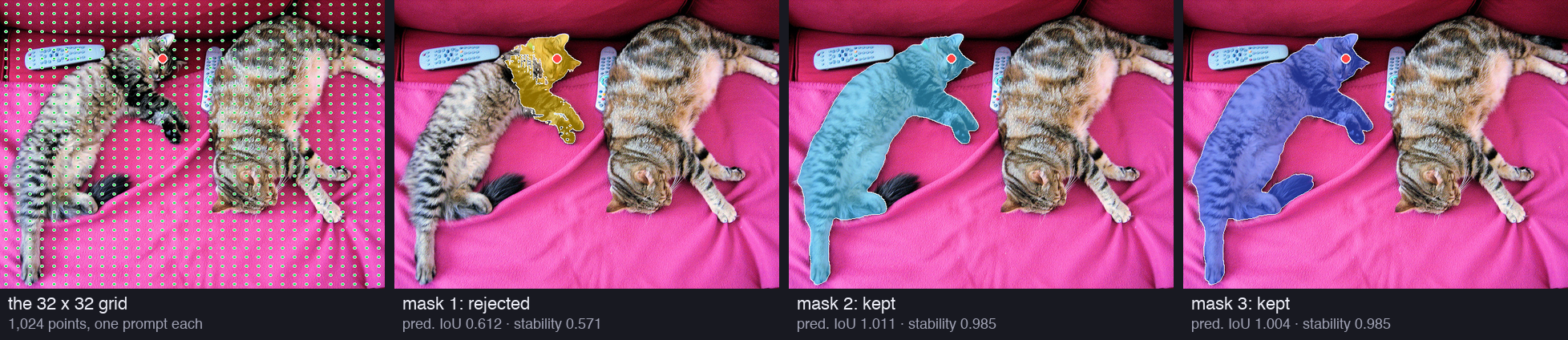
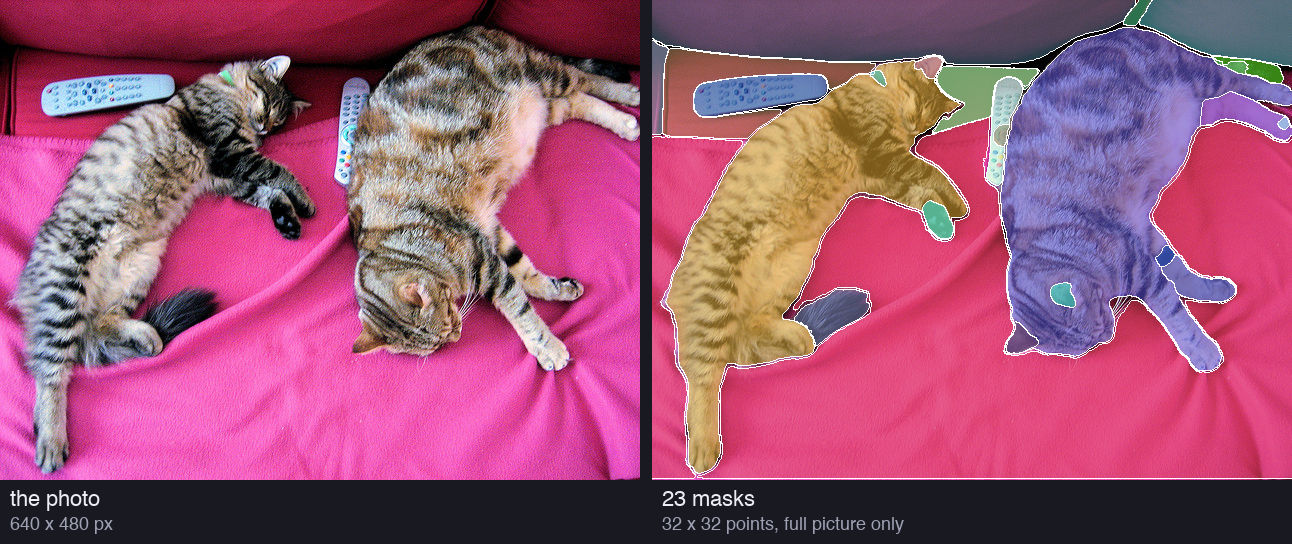
We did the same on the cat photo of the earlier parts, with the released ViT-H. Each grid point is one prompt, and each prompt gives three masks:

<figure><img src="/img/papers/sam/p4-grid.png" alt="Four copies of the cat photo. The first has a net of 1,024 small green dots over the whole photo, with one red dot on the head of the left cat. The other three show the three masks of that point: the head and a front leg with a ragged edge (rejected), the cat without its tail, and the whole cat" loading="lazy" /><figcaption>The 32 × 32 grid on the cat photo, and the three masks of one grid point (red dot). Each mask carries two numbers, the predicted IoU and the stability; the filters below use them.</figcaption></figure>

```text
grid: 32 x 32 = 1024 points; first point at (10.0, 7.5) px, spacing 20.0 px across and 15.0 px down
candidates: 1024 points x 3 masks = 3072
```

So one photo gives 3,072 **candidate** masks. Most are poor or are copies of each other. The next lines of the paper say how SAM keeps the good ones.

> [!PAPER] · §4 · page 6
> [![The end of the Fully automatic paragraph: confident masks by the IoU prediction, stable masks by thresholding the probability map at 0.5 minus and plus delta, non-maximal suppression to filter duplicates, zoomed-in crops, and 1.1B masks in total](https://ishwarj.com/img/papers/sam/p4-auto-2.pngs/sam/p4-auto-2.png)](/img/papers/sam/p4-auto-2.png)
>
> **What it says:** the IoU prediction module is used to "select *confident* masks". Then the team "selected only *stable* masks": a mask is stable if "thresholding the probability map at 0.5 −δ and 0.5 + δ" gives similar masks. Then "non-maximal suppression (NMS)" is used to "filter duplicates". For small masks, the team also processed "zoomed-in" image crops. On all 11M images, this gave "a total of 1.1B high-quality masks".
>
> **What it means:**
>
> Three questions sort the 3,072 candidates. Is SAM sure about this mask? Does the mask keep its shape if we cut it a little differently? Is it a copy of a mask that we already have? Each question is one filter.
>
> The crops answer a fourth problem. A 32 × 32 net has holes 20 pixels wide on our photo, and much wider holes on a large SA-1B picture. A small object can fall between the points. Zooming into parts of the picture makes the net finer.

Appendix B gives the exact rules. We take them one at a time and apply each to our candidates.

## Appendix B: the three filters {§B}

> [!PAPER] · §B · page 18
> [![The Filtering paragraph of Appendix B: predicted IoU at a threshold of 88.0, the stability of the pair of masks thresholded at -1 and +1 at 95.0 or more, and the removal of masks that cover 95% or more of the image](https://ishwarj.com/img/papers/sam/p4-b-filtering.png/p4-b-filtering.png)](/img/papers/sam/p4-b-filtering.png)
>
> **What it says:** first, "the model's predicted IoU score at a threshold of 88.0". Second, the mask is the result of "thresholding logits at 0", and it is kept only if the IoU between its "pair of -1 and +1 thresholded masks" is "equal to or greater than 95.0". Third, masks that "covered 95% or more of an image" are removed. The thresholds were chosen for many masks and high quality "as judged by" professional annotators.
>
> **What it means:**
>
> The paper writes the thresholds as percentages: 88.0 means 0.88, and 95.0 means 0.95. Each filter uses a number that SAM already computes. The predicted IoU is the score of the IoU head of Part 3. The stability comes from the mask logits. The size is a count of pixels.
>
> The last sentence is honest about where the numbers come from. Nothing in theory says "0.88". The team tried values, showed the results to annotators, and kept the values that gave many good masks.

> [!DEFINITION] Threshold (cut-off)
> A fixed value that turns a number into a yes or a no. "Predicted IoU above 0.88" keeps a mask with 0.91 and removes a mask with 0.85. An **IoU threshold** is a threshold on an IoU value. [Part 1](https://ishwarj.com/papers/sam/part-1-the-big-idea/) defined IoU: the overlap of two masks divided by their union.

### Filter 1: is SAM confident?

The IoU head of Part 3 predicts how well each mask fits the object it covers. A score of 0.95 means "I think this mask overlaps the true object with an IoU of about 0.95". Filter 1 keeps only masks with a predicted IoU above 0.88. On the cat photo:

```text
  predicted IoU > 0.88:                     2507  (removed 565)
```

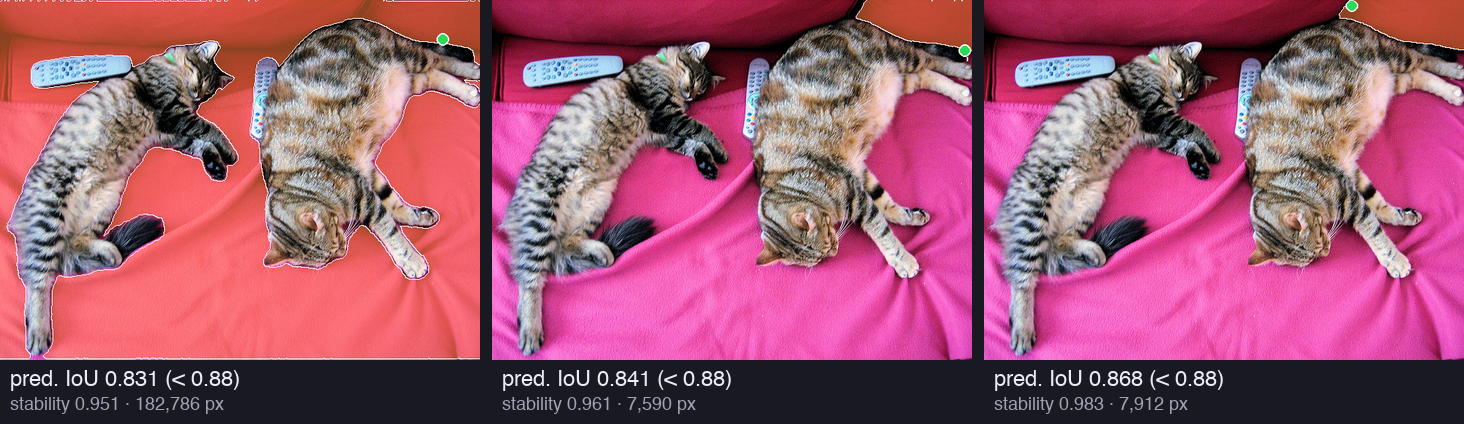
565 candidates fail. Here are three of them, from the lowest score upward:

<figure><img src="/img/papers/sam/p4-reject-iou.png" alt="Three copies of the cat photo, each with one rejected mask in orange. The first covers the blanket and the sofa around both cats, with predicted IoU 0.831. The second and the third are thin pieces of the sofa at the top edge, with predicted IoU 0.841 and 0.868" loading="lazy" /><figcaption>Masks that filter 1 removes. Each has a predicted IoU under 0.88, though each is stable (stability 0.951 to 0.983). The green dot is the grid point that made the mask.</figcaption></figure>

These masks are not nonsense, but they are not clear objects either. The first one is "everything except the cats". The other two are slices of the sofa at the edge of the photo. SAM gives them a low score, so they go.

### Filter 2: is the mask stable?

The second filter asks a different question. Think of a drawing made with a soft pencil. If you trace it with a thin pen, then with a thick marker, a clear drawing gives almost the same shape twice. A fuzzy drawing gives two very different shapes. The stability score measures this.

SAM's mask is really a map of logits, one number for each pixel (Part 2 defined logits). The mask is the set of pixels with a logit above 0. Now cut the same map at +1 and at −1. The pixels above +1 form a smaller mask; the pixels above −1 form a larger mask. Every pixel above +1 is also above −1, so the small mask sits inside the large one.

$$
S = \text{IoU}\big(M_{+1}, M_{-1}\big) = \frac{|M_{+1} \cap M_{-1}|}{|M_{+1} \cup M_{-1}|} = \frac{|M_{+1}|}{|M_{-1}|}, \qquad M_{c} = \{\, \text{pixels } i : \ell_i > c \,\}
$$

Read it from right to left:

- $$\ell_i$$ is the logit of pixel $$i$$: positive means "inside", negative means "outside", and far from 0 means "sure".
- $$M_c$$ is the mask cut at the value $$c$$: all pixels with a logit above $$c$$.
- $$|M_{+1}|$$ counts the pixels that are clearly inside, and $$|M_{-1}|$$ counts the pixels that are inside or nearly inside.
- Because $$M_{+1}$$ is inside $$M_{-1}$$, their intersection is $$M_{+1}$$ and their union is $$M_{-1}$$. So the IoU is a plain ratio of two counts.
- $$S$$ is near 1 when few pixels have a logit between −1 and +1. Those pixels are the unsure ones.

Section 4 describes the same rule with probabilities: cut "at 0.5 − δ and 0.5 + δ". A logit of +1 is a probability of 0.731, and a logit of −1 is 0.269. So the two descriptions agree with $$\delta = 0.231$$:

```text
  logit +1 = probability 0.731;  logit -1 = probability 0.269  -> in the words of Section 4: 0.5 - delta and 0.5 + delta with delta = 0.231
```

A tiny example with one row of 10 pixels:

<figure class="fig"><svg viewBox="0 0 800 324" role="img" aria-label="Ten pixels of one mask with their logits. Three pixels are above plus 1, five are above 0 and seven are above minus 1. The stability score is 3 divided by 7, 0.429."><defs><marker id="ah" viewBox="0 0 10 10" refX="9" refY="5" markerWidth="7" markerHeight="7" orient="auto-start-reverse"><path class="arrow" d="M0,0L10,5L0,10z"/></marker><marker id="ah-on" viewBox="0 0 10 10" refX="9" refY="5" markerWidth="6" markerHeight="6" orient="auto-start-reverse"><path class="arrow-on" d="M0,0L10,5L0,10z"/></marker><marker id="ah-2" viewBox="0 0 10 10" refX="9" refY="5" markerWidth="6" markerHeight="6" orient="auto-start-reverse"><path class="arrow-2" d="M0,0L10,5L0,10z"/></marker></defs><text class="t-title" x="20.0" y="22.0" text-anchor="start">Ten pixels of one mask: the logit of each pixel, and three cut-offs</text><line class="edge-2" x1="60.0" y1="114.1" x2="680.0" y2="114.1"/><text class="t-tick" x="686.0" y="118.1" text-anchor="start">cut at +1</text><line class="edge-dim" x1="60.0" y1="138.8" x2="680.0" y2="138.8"/><text class="t-tick" x="686.0" y="142.8" text-anchor="start">cut at 0: the mask</text><line class="edge-1" x1="60.0" y1="163.5" x2="680.0" y2="163.5"/><text class="t-tick" x="686.0" y="167.5" text-anchor="start">cut at −1</text><line class="axis" x1="60.0" y1="138.8" x2="60.0" y2="138.8"/><g class="mark"><title>pixel 1: logit -4.0</title><rect class="s4" x="78" y="138.8" width="44" height="98.8" rx="3" style="fill-opacity:0.35"/></g><text class="t-tick" x="100.0" y="253.6" text-anchor="middle">-4.0</text><g class="mark"><title>pixel 2: logit -1.5</title><rect class="s4" x="138" y="138.8" width="44" height="37.1" rx="3" style="fill-opacity:0.35"/></g><text class="t-tick" x="160.0" y="191.9" text-anchor="middle">-1.5</text><g class="mark"><title>pixel 3: logit -0.6</title><rect class="s1" x="198" y="138.8" width="44" height="14.8" rx="3"/></g><text class="t-tick" x="220.0" y="169.6" text-anchor="middle">-0.6</text><g class="mark"><title>pixel 4: logit +0.3</title><rect class="s1" x="258" y="131.4" width="44" height="7.4" rx="3"/></g><text class="t-tick" x="280.0" y="125.4" text-anchor="middle">+0.3</text><g class="mark"><title>pixel 5: logit +1.8</title><rect class="s2" x="318" y="94.4" width="44" height="44.5" rx="3"/></g><text class="t-tick" x="340.0" y="88.4" text-anchor="middle">+1.8</text><g class="mark"><title>pixel 6: logit +3.2</title><rect class="s2" x="378" y="59.8" width="44" height="79.1" rx="3"/></g><text class="t-tick" x="400.0" y="53.8" text-anchor="middle">+3.2</text><g class="mark"><title>pixel 7: logit +2.5</title><rect class="s2" x="438" y="77.1" width="44" height="61.8" rx="3"/></g><text class="t-tick" x="460.0" y="71.1" text-anchor="middle">+2.5</text><g class="mark"><title>pixel 8: logit +0.9</title><rect class="s1" x="498" y="116.6" width="44" height="22.2" rx="3"/></g><text class="t-tick" x="520.0" y="110.6" text-anchor="middle">+0.9</text><g class="mark"><title>pixel 9: logit -0.4</title><rect class="s1" x="558" y="138.8" width="44" height="9.9" rx="3"/></g><text class="t-tick" x="580.0" y="164.7" text-anchor="middle">-0.4</text><g class="mark"><title>pixel 10: logit -2.0</title><rect class="s4" x="618" y="138.8" width="44" height="49.4" rx="3" style="fill-opacity:0.35"/></g><text class="t-tick" x="640.0" y="204.2" text-anchor="middle">-2.0</text><text class="t-muted" x="56.0" y="44.0" text-anchor="end">logit</text><text class="t-note" x="20.0" y="284.0" text-anchor="start">above +1: 3 pixels (orange)     above 0: 5 pixels     above −1: 7 pixels (orange + blue)</text><text class="t-on" x="20.0" y="308.0" text-anchor="start">stability = 3 / 7 = 0.429: under 0.95, so this mask would be rejected</text></svg><figcaption>Ten pixels of one mask. Three pixels have a logit above +1 and seven have a logit above −1, so the stability is 3 / 7 = 0.429. The four pixels between the two cut-offs are the unsure edge.</figcaption></figure>

```text
one row of 10 mask logits: -4.0, -1.5, -0.6, +0.3, +1.8, +3.2, +2.5, +0.9, -0.4, -2.0
  cut at +1: 3 pixels;  cut at 0 (the mask): 5 pixels;  cut at -1: 7 pixels;  stability = 3 / 7 = 0.429
```

The mask itself has 5 pixels. But 4 of the 7 pixels near the mask sit between −1 and +1. A small change of the cut-off changes this mask a lot. The stability is 0.429, far under 0.95, and the mask is rejected. A real mask passes only if at most 5% of its "nearly inside" pixels are unsure.

Now the real thing. Here are the three masks of the grid point on the head of the left cat, the red dot in the grid picture.

```text
the three masks of grid point 205 at (270, 98):
  mask 1: 11,045 px  predicted IoU 0.612  pixels > +1:  7,441  pixels > -1: 13,022  stability 7,441 / 13,022 = 0.571  ->  rejected
  mask 2: 48,135 px  predicted IoU 1.011  pixels > +1: 47,736  pixels > -1: 48,458  stability 47,736 / 48,458 = 0.985  ->  kept
  mask 3: 50,501 px  predicted IoU 1.004  pixels > +1: 50,127  pixels > -1: 50,880  stability 50,127 / 50,880 = 0.985  ->  kept
```

Mask 1 covers the head and a front leg, with a ragged edge into the body. SAM is unsure where "the head" ends: 5,581 pixels lie between the two cut-offs. So $$S = 7{,}441 / 13{,}022 = 0.571$$, and the mask fails. Its predicted IoU of 0.612 fails too. Masks 2 and 3 are the cat without its tail and the cat with its tail. Only 722 and 753 of their pixels are unsure, so both have $$S = 0.985$$ and pass.

On the whole cat photo, filter 2 removes 380 of the 2,507 masks that passed filter 1:

```text
  and stability >= 0.95:                   2127  (removed 380)
```

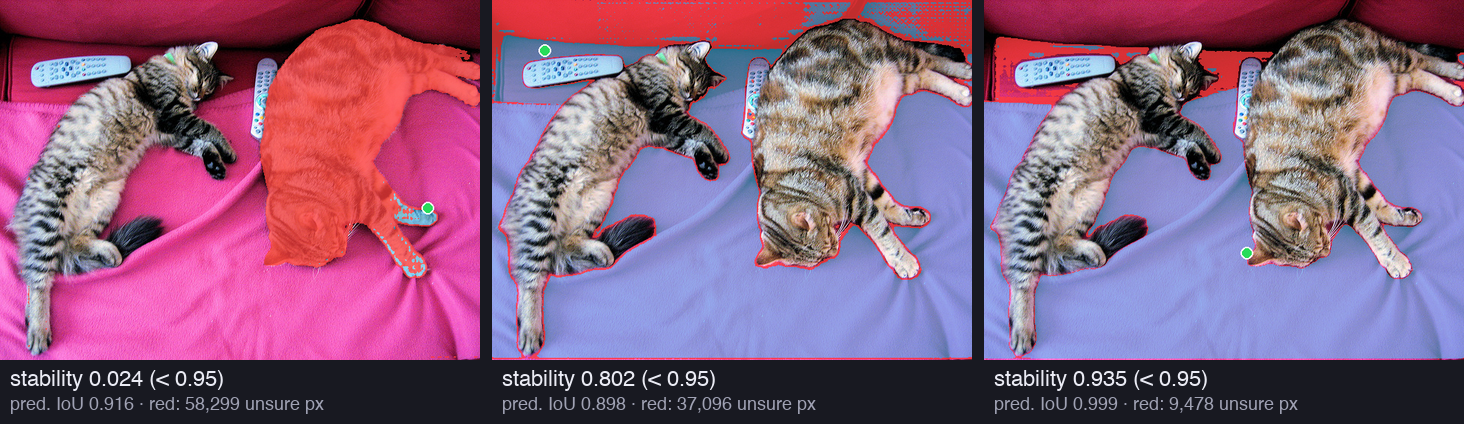
Here are three of them. Blue is the sure part (logit above +1); red is the unsure band (between −1 and +1):

<figure><img src="/img/papers/sam/p4-reject-stab.png" alt="Three copies of the cat photo. In the first, the whole right cat is red, with only a small blue paw: stability 0.024. In the second, the blanket is blue with a wide red band over the sofa at the top: stability 0.802. In the third, the blanket is blue with a thinner red band at the top: stability 0.935" loading="lazy" /><figcaption>Masks that filter 2 removes, although their predicted IoU is high (0.898 to 0.999). Blue: logit above +1. Red: logit between −1 and +1, the unsure pixels. The first mask is almost all doubt: 58,299 unsure pixels around a sure paw.</figcaption></figure>

```text
unstable example: stability 1,438 / 59,737 = 0.024, predicted IoU 0.916, 58,299 pixels between -1 and +1
unstable example: stability 150,707 / 187,803 = 0.802, predicted IoU 0.898, 37,096 pixels between -1 and +1
unstable example: stability 137,460 / 146,938 = 0.935, predicted IoU 0.999, 9,478 pixels between -1 and +1
```

The first example is a good lesson. The grid point sits on a paw of the right cat. SAM is sure about the paw, and it half believes that the whole cat belongs to the mask. The IoU head gives 0.916, so filter 1 lets it pass, and only the stability catches it.

The third example has a predicted IoU of 0.999, but its edge with the sofa is unsure. The two filters see different faults, which is why the paper uses both.

<figure class="fig"><svg viewBox="0 0 800 402" role="img" aria-label="A 2D histogram of the 3072 candidate masks of the cat photo, predicted IoU on the x axis and stability on the y axis. Only the top right corner, predicted IoU above 0.88 and stability at least 0.95, is kept: 2127 masks."><defs><marker id="ah" viewBox="0 0 10 10" refX="9" refY="5" markerWidth="7" markerHeight="7" orient="auto-start-reverse"><path class="arrow" d="M0,0L10,5L0,10z"/></marker><marker id="ah-on" viewBox="0 0 10 10" refX="9" refY="5" markerWidth="6" markerHeight="6" orient="auto-start-reverse"><path class="arrow-on" d="M0,0L10,5L0,10z"/></marker><marker id="ah-2" viewBox="0 0 10 10" refX="9" refY="5" markerWidth="6" markerHeight="6" orient="auto-start-reverse"><path class="arrow-2" d="M0,0L10,5L0,10z"/></marker></defs><text class="t-title" x="20.0" y="22.0" text-anchor="start">The 3,072 candidate masks of the cat photo: predicted IoU against stability</text><g class="mark"><title>4 masks</title><rect class="cell" x="80.5" y="335.5" width="19.0" height="14.0" style="fill-opacity:0.17"/></g><g class="mark"><title>1 masks</title><rect class="cell" x="80.5" y="305.5" width="19.0" height="14.0" style="fill-opacity:0.15"/></g><g class="mark"><title>1 masks</title><rect class="cell" x="100.5" y="335.5" width="19.0" height="14.0" style="fill-opacity:0.15"/></g><g class="mark"><title>1 masks</title><rect class="cell" x="100.5" y="245.5" width="19.0" height="14.0" style="fill-opacity:0.15"/></g><g class="mark"><title>1 masks</title><rect class="cell" x="100.5" y="125.5" width="19.0" height="14.0" style="fill-opacity:0.15"/></g><g class="mark"><title>1 masks</title><rect class="cell" x="120.5" y="305.5" width="19.0" height="14.0" style="fill-opacity:0.15"/></g><g class="mark"><title>1 masks</title><rect class="cell" x="120.5" y="290.5" width="19.0" height="14.0" style="fill-opacity:0.15"/></g><g class="mark"><title>1 masks</title><rect class="cell" x="120.5" y="215.5" width="19.0" height="14.0" style="fill-opacity:0.15"/></g><g class="mark"><title>1 masks</title><rect class="cell" x="120.5" y="185.5" width="19.0" height="14.0" style="fill-opacity:0.15"/></g><g class="mark"><title>1 masks</title><rect class="cell" x="120.5" y="170.5" width="19.0" height="14.0" style="fill-opacity:0.15"/></g><g class="mark"><title>1 masks</title><rect class="cell" x="120.5" y="140.5" width="19.0" height="14.0" style="fill-opacity:0.15"/></g><g class="mark"><title>1 masks</title><rect class="cell" x="140.5" y="335.5" width="19.0" height="14.0" style="fill-opacity:0.15"/></g><g class="mark"><title>1 masks</title><rect class="cell" x="140.5" y="290.5" width="19.0" height="14.0" style="fill-opacity:0.15"/></g><g class="mark"><title>1 masks</title><rect class="cell" x="160.5" y="335.5" width="19.0" height="14.0" style="fill-opacity:0.15"/></g><g class="mark"><title>1 masks</title><rect class="cell" x="160.5" y="320.5" width="19.0" height="14.0" style="fill-opacity:0.15"/></g><g class="mark"><title>1 masks</title><rect class="cell" x="160.5" y="275.5" width="19.0" height="14.0" style="fill-opacity:0.15"/></g><g class="mark"><title>1 masks</title><rect class="cell" x="160.5" y="260.5" width="19.0" height="14.0" style="fill-opacity:0.15"/></g><g class="mark"><title>1 masks</title><rect class="cell" x="160.5" y="230.5" width="19.0" height="14.0" style="fill-opacity:0.15"/></g><g class="mark"><title>1 masks</title><rect class="cell" x="160.5" y="200.5" width="19.0" height="14.0" style="fill-opacity:0.15"/></g><g class="mark"><title>1 masks</title><rect class="cell" x="160.5" y="170.5" width="19.0" height="14.0" style="fill-opacity:0.15"/></g><g class="mark"><title>1 masks</title><rect class="cell" x="160.5" y="155.5" width="19.0" height="14.0" style="fill-opacity:0.15"/></g><g class="mark"><title>1 masks</title><rect class="cell" x="160.5" y="140.5" width="19.0" height="14.0" style="fill-opacity:0.15"/></g><g class="mark"><title>1 masks</title><rect class="cell" x="160.5" y="125.5" width="19.0" height="14.0" style="fill-opacity:0.15"/></g><g class="mark"><title>2 masks</title><rect class="cell" x="180.5" y="335.5" width="19.0" height="14.0" style="fill-opacity:0.16"/></g><g class="mark"><title>2 masks</title><rect class="cell" x="180.5" y="305.5" width="19.0" height="14.0" style="fill-opacity:0.16"/></g><g class="mark"><title>3 masks</title><rect class="cell" x="180.5" y="290.5" width="19.0" height="14.0" style="fill-opacity:0.16"/></g><g class="mark"><title>3 masks</title><rect class="cell" x="180.5" y="215.5" width="19.0" height="14.0" style="fill-opacity:0.16"/></g><g class="mark"><title>1 masks</title><rect class="cell" x="180.5" y="200.5" width="19.0" height="14.0" style="fill-opacity:0.15"/></g><g class="mark"><title>1 masks</title><rect class="cell" x="180.5" y="155.5" width="19.0" height="14.0" style="fill-opacity:0.15"/></g><g class="mark"><title>1 masks</title><rect class="cell" x="180.5" y="125.5" width="19.0" height="14.0" style="fill-opacity:0.15"/></g><g class="mark"><title>1 masks</title><rect class="cell" x="180.5" y="110.5" width="19.0" height="14.0" style="fill-opacity:0.15"/></g><g class="mark"><title>1 masks</title><rect class="cell" x="200.5" y="275.5" width="19.0" height="14.0" style="fill-opacity:0.15"/></g><g class="mark"><title>3 masks</title><rect class="cell" x="200.5" y="260.5" width="19.0" height="14.0" style="fill-opacity:0.16"/></g><g class="mark"><title>1 masks</title><rect class="cell" x="200.5" y="245.5" width="19.0" height="14.0" style="fill-opacity:0.15"/></g><g class="mark"><title>1 masks</title><rect class="cell" x="200.5" y="230.5" width="19.0" height="14.0" style="fill-opacity:0.15"/></g><g class="mark"><title>1 masks</title><rect class="cell" x="200.5" y="215.5" width="19.0" height="14.0" style="fill-opacity:0.15"/></g><g class="mark"><title>1 masks</title><rect class="cell" x="200.5" y="200.5" width="19.0" height="14.0" style="fill-opacity:0.15"/></g><g class="mark"><title>2 masks</title><rect class="cell" x="200.5" y="155.5" width="19.0" height="14.0" style="fill-opacity:0.16"/></g><g class="mark"><title>1 masks</title><rect class="cell" x="200.5" y="125.5" width="19.0" height="14.0" style="fill-opacity:0.15"/></g><g class="mark"><title>7 masks</title><rect class="cell" x="220.5" y="335.5" width="19.0" height="14.0" style="fill-opacity:0.19"/></g><g class="mark"><title>1 masks</title><rect class="cell" x="220.5" y="320.5" width="19.0" height="14.0" style="fill-opacity:0.15"/></g><g class="mark"><title>1 masks</title><rect class="cell" x="220.5" y="305.5" width="19.0" height="14.0" style="fill-opacity:0.15"/></g><g class="mark"><title>1 masks</title><rect class="cell" x="220.5" y="215.5" width="19.0" height="14.0" style="fill-opacity:0.15"/></g><g class="mark"><title>2 masks</title><rect class="cell" x="220.5" y="200.5" width="19.0" height="14.0" style="fill-opacity:0.16"/></g><g class="mark"><title>1 masks</title><rect class="cell" x="220.5" y="140.5" width="19.0" height="14.0" style="fill-opacity:0.15"/></g><g class="mark"><title>1 masks</title><rect class="cell" x="220.5" y="110.5" width="19.0" height="14.0" style="fill-opacity:0.15"/></g><g class="mark"><title>3 masks</title><rect class="cell" x="240.5" y="335.5" width="19.0" height="14.0" style="fill-opacity:0.16"/></g><g class="mark"><title>1 masks</title><rect class="cell" x="240.5" y="320.5" width="19.0" height="14.0" style="fill-opacity:0.15"/></g><g class="mark"><title>2 masks</title><rect class="cell" x="240.5" y="290.5" width="19.0" height="14.0" style="fill-opacity:0.16"/></g><g class="mark"><title>1 masks</title><rect class="cell" x="240.5" y="275.5" width="19.0" height="14.0" style="fill-opacity:0.15"/></g><g class="mark"><title>1 masks</title><rect class="cell" x="240.5" y="260.5" width="19.0" height="14.0" style="fill-opacity:0.15"/></g><g class="mark"><title>2 masks</title><rect class="cell" x="240.5" y="245.5" width="19.0" height="14.0" style="fill-opacity:0.16"/></g><g class="mark"><title>1 masks</title><rect class="cell" x="240.5" y="215.5" width="19.0" height="14.0" style="fill-opacity:0.15"/></g><g class="mark"><title>3 masks</title><rect class="cell" x="240.5" y="200.5" width="19.0" height="14.0" style="fill-opacity:0.16"/></g><g class="mark"><title>2 masks</title><rect class="cell" x="240.5" y="185.5" width="19.0" height="14.0" style="fill-opacity:0.16"/></g><g class="mark"><title>3 masks</title><rect class="cell" x="240.5" y="170.5" width="19.0" height="14.0" style="fill-opacity:0.16"/></g><g class="mark"><title>2 masks</title><rect class="cell" x="240.5" y="155.5" width="19.0" height="14.0" style="fill-opacity:0.16"/></g><g class="mark"><title>1 masks</title><rect class="cell" x="240.5" y="140.5" width="19.0" height="14.0" style="fill-opacity:0.15"/></g><g class="mark"><title>1 masks</title><rect class="cell" x="240.5" y="95.5" width="19.0" height="14.0" style="fill-opacity:0.15"/></g><g class="mark"><title>1 masks</title><rect class="cell" x="260.5" y="335.5" width="19.0" height="14.0" style="fill-opacity:0.15"/></g><g class="mark"><title>2 masks</title><rect class="cell" x="260.5" y="305.5" width="19.0" height="14.0" style="fill-opacity:0.16"/></g><g class="mark"><title>1 masks</title><rect class="cell" x="260.5" y="290.5" width="19.0" height="14.0" style="fill-opacity:0.15"/></g><g class="mark"><title>2 masks</title><rect class="cell" x="260.5" y="230.5" width="19.0" height="14.0" style="fill-opacity:0.16"/></g><g class="mark"><title>4 masks</title><rect class="cell" x="260.5" y="215.5" width="19.0" height="14.0" style="fill-opacity:0.17"/></g><g class="mark"><title>1 masks</title><rect class="cell" x="260.5" y="200.5" width="19.0" height="14.0" style="fill-opacity:0.15"/></g><g class="mark"><title>1 masks</title><rect class="cell" x="260.5" y="185.5" width="19.0" height="14.0" style="fill-opacity:0.15"/></g><g class="mark"><title>3 masks</title><rect class="cell" x="260.5" y="170.5" width="19.0" height="14.0" style="fill-opacity:0.16"/></g><g class="mark"><title>1 masks</title><rect class="cell" x="260.5" y="155.5" width="19.0" height="14.0" style="fill-opacity:0.15"/></g><g class="mark"><title>2 masks</title><rect class="cell" x="260.5" y="140.5" width="19.0" height="14.0" style="fill-opacity:0.16"/></g><g class="mark"><title>5 masks</title><rect class="cell" x="280.5" y="335.5" width="19.0" height="14.0" style="fill-opacity:0.18"/></g><g class="mark"><title>2 masks</title><rect class="cell" x="280.5" y="305.5" width="19.0" height="14.0" style="fill-opacity:0.16"/></g><g class="mark"><title>2 masks</title><rect class="cell" x="280.5" y="275.5" width="19.0" height="14.0" style="fill-opacity:0.16"/></g><g class="mark"><title>4 masks</title><rect class="cell" x="280.5" y="260.5" width="19.0" height="14.0" style="fill-opacity:0.17"/></g><g class="mark"><title>1 masks</title><rect class="cell" x="280.5" y="245.5" width="19.0" height="14.0" style="fill-opacity:0.15"/></g><g class="mark"><title>2 masks</title><rect class="cell" x="280.5" y="230.5" width="19.0" height="14.0" style="fill-opacity:0.16"/></g><g class="mark"><title>1 masks</title><rect class="cell" x="280.5" y="215.5" width="19.0" height="14.0" style="fill-opacity:0.15"/></g><g class="mark"><title>4 masks</title><rect class="cell" x="280.5" y="200.5" width="19.0" height="14.0" style="fill-opacity:0.17"/></g><g class="mark"><title>2 masks</title><rect class="cell" x="280.5" y="185.5" width="19.0" height="14.0" style="fill-opacity:0.16"/></g><g class="mark"><title>1 masks</title><rect class="cell" x="280.5" y="170.5" width="19.0" height="14.0" style="fill-opacity:0.15"/></g><g class="mark"><title>1 masks</title><rect class="cell" x="280.5" y="140.5" width="19.0" height="14.0" style="fill-opacity:0.15"/></g><g class="mark"><title>4 masks</title><rect class="cell" x="300.5" y="335.5" width="19.0" height="14.0" style="fill-opacity:0.17"/></g><g class="mark"><title>1 masks</title><rect class="cell" x="300.5" y="320.5" width="19.0" height="14.0" style="fill-opacity:0.15"/></g><g class="mark"><title>2 masks</title><rect class="cell" x="300.5" y="305.5" width="19.0" height="14.0" style="fill-opacity:0.16"/></g><g class="mark"><title>3 masks</title><rect class="cell" x="300.5" y="290.5" width="19.0" height="14.0" style="fill-opacity:0.16"/></g><g class="mark"><title>1 masks</title><rect class="cell" x="300.5" y="275.5" width="19.0" height="14.0" style="fill-opacity:0.15"/></g><g class="mark"><title>4 masks</title><rect class="cell" x="300.5" y="260.5" width="19.0" height="14.0" style="fill-opacity:0.17"/></g><g class="mark"><title>1 masks</title><rect class="cell" x="300.5" y="245.5" width="19.0" height="14.0" style="fill-opacity:0.15"/></g><g class="mark"><title>3 masks</title><rect class="cell" x="300.5" y="230.5" width="19.0" height="14.0" style="fill-opacity:0.16"/></g><g class="mark"><title>3 masks</title><rect class="cell" x="300.5" y="200.5" width="19.0" height="14.0" style="fill-opacity:0.16"/></g><g class="mark"><title>2 masks</title><rect class="cell" x="300.5" y="185.5" width="19.0" height="14.0" style="fill-opacity:0.16"/></g><g class="mark"><title>1 masks</title><rect class="cell" x="300.5" y="140.5" width="19.0" height="14.0" style="fill-opacity:0.15"/></g><g class="mark"><title>1 masks</title><rect class="cell" x="300.5" y="110.5" width="19.0" height="14.0" style="fill-opacity:0.15"/></g><g class="mark"><title>1 masks</title><rect class="cell" x="300.5" y="95.5" width="19.0" height="14.0" style="fill-opacity:0.15"/></g><g class="mark"><title>1 masks</title><rect class="cell" x="300.5" y="80.5" width="19.0" height="14.0" style="fill-opacity:0.15"/></g><g class="mark"><title>1 masks</title><rect class="cell" x="300.5" y="50.5" width="19.0" height="14.0" style="fill-opacity:0.15"/></g><g class="mark"><title>2 masks</title><rect class="cell" x="320.5" y="335.5" width="19.0" height="14.0" style="fill-opacity:0.16"/></g><g class="mark"><title>1 masks</title><rect class="cell" x="320.5" y="320.5" width="19.0" height="14.0" style="fill-opacity:0.15"/></g><g class="mark"><title>3 masks</title><rect class="cell" x="320.5" y="260.5" width="19.0" height="14.0" style="fill-opacity:0.16"/></g><g class="mark"><title>4 masks</title><rect class="cell" x="320.5" y="245.5" width="19.0" height="14.0" style="fill-opacity:0.17"/></g><g class="mark"><title>6 masks</title><rect class="cell" x="320.5" y="230.5" width="19.0" height="14.0" style="fill-opacity:0.18"/></g><g class="mark"><title>1 masks</title><rect class="cell" x="320.5" y="170.5" width="19.0" height="14.0" style="fill-opacity:0.15"/></g><g class="mark"><title>2 masks</title><rect class="cell" x="320.5" y="155.5" width="19.0" height="14.0" style="fill-opacity:0.16"/></g><g class="mark"><title>1 masks</title><rect class="cell" x="320.5" y="125.5" width="19.0" height="14.0" style="fill-opacity:0.15"/></g><g class="mark"><title>2 masks</title><rect class="cell" x="320.5" y="110.5" width="19.0" height="14.0" style="fill-opacity:0.16"/></g><g class="mark"><title>1 masks</title><rect class="cell" x="320.5" y="95.5" width="19.0" height="14.0" style="fill-opacity:0.15"/></g><g class="mark"><title>2 masks</title><rect class="cell" x="320.5" y="80.5" width="19.0" height="14.0" style="fill-opacity:0.16"/></g><g class="mark"><title>2 masks</title><rect class="cell" x="320.5" y="65.5" width="19.0" height="14.0" style="fill-opacity:0.16"/></g><g class="mark"><title>3 masks</title><rect class="cell" x="340.5" y="335.5" width="19.0" height="14.0" style="fill-opacity:0.16"/></g><g class="mark"><title>2 masks</title><rect class="cell" x="340.5" y="320.5" width="19.0" height="14.0" style="fill-opacity:0.16"/></g><g class="mark"><title>1 masks</title><rect class="cell" x="340.5" y="275.5" width="19.0" height="14.0" style="fill-opacity:0.15"/></g><g class="mark"><title>3 masks</title><rect class="cell" x="340.5" y="260.5" width="19.0" height="14.0" style="fill-opacity:0.16"/></g><g class="mark"><title>4 masks</title><rect class="cell" x="340.5" y="245.5" width="19.0" height="14.0" style="fill-opacity:0.17"/></g><g class="mark"><title>2 masks</title><rect class="cell" x="340.5" y="230.5" width="19.0" height="14.0" style="fill-opacity:0.16"/></g><g class="mark"><title>3 masks</title><rect class="cell" x="340.5" y="215.5" width="19.0" height="14.0" style="fill-opacity:0.16"/></g><g class="mark"><title>1 masks</title><rect class="cell" x="340.5" y="200.5" width="19.0" height="14.0" style="fill-opacity:0.15"/></g><g class="mark"><title>1 masks</title><rect class="cell" x="340.5" y="170.5" width="19.0" height="14.0" style="fill-opacity:0.15"/></g><g class="mark"><title>3 masks</title><rect class="cell" x="340.5" y="140.5" width="19.0" height="14.0" style="fill-opacity:0.16"/></g><g class="mark"><title>1 masks</title><rect class="cell" x="340.5" y="125.5" width="19.0" height="14.0" style="fill-opacity:0.15"/></g><g class="mark"><title>2 masks</title><rect class="cell" x="340.5" y="110.5" width="19.0" height="14.0" style="fill-opacity:0.16"/></g><g class="mark"><title>1 masks</title><rect class="cell" x="340.5" y="95.5" width="19.0" height="14.0" style="fill-opacity:0.15"/></g><g class="mark"><title>2 masks</title><rect class="cell" x="340.5" y="80.5" width="19.0" height="14.0" style="fill-opacity:0.16"/></g><g class="mark"><title>3 masks</title><rect class="cell" x="340.5" y="65.5" width="19.0" height="14.0" style="fill-opacity:0.16"/></g><g class="mark"><title>6 masks</title><rect class="cell" x="360.5" y="335.5" width="19.0" height="14.0" style="fill-opacity:0.18"/></g><g class="mark"><title>3 masks</title><rect class="cell" x="360.5" y="290.5" width="19.0" height="14.0" style="fill-opacity:0.16"/></g><g class="mark"><title>2 masks</title><rect class="cell" x="360.5" y="275.5" width="19.0" height="14.0" style="fill-opacity:0.16"/></g><g class="mark"><title>2 masks</title><rect class="cell" x="360.5" y="245.5" width="19.0" height="14.0" style="fill-opacity:0.16"/></g><g class="mark"><title>4 masks</title><rect class="cell" x="360.5" y="215.5" width="19.0" height="14.0" style="fill-opacity:0.17"/></g><g class="mark"><title>4 masks</title><rect class="cell" x="360.5" y="200.5" width="19.0" height="14.0" style="fill-opacity:0.17"/></g><g class="mark"><title>4 masks</title><rect class="cell" x="360.5" y="185.5" width="19.0" height="14.0" style="fill-opacity:0.17"/></g><g class="mark"><title>1 masks</title><rect class="cell" x="360.5" y="170.5" width="19.0" height="14.0" style="fill-opacity:0.15"/></g><g class="mark"><title>4 masks</title><rect class="cell" x="360.5" y="155.5" width="19.0" height="14.0" style="fill-opacity:0.17"/></g><g class="mark"><title>1 masks</title><rect class="cell" x="360.5" y="110.5" width="19.0" height="14.0" style="fill-opacity:0.15"/></g><g class="mark"><title>1 masks</title><rect class="cell" x="360.5" y="95.5" width="19.0" height="14.0" style="fill-opacity:0.15"/></g><g class="mark"><title>5 masks</title><rect class="cell" x="360.5" y="80.5" width="19.0" height="14.0" style="fill-opacity:0.18"/></g><g class="mark"><title>4 masks</title><rect class="cell" x="360.5" y="65.5" width="19.0" height="14.0" style="fill-opacity:0.17"/></g><g class="mark"><title>1 masks</title><rect class="cell" x="380.5" y="335.5" width="19.0" height="14.0" style="fill-opacity:0.15"/></g><g class="mark"><title>2 masks</title><rect class="cell" x="380.5" y="320.5" width="19.0" height="14.0" style="fill-opacity:0.16"/></g><g class="mark"><title>1 masks</title><rect class="cell" x="380.5" y="305.5" width="19.0" height="14.0" style="fill-opacity:0.15"/></g><g class="mark"><title>3 masks</title><rect class="cell" x="380.5" y="290.5" width="19.0" height="14.0" style="fill-opacity:0.16"/></g><g class="mark"><title>1 masks</title><rect class="cell" x="380.5" y="260.5" width="19.0" height="14.0" style="fill-opacity:0.15"/></g><g class="mark"><title>2 masks</title><rect class="cell" x="380.5" y="245.5" width="19.0" height="14.0" style="fill-opacity:0.16"/></g><g class="mark"><title>1 masks</title><rect class="cell" x="380.5" y="230.5" width="19.0" height="14.0" style="fill-opacity:0.15"/></g><g class="mark"><title>1 masks</title><rect class="cell" x="380.5" y="215.5" width="19.0" height="14.0" style="fill-opacity:0.15"/></g><g class="mark"><title>8 masks</title><rect class="cell" x="380.5" y="200.5" width="19.0" height="14.0" style="fill-opacity:0.19"/></g><g class="mark"><title>16 masks</title><rect class="cell" x="380.5" y="185.5" width="19.0" height="14.0" style="fill-opacity:0.22"/></g><g class="mark"><title>5 masks</title><rect class="cell" x="380.5" y="170.5" width="19.0" height="14.0" style="fill-opacity:0.18"/></g><g class="mark"><title>2 masks</title><rect class="cell" x="380.5" y="155.5" width="19.0" height="14.0" style="fill-opacity:0.16"/></g><g class="mark"><title>1 masks</title><rect class="cell" x="380.5" y="140.5" width="19.0" height="14.0" style="fill-opacity:0.15"/></g><g class="mark"><title>2 masks</title><rect class="cell" x="380.5" y="125.5" width="19.0" height="14.0" style="fill-opacity:0.16"/></g><g class="mark"><title>1 masks</title><rect class="cell" x="380.5" y="110.5" width="19.0" height="14.0" style="fill-opacity:0.15"/></g><g class="mark"><title>2 masks</title><rect class="cell" x="380.5" y="95.5" width="19.0" height="14.0" style="fill-opacity:0.16"/></g><g class="mark"><title>6 masks</title><rect class="cell" x="380.5" y="65.5" width="19.0" height="14.0" style="fill-opacity:0.18"/></g><g class="mark"><title>2 masks</title><rect class="cell" x="380.5" y="50.5" width="19.0" height="14.0" style="fill-opacity:0.16"/></g><g class="mark"><title>1 masks</title><rect class="cell" x="400.5" y="320.5" width="19.0" height="14.0" style="fill-opacity:0.15"/></g><g class="mark"><title>6 masks</title><rect class="cell" x="400.5" y="290.5" width="19.0" height="14.0" style="fill-opacity:0.18"/></g><g class="mark"><title>1 masks</title><rect class="cell" x="400.5" y="275.5" width="19.0" height="14.0" style="fill-opacity:0.15"/></g><g class="mark"><title>1 masks</title><rect class="cell" x="400.5" y="260.5" width="19.0" height="14.0" style="fill-opacity:0.15"/></g><g class="mark"><title>1 masks</title><rect class="cell" x="400.5" y="245.5" width="19.0" height="14.0" style="fill-opacity:0.15"/></g><g class="mark"><title>4 masks</title><rect class="cell" x="400.5" y="230.5" width="19.0" height="14.0" style="fill-opacity:0.17"/></g><g class="mark"><title>1 masks</title><rect class="cell" x="400.5" y="215.5" width="19.0" height="14.0" style="fill-opacity:0.15"/></g><g class="mark"><title>2 masks</title><rect class="cell" x="400.5" y="200.5" width="19.0" height="14.0" style="fill-opacity:0.16"/></g><g class="mark"><title>2 masks</title><rect class="cell" x="400.5" y="185.5" width="19.0" height="14.0" style="fill-opacity:0.16"/></g><g class="mark"><title>1 masks</title><rect class="cell" x="400.5" y="170.5" width="19.0" height="14.0" style="fill-opacity:0.15"/></g><g class="mark"><title>11 masks</title><rect class="cell" x="400.5" y="110.5" width="19.0" height="14.0" style="fill-opacity:0.21"/></g><g class="mark"><title>2 masks</title><rect class="cell" x="400.5" y="80.5" width="19.0" height="14.0" style="fill-opacity:0.16"/></g><g class="mark"><title>6 masks</title><rect class="cell" x="400.5" y="65.5" width="19.0" height="14.0" style="fill-opacity:0.18"/></g><g class="mark"><title>1 masks</title><rect class="cell" x="420.5" y="335.5" width="19.0" height="14.0" style="fill-opacity:0.15"/></g><g class="mark"><title>1 masks</title><rect class="cell" x="420.5" y="320.5" width="19.0" height="14.0" style="fill-opacity:0.15"/></g><g class="mark"><title>41 masks</title><rect class="cell" x="420.5" y="290.5" width="19.0" height="14.0" style="fill-opacity:0.29"/></g><g class="mark"><title>1 masks</title><rect class="cell" x="420.5" y="260.5" width="19.0" height="14.0" style="fill-opacity:0.15"/></g><g class="mark"><title>2 masks</title><rect class="cell" x="420.5" y="245.5" width="19.0" height="14.0" style="fill-opacity:0.16"/></g><g class="mark"><title>1 masks</title><rect class="cell" x="420.5" y="215.5" width="19.0" height="14.0" style="fill-opacity:0.15"/></g><g class="mark"><title>3 masks</title><rect class="cell" x="420.5" y="200.5" width="19.0" height="14.0" style="fill-opacity:0.16"/></g><g class="mark"><title>3 masks</title><rect class="cell" x="420.5" y="185.5" width="19.0" height="14.0" style="fill-opacity:0.16"/></g><g class="mark"><title>1 masks</title><rect class="cell" x="420.5" y="170.5" width="19.0" height="14.0" style="fill-opacity:0.15"/></g><g class="mark"><title>1 masks</title><rect class="cell" x="420.5" y="155.5" width="19.0" height="14.0" style="fill-opacity:0.15"/></g><g class="mark"><title>2 masks</title><rect class="cell" x="420.5" y="140.5" width="19.0" height="14.0" style="fill-opacity:0.16"/></g><g class="mark"><title>2 masks</title><rect class="cell" x="420.5" y="110.5" width="19.0" height="14.0" style="fill-opacity:0.16"/></g><g class="mark"><title>1 masks</title><rect class="cell" x="420.5" y="95.5" width="19.0" height="14.0" style="fill-opacity:0.15"/></g><g class="mark"><title>2 masks</title><rect class="cell" x="420.5" y="80.5" width="19.0" height="14.0" style="fill-opacity:0.16"/></g><g class="mark"><title>3 masks</title><rect class="cell" x="420.5" y="65.5" width="19.0" height="14.0" style="fill-opacity:0.16"/></g><g class="mark"><title>3 masks</title><rect class="cell" x="420.5" y="50.5" width="19.0" height="14.0" style="fill-opacity:0.16"/></g><g class="mark"><title>2 masks</title><rect class="cell" x="440.5" y="320.5" width="19.0" height="14.0" style="fill-opacity:0.16"/></g><g class="mark"><title>73 masks</title><rect class="cell" x="440.5" y="290.5" width="19.0" height="14.0" style="fill-opacity:0.34"/></g><g class="mark"><title>2 masks</title><rect class="cell" x="440.5" y="275.5" width="19.0" height="14.0" style="fill-opacity:0.16"/></g><g class="mark"><title>1 masks</title><rect class="cell" x="440.5" y="260.5" width="19.0" height="14.0" style="fill-opacity:0.15"/></g><g class="mark"><title>2 masks</title><rect class="cell" x="440.5" y="245.5" width="19.0" height="14.0" style="fill-opacity:0.16"/></g><g class="mark"><title>1 masks</title><rect class="cell" x="440.5" y="230.5" width="19.0" height="14.0" style="fill-opacity:0.15"/></g><g class="mark"><title>1 masks</title><rect class="cell" x="440.5" y="215.5" width="19.0" height="14.0" style="fill-opacity:0.15"/></g><g class="mark"><title>1 masks</title><rect class="cell" x="440.5" y="200.5" width="19.0" height="14.0" style="fill-opacity:0.15"/></g><g class="mark"><title>3 masks</title><rect class="cell" x="440.5" y="185.5" width="19.0" height="14.0" style="fill-opacity:0.16"/></g><g class="mark"><title>2 masks</title><rect class="cell" x="440.5" y="170.5" width="19.0" height="14.0" style="fill-opacity:0.16"/></g><g class="mark"><title>1 masks</title><rect class="cell" x="440.5" y="155.5" width="19.0" height="14.0" style="fill-opacity:0.15"/></g><g class="mark"><title>2 masks</title><rect class="cell" x="440.5" y="140.5" width="19.0" height="14.0" style="fill-opacity:0.16"/></g><g class="mark"><title>1 masks</title><rect class="cell" x="440.5" y="125.5" width="19.0" height="14.0" style="fill-opacity:0.15"/></g><g class="mark"><title>8 masks</title><rect class="cell" x="440.5" y="110.5" width="19.0" height="14.0" style="fill-opacity:0.19"/></g><g class="mark"><title>1 masks</title><rect class="cell" x="440.5" y="95.5" width="19.0" height="14.0" style="fill-opacity:0.15"/></g><g class="mark"><title>1 masks</title><rect class="cell" x="440.5" y="80.5" width="19.0" height="14.0" style="fill-opacity:0.15"/></g><g class="mark"><title>13 masks</title><rect class="cell" x="440.5" y="65.5" width="19.0" height="14.0" style="fill-opacity:0.21"/></g><g class="mark"><title>2 masks</title><rect class="cell" x="440.5" y="50.5" width="19.0" height="14.0" style="fill-opacity:0.16"/></g><g class="mark"><title>44 masks</title><rect class="cell" x="460.5" y="290.5" width="19.0" height="14.0" style="fill-opacity:0.29"/></g><g class="mark"><title>4 masks</title><rect class="cell" x="460.5" y="245.5" width="19.0" height="14.0" style="fill-opacity:0.17"/></g><g class="mark"><title>5 masks</title><rect class="cell" x="460.5" y="230.5" width="19.0" height="14.0" style="fill-opacity:0.18"/></g><g class="mark"><title>3 masks</title><rect class="cell" x="460.5" y="200.5" width="19.0" height="14.0" style="fill-opacity:0.16"/></g><g class="mark"><title>1 masks</title><rect class="cell" x="460.5" y="185.5" width="19.0" height="14.0" style="fill-opacity:0.15"/></g><g class="mark"><title>3 masks</title><rect class="cell" x="460.5" y="170.5" width="19.0" height="14.0" style="fill-opacity:0.16"/></g><g class="mark"><title>3 masks</title><rect class="cell" x="460.5" y="155.5" width="19.0" height="14.0" style="fill-opacity:0.16"/></g><g class="mark"><title>4 masks</title><rect class="cell" x="460.5" y="125.5" width="19.0" height="14.0" style="fill-opacity:0.17"/></g><g class="mark"><title>6 masks</title><rect class="cell" x="460.5" y="110.5" width="19.0" height="14.0" style="fill-opacity:0.18"/></g><g class="mark"><title>3 masks</title><rect class="cell" x="460.5" y="95.5" width="19.0" height="14.0" style="fill-opacity:0.16"/></g><g class="mark"><title>4 masks</title><rect class="cell" x="460.5" y="80.5" width="19.0" height="14.0" style="fill-opacity:0.17"/></g><g class="mark"><title>6 masks</title><rect class="cell" x="460.5" y="65.5" width="19.0" height="14.0" style="fill-opacity:0.18"/></g><g class="mark"><title>5 masks</title><rect class="cell" x="460.5" y="50.5" width="19.0" height="14.0" style="fill-opacity:0.18"/></g><g class="mark"><title>1 masks</title><rect class="cell" x="480.5" y="335.5" width="19.0" height="14.0" style="fill-opacity:0.15"/></g><g class="mark"><title>9 masks</title><rect class="cell" x="480.5" y="290.5" width="19.0" height="14.0" style="fill-opacity:0.20"/></g><g class="mark"><title>5 masks</title><rect class="cell" x="480.5" y="275.5" width="19.0" height="14.0" style="fill-opacity:0.18"/></g><g class="mark"><title>1 masks</title><rect class="cell" x="480.5" y="260.5" width="19.0" height="14.0" style="fill-opacity:0.15"/></g><g class="mark"><title>1 masks</title><rect class="cell" x="480.5" y="245.5" width="19.0" height="14.0" style="fill-opacity:0.15"/></g><g class="mark"><title>3 masks</title><rect class="cell" x="480.5" y="215.5" width="19.0" height="14.0" style="fill-opacity:0.16"/></g><g class="mark"><title>2 masks</title><rect class="cell" x="480.5" y="185.5" width="19.0" height="14.0" style="fill-opacity:0.16"/></g><g class="mark"><title>2 masks</title><rect class="cell" x="480.5" y="170.5" width="19.0" height="14.0" style="fill-opacity:0.16"/></g><g class="mark"><title>2 masks</title><rect class="cell" x="480.5" y="155.5" width="19.0" height="14.0" style="fill-opacity:0.16"/></g><g class="mark"><title>2 masks</title><rect class="cell" x="480.5" y="140.5" width="19.0" height="14.0" style="fill-opacity:0.16"/></g><g class="mark"><title>1 masks</title><rect class="cell" x="480.5" y="125.5" width="19.0" height="14.0" style="fill-opacity:0.15"/></g><g class="mark"><title>7 masks</title><rect class="cell" x="480.5" y="110.5" width="19.0" height="14.0" style="fill-opacity:0.19"/></g><g class="mark"><title>7 masks</title><rect class="cell" x="480.5" y="95.5" width="19.0" height="14.0" style="fill-opacity:0.19"/></g><g class="mark"><title>6 masks</title><rect class="cell" x="480.5" y="80.5" width="19.0" height="14.0" style="fill-opacity:0.18"/></g><g class="mark"><title>11 masks</title><rect class="cell" x="480.5" y="65.5" width="19.0" height="14.0" style="fill-opacity:0.21"/></g><g class="mark"><title>16 masks</title><rect class="cell" x="480.5" y="50.5" width="19.0" height="14.0" style="fill-opacity:0.22"/></g><g class="mark"><title>3 masks</title><rect class="cell" x="500.5" y="290.5" width="19.0" height="14.0" style="fill-opacity:0.16"/></g><g class="mark"><title>2 masks</title><rect class="cell" x="500.5" y="275.5" width="19.0" height="14.0" style="fill-opacity:0.16"/></g><g class="mark"><title>1 masks</title><rect class="cell" x="500.5" y="245.5" width="19.0" height="14.0" style="fill-opacity:0.15"/></g><g class="mark"><title>1 masks</title><rect class="cell" x="500.5" y="215.5" width="19.0" height="14.0" style="fill-opacity:0.15"/></g><g class="mark"><title>1 masks</title><rect class="cell" x="500.5" y="185.5" width="19.0" height="14.0" style="fill-opacity:0.15"/></g><g class="mark"><title>1 masks</title><rect class="cell" x="500.5" y="155.5" width="19.0" height="14.0" style="fill-opacity:0.15"/></g><g class="mark"><title>4 masks</title><rect class="cell" x="500.5" y="140.5" width="19.0" height="14.0" style="fill-opacity:0.17"/></g><g class="mark"><title>6 masks</title><rect class="cell" x="500.5" y="125.5" width="19.0" height="14.0" style="fill-opacity:0.18"/></g><g class="mark"><title>4 masks</title><rect class="cell" x="500.5" y="110.5" width="19.0" height="14.0" style="fill-opacity:0.17"/></g><g class="mark"><title>3 masks</title><rect class="cell" x="500.5" y="95.5" width="19.0" height="14.0" style="fill-opacity:0.16"/></g><g class="mark"><title>1 masks</title><rect class="cell" x="500.5" y="80.5" width="19.0" height="14.0" style="fill-opacity:0.15"/></g><g class="mark"><title>24 masks</title><rect class="cell" x="500.5" y="65.5" width="19.0" height="14.0" style="fill-opacity:0.25"/></g><g class="mark"><title>51 masks</title><rect class="cell" x="500.5" y="50.5" width="19.0" height="14.0" style="fill-opacity:0.30"/></g><g class="mark"><title>1 masks</title><rect class="cell" x="520.5" y="275.5" width="19.0" height="14.0" style="fill-opacity:0.15"/></g><g class="mark"><title>1 masks</title><rect class="cell" x="520.5" y="215.5" width="19.0" height="14.0" style="fill-opacity:0.15"/></g><g class="mark"><title>1 masks</title><rect class="cell" x="520.5" y="185.5" width="19.0" height="14.0" style="fill-opacity:0.15"/></g><g class="mark"><title>2 masks</title><rect class="cell" x="520.5" y="170.5" width="19.0" height="14.0" style="fill-opacity:0.16"/></g><g class="mark"><title>1 masks</title><rect class="cell" x="520.5" y="155.5" width="19.0" height="14.0" style="fill-opacity:0.15"/></g><g class="mark"><title>1 masks</title><rect class="cell" x="520.5" y="140.5" width="19.0" height="14.0" style="fill-opacity:0.15"/></g><g class="mark"><title>2 masks</title><rect class="cell" x="520.5" y="125.5" width="19.0" height="14.0" style="fill-opacity:0.16"/></g><g class="mark"><title>4 masks</title><rect class="cell" x="520.5" y="110.5" width="19.0" height="14.0" style="fill-opacity:0.17"/></g><g class="mark"><title>2 masks</title><rect class="cell" x="520.5" y="95.5" width="19.0" height="14.0" style="fill-opacity:0.16"/></g><g class="mark"><title>9 masks</title><rect class="cell" x="520.5" y="80.5" width="19.0" height="14.0" style="fill-opacity:0.20"/></g><g class="mark"><title>33 masks</title><rect class="cell" x="520.5" y="65.5" width="19.0" height="14.0" style="fill-opacity:0.27"/></g><g class="mark"><title>240 masks</title><rect class="cell" x="520.5" y="50.5" width="19.0" height="14.0" style="fill-opacity:0.52"/></g><g class="mark"><title>2 masks</title><rect class="cell" x="540.5" y="95.5" width="19.0" height="14.0" style="fill-opacity:0.16"/></g><g class="mark"><title>3 masks</title><rect class="cell" x="540.5" y="80.5" width="19.0" height="14.0" style="fill-opacity:0.16"/></g><g class="mark"><title>105 masks</title><rect class="cell" x="540.5" y="65.5" width="19.0" height="14.0" style="fill-opacity:0.39"/></g><g class="mark"><title>643 masks</title><rect class="cell" x="540.5" y="50.5" width="19.0" height="14.0" style="fill-opacity:0.78"/></g><g class="mark"><title>49 masks</title><rect class="cell" x="560.5" y="65.5" width="19.0" height="14.0" style="fill-opacity:0.30"/></g><g class="mark"><title>1157 masks</title><rect class="cell" x="560.5" y="50.5" width="19.0" height="14.0" style="fill-opacity:1.00"/></g><g class="mark"><title>6 masks</title><rect class="cell" x="580.5" y="50.5" width="19.0" height="14.0" style="fill-opacity:0.18"/></g><rect class="box-on" x="464.0" y="50.0" width="136.0" height="15.0" rx="2" style="fill-opacity:0.12"/><line class="edge-2" x1="464.0" y1="50.0" x2="464.0" y2="350.0"/><line class="edge-2" x1="80.0" y1="65.0" x2="600.0" y2="65.0"/><text class="t-tick" x="80.0" y="368.0" text-anchor="middle">0.4</text><text class="t-tick" x="240.0" y="368.0" text-anchor="middle">0.6</text><text class="t-tick" x="400.0" y="368.0" text-anchor="middle">0.8</text><text class="t-tick" x="560.0" y="368.0" text-anchor="middle">1.0</text><text class="t-tick" x="72.0" y="354.0" text-anchor="end">0.00</text><text class="t-tick" x="72.0" y="279.0" text-anchor="end">0.25</text><text class="t-tick" x="72.0" y="204.0" text-anchor="end">0.50</text><text class="t-tick" x="72.0" y="129.0" text-anchor="end">0.75</text><text class="t-tick" x="72.0" y="54.0" text-anchor="end">1.00</text><line class="axis" x1="80" y1="350" x2="600" y2="350"/><text class="t-tick" x="340.0" y="390.0" text-anchor="middle">predicted IoU (the IoU head)</text><text class="t-tick" x="86.0" y="40.0" text-anchor="start">stability</text><text class="t-on" x="624.0" y="70.0" text-anchor="start">kept by both filters</text><text class="t-tick" x="624.0" y="88.0" text-anchor="start">(top right box): 2127</text><text class="t-note" x="624.0" y="124.0" text-anchor="start">orange lines:</text><text class="t-tick" x="624.0" y="142.0" text-anchor="start">predicted IoU 0.88</text><text class="t-tick" x="624.0" y="160.0" text-anchor="start">stability 0.95</text><text class="t-muted" x="624.0" y="196.0" text-anchor="start">darker cell = more masks</text><text class="t-muted" x="624.0" y="214.0" text-anchor="start">IoU under 0.4 drawn at 0.4</text></svg><figcaption>All 3,072 candidate masks of the cat photo, by predicted IoU and stability. The kept masks are in the top right box. Many masks have a high predicted IoU and a low stability, and the reverse: each filter removes masks that the other one keeps.</figcaption></figure>

```text
stability only (ignoring the IoU filter): 2135 of 3072 pass;  both fail: 557
```

> [!DEFINITION] Stability score
> The IoU between a mask cut at a high logit (+1) and the same mask cut at a low logit (−1). It is near 1 when the mask's edge is sharp, and small when many pixels are unsure. SAM's automatic stage keeps a mask only if its stability is at least 0.95.

### Filter 3: not the whole picture

Sometimes a point on a plain background gives a mask of the whole picture. Such a mask says nothing, so masks that cover 95% or more of the picture go. On the cat photo, this filter removes nothing:

```text
  and covers < 95% of the picture:           2127  (removed 0)
```

## Appendix B: duplicates and crops {§B}

2,127 masks pass the three filters, but the photo shows only a few dozen objects. Many grid points sit on the same object, so they give the same mask again and again. The blanket under the cats is one region, but 563 grid points lie on it:

```text
duplicates: candidates (after the filters) whose box overlaps a final mask by more than 0.7
  final mask of 137,171 px: 1193 candidates from 563 grid points
  final mask of 57,277 px: 319 candidates from 193 grid points
  final mask of 48,240 px: 303 candidates from 164 grid points
```

> [!PAPER] · §B · page 18
> [![The Cropping paragraph of Appendix B: a 32×32 grid on the full image and 20 zoomed-in crops from 2×2 and 4×4 overlapping windows with 16×16 and 8×8 grids, removal of masks at inner crop boundaries, greedy box-based NMS within and across crops, ranked by predicted IoU and by zoom, threshold 0.7](https://ishwarj.com/img/papers/sam/p4-b-cropping.pngm/p4-b-cropping.png)](/img/papers/sam/p4-b-cropping.png)
>
> **What it says:** masks come from "32×32 points on the full image" and "20 additional zoomed-in image crops" from "2×2 and 4×4 partially overlapping windows" with "16×16 and 8×8 regular point grids". The team "removed masks that touch the inner boundaries" of crops. They used "greedy box-based NMS" twice: inside each crop, with the "predicted IoU to rank masks", and across crops, from the "most zoomed-in" crop first. Both used an "NMS threshold of 0.7".
>
> **What it means:**
>
> The paragraph holds two ideas. The first is NMS, the rule that removes copies. The second is the crops, which add small objects. We take NMS first.
>
> "Box-based" is a shortcut. To compare two masks exactly, you must compare every pixel. To compare their bounding boxes, you need four numbers each. A picture needs hundreds of thousands of comparisons, so the boxes save a lot of time. And two masks with almost the same box are almost always copies.

### NMS: keep the best copy

**Non-maximum suppression** is a greedy rule from object detection. Sort all masks by score, from the best down. Take the best mask and keep it. Delete every other mask whose box overlaps it with an IoU above 0.7. Then take the best mask that is left, and repeat until no mask is left.

Think of a class photo where each student was photographed many times. You sort the photos by quality. You keep the best photo of the first face, and you throw away all other photos of that face. Then you go to the best photo that is left, which shows a new face.

Here is our version, in a few lines. It gives the same result as the NMS of `torchvision`; the script checks this on every crop.

```python
def greedy_nms(boxes, scores, thr):
    order = scores.argsort(descending=True).tolist()      # best mask first
    keep, gone = [], set()
    iou = box_iou(boxes, boxes)                            # the IoU of every pair of boxes
    for i in order:
        if i in gone:
            continue
        keep.append(i)                                     # the best mask that is left
        for j in order:
            if j not in gone and j != i and iou[i, j] > thr:
                gone.add(j)                                # its copies go
    return keep
```

On the cat photo, NMS removes almost everything:

```text
  box NMS at 0.7 (duplicates):                 30  (removed 2097)
```

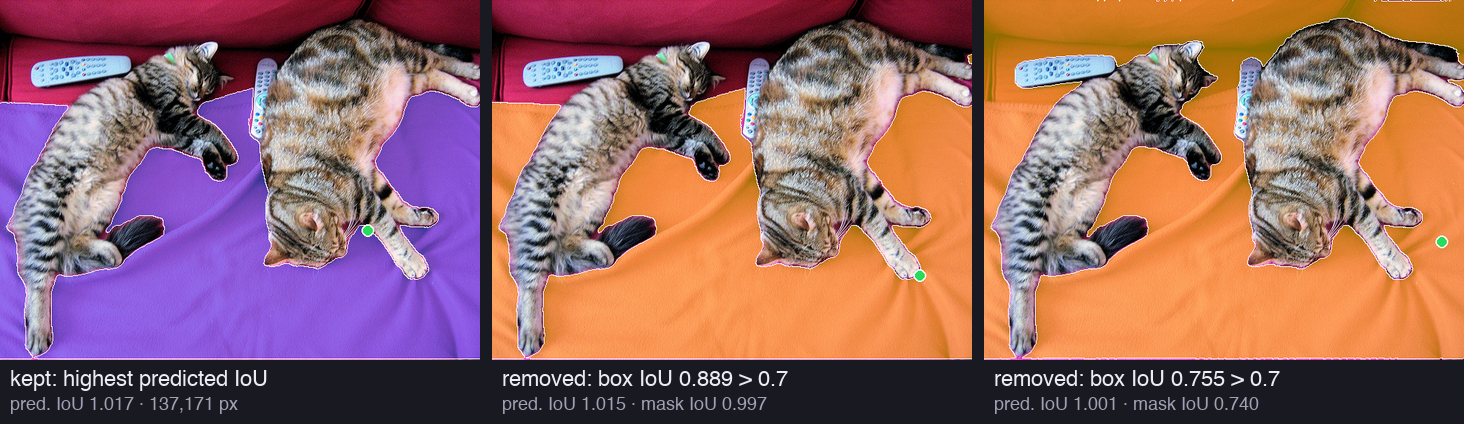
<figure><img src="/img/papers/sam/p4-nms.png" alt="Three copies of the cat photo. The first shows the kept mask of the blanket in purple. The second shows a removed copy in orange that is almost the same, with box IoU 0.889 and mask IoU 0.997. The third shows a removed copy that also covers the sofa, with box IoU 0.755 and mask IoU 0.740" loading="lazy" /><figcaption>NMS on the blanket. Left: the kept mask, with the highest predicted IoU among its copies. Middle and right: two of its 1,192 copies. Their boxes overlap the kept box by more than 0.7, so they go, even the right one, which also covers the sofa.</figcaption></figure>

```text
NMS example: duplicate with box IoU 0.889, predicted IoU 1.015 (kept mask: 1.017), mask IoU 0.997
NMS example: duplicate with box IoU 0.755, predicted IoU 1.001 (kept mask: 1.017), mask IoU 0.740
```

The right-hand example shows the price of the shortcut. Its mask covers the sofa too, so the masks overlap only by 0.740. But its box is almost the same as the box of the blanket, so NMS treats it as a copy. The scores of 1.015 and 1.017 are above 1; Part 3 explained that the IoU head can overshoot a little when it is very sure.

> [!DEFINITION] NMS (non-maximum suppression)
> A rule that removes duplicate predictions. Sort the predictions by score. Keep the best one, and remove every prediction that overlaps it by more than a threshold (here, a box IoU of 0.7). Repeat with the best prediction that is left.

### Zoomed-in crops

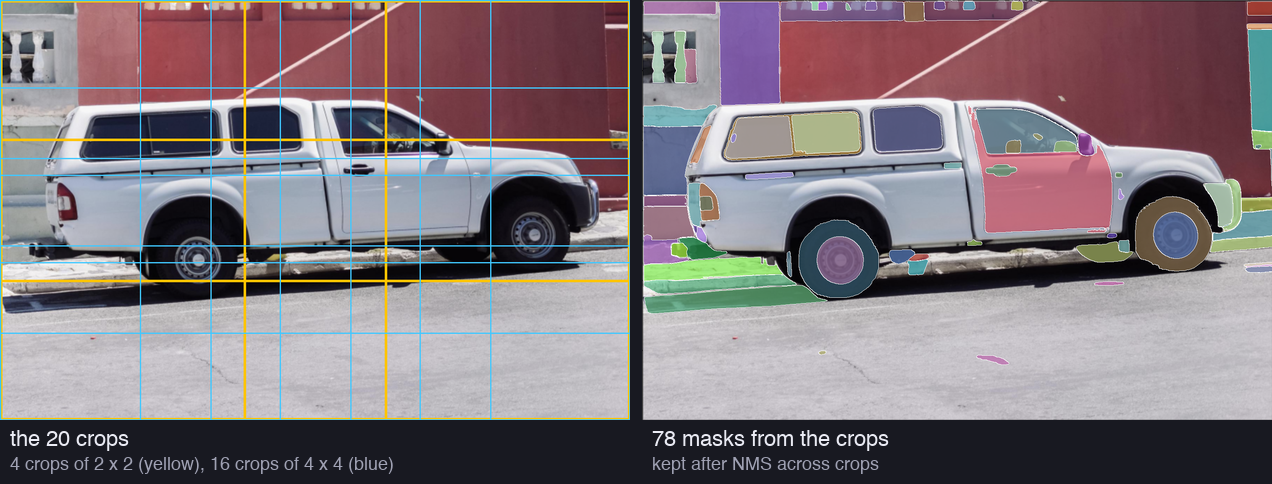
On the car photo, the crops add many small masks. We resized the photo to 1500 × 1000 pixels, the size of the released SA-1B pictures (shortest side 1500). The paper cut its crops from the original high-resolution pictures; we cut ours from the resized photo.

```text
crops: 21 = 1 full picture + 4 (2 x 2) + 16 (4 x 4); sizes 921 x 671 and 503 x 378 px; points 32 x 32, 16 x 16 and 8 x 8
```

<figure><img src="/img/papers/sam/p4-crops.png" alt="Two copies of a photo of a white pickup truck parked on a street. The first shows the 20 crop windows: 4 large yellow rectangles and 16 smaller blue rectangles that overlap. The second shows 78 masks that came from the crops: windows, door, wheels, hubcaps, the kerb, small marks on the road and pieces of the wall" loading="lazy" /><figcaption>The 20 crops of the car photo and the 78 masks that survive from them. Each crop is resized to 1024 pixels on its long side before SAM sees it, so small objects become large.</figcaption></figure>

Why does a crop help? SAM always reads a picture at 1024 pixels on its long side. The full photo of 1500 pixels is shrunk to fit, and a crop of 503 pixels is enlarged:

```text
scale that SAM applies: full car photo 1024 / 1500 = 0.68; a 4 x 4 crop 1024 / 503 = 2.04 -> an object looks 3.0x larger in the crop
```

A hubcap looks three times larger in a small crop than in the full photo. The 8 × 8 points of the crop also sit closer together on it.

The crops bring one new problem. An object cut by the edge of a crop gives a half mask. So a mask that touches an inner edge of its crop (an edge that is not also an edge of the picture) is removed. When the same object appears in several crops, NMS across crops keeps the mask from the most zoomed-in crop.

```text
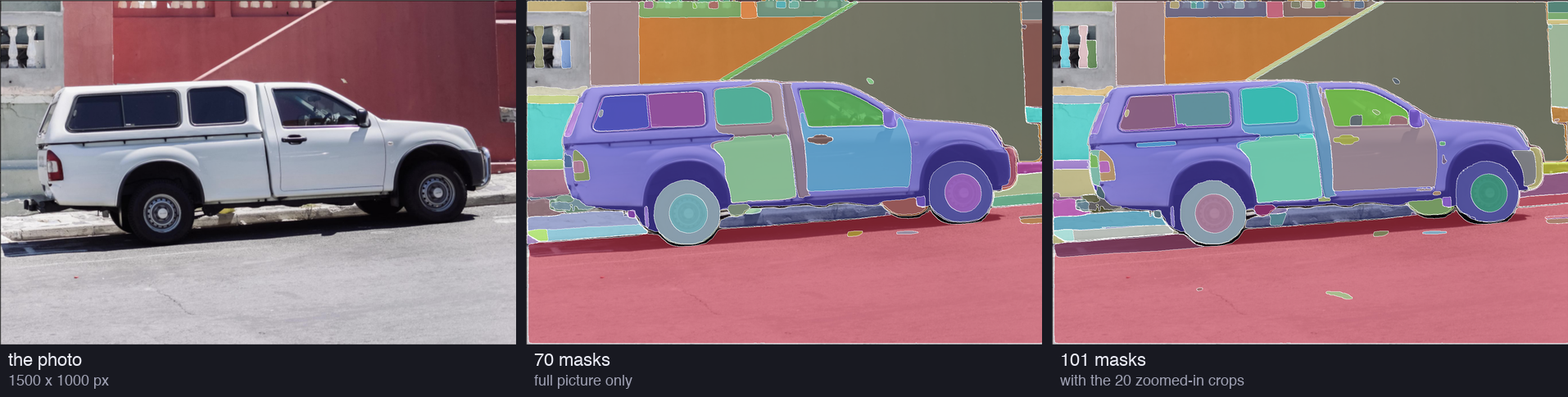
full picture only: 3072 candidates -> IoU 2607 -> stability 1641 -> < 95% 1641 -> NMS 76 -> final 70
with crops: 3072 points, 9216 candidates -> IoU 7969 -> stability 5197 -> < 95% 5197 -> not at an inner crop edge 2098 -> NMS in each crop 218 -> NMS across crops 110 -> final 101
final masks by source: full picture 23, 2 x 2 crops 33, 4 x 4 crops 45
```

<figure><img src="/img/papers/sam/p4-amg-car.png" alt="Three copies of the car photo. The first is the photo. The second has 70 coloured masks from the full picture only. The third has 101 masks with the crops: more small masks on the wall, the kerb, the windows and the road" loading="lazy" /><figcaption>The car photo with the masks of the fully automatic stage. Middle: 32 × 32 points on the full picture, 70 masks. Right: with the 20 crops, 101 masks.</figcaption></figure>

The crops raise the count from 70 to 101 masks. 78 of the 101 come from crops, and only 23 from the full picture. Our count is close to the "∼100 masks per image" of SA-1B, but that is partly luck. A busy market photo gives many more, and a photo of the sky gives fewer.

### Clean-up: small pieces and holes

> [!PAPER] · §B · page 18
> [![The Postprocessing paragraph of Appendix B: about 4% of masks have small spurious components and 4% have small holes; components and holes under 100 pixels are removed or filled](https://ishwarj.com/img/papers/sam/p4-b-post.pngs/sam/p4-b-post.png)](/img/papers/sam/p4-b-post.png)
>
> **What it says:** "an estimated 4% of masks include small, spurious components", so the team "removed connected components with area less than 100 pixels", including whole masks whose largest piece is that small. Another 4% have "small, spurious holes", so they "filled holes with area less than 100 pixels".
>
> **What it means:**
>
> A mask of a cat can come with a few stray pixels on the blanket, or with a pinhole in the fur. Neither is part of a real object. Both are easy to find. A stray piece is a separate island of pixels, and a hole is an island of the background inside the mask.
>
> 100 pixels is tiny on a picture of 1500 × 2250 pixels: a square of 10 × 10. So the clean-up changes the edges of a few masks, not their meaning.

> [!DEFINITION] Connected component
> A group of mask pixels that touch each other (here, also at the corners). A mask with two separate islands has two connected components. A hole is a connected component of the pixels outside the mask that does not touch the edge of the picture.

On the cat photo, the clean-up changed 7 masks and removed 3. A last NMS then prefers the masks that did not change:

```text
  pieces and holes under 100 px: 7 masks changed, 3 removed; NMS again: 23 final masks
```

### The whole funnel

<figure class="fig"><svg viewBox="0 0 800 374" role="img" aria-label="The number of masks after each step of the fully automatic stage. Cat photo: 3072 candidates, 23 final masks. Car photo with crops: 9216 candidates, 101 final masks."><defs><marker id="ah" viewBox="0 0 10 10" refX="9" refY="5" markerWidth="7" markerHeight="7" orient="auto-start-reverse"><path class="arrow" d="M0,0L10,5L0,10z"/></marker><marker id="ah-on" viewBox="0 0 10 10" refX="9" refY="5" markerWidth="6" markerHeight="6" orient="auto-start-reverse"><path class="arrow-on" d="M0,0L10,5L0,10z"/></marker><marker id="ah-2" viewBox="0 0 10 10" refX="9" refY="5" markerWidth="6" markerHeight="6" orient="auto-start-reverse"><path class="arrow-2" d="M0,0L10,5L0,10z"/></marker></defs><text class="t-title" x="20.0" y="22.0" text-anchor="start">How many masks survive each step</text><text class="t-note" x="300.0" y="48.0" text-anchor="start">cat photo, full picture only</text><text class="t-note" x="560.0" y="48.0" text-anchor="start">car photo, full picture + 20 crops</text><text class="t-tick" x="280.0" y="81.0" text-anchor="end">candidates (points × 3)</text><g class="mark"><title>cat photo, full picture only, candidates (points × 3): 3,072</title><rect class="s1" x="300" y="68" width="190.0" height="20" rx="3"/></g><text class="t-val" x="496.0" y="83.0" text-anchor="start">3,072</text><g class="mark"><title>car photo, full picture + 20 crops, candidates (points × 3): 9,216</title><rect class="s3" x="560" y="68" width="190.0" height="20" rx="3"/></g><text class="t-val" x="756.0" y="83.0" text-anchor="start">9,216</text><text class="t-tick" x="280.0" y="115.0" text-anchor="end">predicted IoU &gt; 0.88</text><g class="mark"><title>cat photo, full picture only, predicted IoU &gt; 0.88: 2,507</title><rect class="s1" x="300" y="102" width="171.6" height="20" rx="3"/></g><text class="t-val" x="477.6" y="117.0" text-anchor="start">2,507</text><g class="mark"><title>car photo, full picture + 20 crops, predicted IoU &gt; 0.88: 7,969</title><rect class="s3" x="560" y="102" width="176.7" height="20" rx="3"/></g><text class="t-val" x="742.7" y="117.0" text-anchor="start">7,969</text><text class="t-tick" x="280.0" y="149.0" text-anchor="end">stability ≥ 0.95</text><g class="mark"><title>cat photo, full picture only, stability ≥ 0.95: 2,127</title><rect class="s1" x="300" y="136" width="158.1" height="20" rx="3"/></g><text class="t-val" x="464.1" y="151.0" text-anchor="start">2,127</text><g class="mark"><title>car photo, full picture + 20 crops, stability ≥ 0.95: 5,197</title><rect class="s3" x="560" y="136" width="142.7" height="20" rx="3"/></g><text class="t-val" x="708.7" y="151.0" text-anchor="start">5,197</text><text class="t-tick" x="280.0" y="183.0" text-anchor="end">covers &lt; 95% of the picture</text><g class="mark"><title>cat photo, full picture only, covers &lt; 95% of the picture: 2,127</title><rect class="s1" x="300" y="170" width="158.1" height="20" rx="3"/></g><text class="t-val" x="464.1" y="185.0" text-anchor="start">2,127</text><g class="mark"><title>car photo, full picture + 20 crops, covers &lt; 95% of the picture: 5,197</title><rect class="s3" x="560" y="170" width="142.7" height="20" rx="3"/></g><text class="t-val" x="708.7" y="185.0" text-anchor="start">5,197</text><text class="t-tick" x="280.0" y="217.0" text-anchor="end">not at an inner crop edge</text><g class="mark"><title>cat photo, full picture only, not at an inner crop edge: 2,127</title><rect class="s1" x="300" y="204" width="158.1" height="20" rx="3"/></g><text class="t-val" x="464.1" y="219.0" text-anchor="start">2,127</text><g class="mark"><title>car photo, full picture + 20 crops, not at an inner crop edge: 2,098</title><rect class="s3" x="560" y="204" width="90.7" height="20" rx="3"/></g><text class="t-val" x="656.7" y="219.0" text-anchor="start">2,098</text><text class="t-tick" x="280.0" y="251.0" text-anchor="end">NMS inside each crop</text><g class="mark"><title>cat photo, full picture only, NMS inside each crop: 30</title><rect class="s1" x="300" y="238" width="18.8" height="20" rx="3"/></g><text class="t-val" x="324.8" y="253.0" text-anchor="start">30</text><g class="mark"><title>car photo, full picture + 20 crops, NMS inside each crop: 218</title><rect class="s3" x="560" y="238" width="29.2" height="20" rx="3"/></g><text class="t-val" x="595.2" y="253.0" text-anchor="start">218</text><text class="t-tick" x="280.0" y="285.0" text-anchor="end">NMS across crops</text><g class="mark"><title>cat photo, full picture only, NMS across crops: 30</title><rect class="s1" x="300" y="272" width="18.8" height="20" rx="3"/></g><text class="t-val" x="324.8" y="287.0" text-anchor="start">30</text><g class="mark"><title>car photo, full picture + 20 crops, NMS across crops: 110</title><rect class="s3" x="560" y="272" width="20.8" height="20" rx="3"/></g><text class="t-val" x="586.8" y="287.0" text-anchor="start">110</text><text class="t-tick" x="280.0" y="319.0" text-anchor="end">clean-up, NMS again: final</text><g class="mark"><title>cat photo, full picture only, clean-up, NMS again: final: 23</title><rect class="s1" x="300" y="306" width="16.4" height="20" rx="3"/></g><text class="t-val" x="322.4" y="321.0" text-anchor="start">23</text><g class="mark"><title>car photo, full picture + 20 crops, clean-up, NMS again: final: 101</title><rect class="s3" x="560" y="306" width="19.9" height="20" rx="3"/></g><text class="t-val" x="585.9" y="321.0" text-anchor="start">101</text><text class="t-muted" x="20.0" y="346.0" text-anchor="start">Bar length is the square root of the count, so the small final numbers stay visible. The cat photo has no crops,</text><text class="t-muted" x="20.0" y="362.0" text-anchor="start">so its crop steps change nothing.</text></svg><figcaption>The number of masks after each step. The cat photo goes from 3,072 candidates to 23 masks. The car photo with crops goes from 9,216 candidates to 101 masks. NMS removes the most, because so many grid points land on the same object.</figcaption></figure>

<figure><img src="/img/papers/sam/p4-amg-cats.png" alt="Two copies of the cat photo. The second shows 23 coloured masks: each cat, the blanket, the sofa back, the two remote controls, a tail, paws, a collar and a few pieces of the sofa" loading="lazy" /><figcaption>The 23 final masks of the cat photo, with the 32 × 32 grid on the full picture. Both cats, both remotes, the blanket and parts of the sofa each get one mask; some small parts, such as a tail and paws, get their own.</figcaption></figure>

Does our hand-made version match the library? The transformers library has an automatic mask generator, `pipeline("mask-generation")`, which follows the released code. It does no clean-up and has no 95% filter, so we compare it with our list before the clean-up:

```text
pipeline: 30 masks;  ours before the clean-up: 30 masks (after it: 23)
each of our masks against its best match in the pipeline output: IoU >= 0.99 for 30 of 30, lowest 1.000;  pipeline masks with a match >= 0.99 in ours: 30 of 30
```

The two lists are the same, mask for mask. So the steps above are the whole stage.

What can our run not show? It used the released SAM ViT-H. The masks of SA-1B came from a special model, which the paper describes next and which was not released. Our two photos are also far from the variety of 11 million pictures.

> [!PAPER] · §B · page 18
> [![The Automatic mask generation model paragraph: a special version of SAM, trained on manual and semi-automatic data only, for 177,656 iterations, with point and mask prompts only, and a mask decoder of 3 layers](https://ishwarj.com/img/papers/sam/p4-b-model.png/sam/p4-b-model.png)](/img/papers/sam/p4-b-model.png)
>
> **What it says:** the team "trained a special version of SAM" for this stage. It "was trained on manual and semi-automatic data only", for "177656 iterations instead of 90k", with "only point and mask prompts (no boxes)", and "the mask decoder used 3 layers instead of 2".
>
> **What it means:**
>
> The order matters. The masks of SA-1B could not come from a model trained on SA-1B, because SA-1B did not exist yet. So the generator learned from the 10.2 million masks of stages 1 and 2. The released SAM was then trained on SA-1B, the output of the generator.
>
> The other changes trade speed for quality. A third decoder layer costs time at each prompt, but this model ran once for each picture, offline. It never needed to answer a user in 50 ms. And because the grid uses only points, the model did not need to learn boxes.

## The dataset: SA-1B {§5}

> [!PAPER] · §5 · page 6
> [![The opening of Section 5: SA-1B has 11M diverse, high-resolution, licensed, and privacy protecting images and 1.1B high-quality segmentation masks, released under a license for research](https://ishwarj.com/img/papers/sam/p4-dataset.png/sam/p4-dataset.png)](/img/papers/sam/p4-dataset.png)
>
> **What it says:** SA-1B "consists of 11M diverse, high-resolution, licensed, and privacy protecting images and 1.1B high-quality segmentation masks". It is released "under a favorable license agreement for certain research uses".
>
> **What it means:**
>
> Each adjective of the first sentence is a promise, and the next paragraphs check them one by one. "Licensed" means that the team bought the right to use the photos. Many datasets were scraped from the web with no such right. "Privacy protecting" means that faces and number plates are blurred.
>
> We did not download SA-1B for this part. It is very large, and you must accept its licence to get it. Every number about SA-1B below comes from the paper.

Figure 2 shows what the masks look like. Part 1 showed the whole figure; here are its busiest rows:

> [!PAPER] · Figure 2 · page 3
> [![The bottom rows of Figure 2: photos with 300 to 400, 400 to 500 and more than 500 masks, such as a market stall, fruit boxes, a café from above, a shop shelf, a mosaic and a pile of fruit, each covered with coloured masks](https://ishwarj.com/img/papers/sam/p4-figure2.png/sam/p4-figure2.png)](/img/papers/sam/p4-figure2.png)
>
> **What it says:** the masks "were annotated *fully automatically* by SAM". The rows group the pictures by the number of masks, and there are "∼100 masks per image on average".
>
> **What it means:**
>
> These are the pictures where the crops pay off: shelves of tins, boxes of fruit, a mosaic of small stones. Each tin and each fruit gets its own mask. A person would never label 500 objects in one picture. A program that clicks 3,072 times and keeps the good answers does it without effort.

> [!PAPER] · §5 · page 6
> [![The Images paragraph of Section 5: 3300×4950 pixels on average, released with the shortest side at 1500 pixels, much larger than COCO images of about 480×640, faces and licence plates blurred](https://ishwarj.com/img/papers/sam/p4-images.pngs/sam/p4-images.png)](/img/papers/sam/p4-images.png)
>
> **What it says:** the images are "3300×4950 pixels on average", released with the "shortest side set to 1500 pixels". COCO images are "∼480×640 pixels". "Faces and vehicle license plates have been blurred".
>
> **What it means:**
>
> A picture of 3300 × 4950 pixels has 16.3 million pixels, 53 times more than a COCO picture of 480 × 640. Even the released size, 1500 × 2250, has 11 times more pixels than COCO. Large pictures matter for masks: an exact edge needs pixels to sit on.
>
> SAM itself reads only 1024 pixels on the long side. The extra resolution helped the data engine, through the zoomed-in crops, more than the model.

```text
SA-1B pictures: 3300 x 4950 = 16.3M pixels = 53x a COCO picture (480 x 640); released at 1500 x 2250 = 3.38M pixels = 11x COCO
grid spacing on an average SA-1B picture: 103 x 155 px; in the 1024 frame that SAM reads: 32 px
```

> [!PAPER] · §5 · page 6
> [![The Masks paragraph of Section 5: 99.1% of the 1.1B masks were generated fully automatically, and SA-1B only includes automatically generated masks](https://ishwarj.com/img/papers/sam/p4-masks.pngrs/sam/p4-masks.png)](/img/papers/sam/p4-masks.png)
>
> **What it says:** of the 1.1B masks, "99.1%" were "generated fully automatically". So the quality of the automatic masks is "centrally important". The release "*only includes automatically generated masks*".
>
> **What it means:**
>
> The 99.1% is easy to check: 10.2 million masks came from people, out of 1,129 million. The surprise is the last sentence. The team threw away the 10.2 million masks that people drew, the most careful masks of the project. The released dataset is all machine-made.
>
> Why? Section 7 of the paper tests it. SAM trained on the automatic masks alone is almost as good as SAM trained on all masks (Part 5 shows the numbers). One kind of mask also keeps the dataset simple and uniform.

```text
stage 3: 1.1B masks / 11M images = 100 masks per image; share made fully automatically: (1129M - 10.2M) / 1129M = 99.1%
```

### Are the automatic masks good? {§5}

> [!PAPER] · §5 · page 6
> [![The Mask quality paragraph: 500 images with about 50k masks corrected by professional annotators; 94% of pairs have more than 90% IoU and 97% more than 75% IoU; inter-annotator consistency is 85-91% IoU](https://ishwarj.com/img/papers/sam/p4-quality.png/sam/p4-quality.png)](/img/papers/sam/p4-quality.png)
>
> **What it says:** the team sampled "500 images (∼50k masks)" and asked annotators to "improve the quality of all masks". This gave "pairs of automatically predicted and professionally corrected masks". "94% of pairs have greater than 90% IoU" and "97% of pairs have greater than 75% IoU". For comparison, earlier work puts "inter-annotator consistency at 85-91%" IoU.
>
> **What it means:**
>
> The test is simple. Give SAM's mask to a professional and say "fix it". If the professional changes almost nothing, the mask was good. The IoU between the mask before and after the fix measures how much changed.
>
> For 94% of the masks, the fix changed less than 10% of the union. Now the comparison. When two professionals draw the same object from scratch, their masks agree at an IoU of only 85% to 91%. So SAM's masks differ from a corrected version less than two people differ from each other.
>
> There is a catch that the paper does not hide. The annotators started from SAM's mask, and a person who edits a mask tends to keep what is already there. That is why Section 7 adds a second check, human ratings of masks from different sources.

> [!DEFINITION] Inter-annotator consistency
> How much two annotators agree when they label the same thing on their own. For masks, it is the IoU between two people's masks of one object. It sets a ceiling: a model cannot be judged more precisely than people agree with each other.

```text
mask quality study: 500 images, ~50k masks -> ~100 masks per image; 94% of ~50k = ~47,000 pairs above 0.90 IoU
```

We cannot repeat this study. It needs professional annotators and the SA-1B pictures.

### Mask properties: where, how many, how big, what shape {§5}

> [!PAPER] · Figure 5 · page 6
> [![Figure 5: five heat maps of mask centre positions, for SA-1B, LVIS v1, COCO, ADE20K and Open Images; SA-1B and ADE20K spread more toward the corners, COCO and Open Images are concentrated at the centre](https://ishwarj.com/img/papers/sam/p4-figure5.png/sam/p4-figure5.png)](/img/papers/sam/p4-figure5.png)
>
> **What it says:** "Image-size normalized mask center distributions" for five datasets.
>
> **What it means:**
>
> Take the centre of every mask, and scale each picture to a unit square. Then pile all the centres into one heat map: a dark spot means "many objects are here". A photographer puts the subject in the middle, so every dataset has a dark centre.
>
> The difference is in the spread. COCO and Open Images have a tight spot: their labels are mostly the main subject. SA-1B is spread over the whole square, with a cross along the middle lines. Its masks cover background objects too, wherever they are.

> [!PAPER] · Figure 6 · page 7
> [![Figure 6: three line charts comparing SA-1B, LVIS v1, COCO, ADE20K and Open Images: number of masks per image, relative segmentation mask size, and concavity; SA-1B has 11× more images and 400× more masks than Open Images](https://ishwarj.com/img/papers/sam/p4-figure6.png/sam/p4-figure6.png)](/img/papers/sam/p4-figure6.png)
>
> [![The Mask properties paragraph: photographer biases, coverage of corners, 36 times more masks per image than Open Images, 3.5 times fewer for ADE20K, relative mask size as the square root of mask area over image area, concavity as 1 minus mask area over convex hull area, stratified sampling, broadly similar concavity](https://ishwarj.com/img/papers/sam/p4-properties.pngm/p4-properties.png)](/img/papers/sam/p4-properties.png)
>
> **What it says:** "Common photographer biases are present in all datasets", but SA-1B has "greater coverage of image corners". SA-1B has "36× more masks per image" than Open Images, and ADE20K still has "3.5× fewer masks per image". The relative mask size is the "square root of the mask area divided by image area". The concavity is "1 minus mask area divided by area of mask's convex hull". To compare shapes fairly, the team used "stratified sampling" by size, and found the concavity "broadly similar" to other datasets.
>
> **What it means:**
>
> Figure 6 compares three properties. The left chart counts masks per picture. Most SA-1B pictures have 51 to 200 masks, and most pictures of the other datasets have fewer than 50. The middle chart shows the size of the masks: SA-1B has more small masks, because it has so many masks per picture. The right chart shows the shape: SA-1B masks are as complex as human-drawn masks.
>
> The last point answers a fair worry. A machine might draw only simple blobs, and simple blobs are easy to get right. The concavity curve says no: SA-1B's shapes look like the shapes that people draw.

Two measures need a closer look. The **relative size** of a mask is

$$
s = \sqrt{\frac{\text{mask area}}{\text{picture area}}}
$$

The square root turns an area into a length. A mask that fills a quarter of the picture has $$s = \sqrt{0.25} = 0.5$$: its side is about half the side of the picture. A mask of 1% of the picture has $$s = 0.1$$.

The **concavity** of a mask is

$$
c = 1 - \frac{\text{mask area}}{\text{convex hull area}}
$$

The **convex hull** is the shape that you get when you stretch a rubber band around the mask. A convex shape, such as a disc or a square, fills its rubber band completely, so $$c = 0$$. A shape with bays and dents leaves empty space inside the band, so $$c$$ grows. A tiny example: a 4 × 4 square with a 2 × 2 bite out of one corner. Its area is 12, its hull cuts the corner diagonally and has area 14, so $$c = 1 - 12/14 = 0.143$$.

```text
tiny example: a 4 x 4 square with a 2 x 2 bite: area 12, convex hull area 14, concavity 1 - 12/14 = 0.143
```

> [!DEFINITION] Convex and concave
> A shape is **convex** when the straight line between any two of its points stays inside the shape: a disc, a square, an egg. A shape is **concave** when some of those lines leave the shape: a crescent, the letter L, a cat with its legs out. The **convex hull** is the smallest convex shape that contains the shape.

> [!DEFINITION] Stratified sampling
> Sampling in groups. Split the masks into bins by size, and draw the same share from each bin. Large masks tend to have more complex outlines, so a dataset with more large masks would look more concave. Stratified sampling removes this effect before the comparison.

The legend of Figure 6 gives the size of each dataset. Our script did the divisions:

```text
dataset sizes (Figure 6 legend): masks per image: SA-1B 103, Open Images 2.7, ADE20K 25, COCO 7.3, LVIS 12.5
  SA-1B / Open Images: images 11x, masks 418x, masks per image 38x; SA-1B / ADE20K masks per image 4.1x (the paper: 3.5x, from exact counts)
```

With the rounded numbers of the legend, we get 38 times and 4.1 times, where the paper says 36 and 3.5. The paper computed its ratios from exact counts that the legend does not print, so the small gap is rounding.

We can compute the same three properties on our own output. This is a tiny sample, two photos and 130 masks, with crops on both. It is not SA-1B:

```text
cats: 29 masks;  relative size sqrt(area / picture): median 0.057, under 0.1: 20 (69%), 0.1 to 0.3: 6, 0.3 and above: 3
      concavity: median 0.101, mean 0.157, max 0.591;  under 0.1: 14
car: 101 masks;  relative size sqrt(area / picture): median 0.039, under 0.1: 83 (82%), 0.1 to 0.3: 14, 0.3 and above: 4
      concavity: median 0.049, mean 0.074, max 0.591;  under 0.1: 74
both photos: 130 masks, 65.0 per photo (SA-1B: 1.1B / 11M = 100 per image); relative size bins 0-0.05-0.1-0.2-0.3-0.5-0.75-1: [72, 31, 17, 3, 4, 3, 0]
```

<figure class="fig"><svg viewBox="0 0 780 296" role="img" aria-label="Histograms of our final masks. Left: relative size, the square root of the mask area divided by the picture area; most masks are under 0.2. Right: concavity; most masks are under 0.1."><defs><marker id="ah" viewBox="0 0 10 10" refX="9" refY="5" markerWidth="7" markerHeight="7" orient="auto-start-reverse"><path class="arrow" d="M0,0L10,5L0,10z"/></marker><marker id="ah-on" viewBox="0 0 10 10" refX="9" refY="5" markerWidth="6" markerHeight="6" orient="auto-start-reverse"><path class="arrow-on" d="M0,0L10,5L0,10z"/></marker><marker id="ah-2" viewBox="0 0 10 10" refX="9" refY="5" markerWidth="6" markerHeight="6" orient="auto-start-reverse"><path class="arrow-2" d="M0,0L10,5L0,10z"/></marker></defs><text class="t-title" x="20.0" y="22.0" text-anchor="start">Our 130 final masks (two photos): a tiny sample, not SA-1B</text><text class="t-note" x="20.0" y="52.0" text-anchor="start">relative size = √(mask area / picture area)</text><g class="mark"><title>&lt;.05: 72</title><rect class="s1" x="20" y="70.0" width="40" height="170.0" rx="3"/></g><text class="t-val" x="40.0" y="64.0" text-anchor="middle">72</text><text class="t-tick" x="40.0" y="256.0" text-anchor="middle">&lt;.05</text><g class="mark"><title>.05-.1: 31</title><rect class="s1" x="70" y="166.8" width="40" height="73.2" rx="3"/></g><text class="t-val" x="90.0" y="160.8" text-anchor="middle">31</text><text class="t-tick" x="90.0" y="256.0" text-anchor="middle">.05-.1</text><g class="mark"><title>.1-.2: 17</title><rect class="s1" x="120" y="199.9" width="40" height="40.1" rx="3"/></g><text class="t-val" x="140.0" y="193.9" text-anchor="middle">17</text><text class="t-tick" x="140.0" y="256.0" text-anchor="middle">.1-.2</text><g class="mark"><title>.2-.3: 3</title><rect class="s1" x="170" y="232.9" width="40" height="7.1" rx="3"/></g><text class="t-val" x="190.0" y="226.9" text-anchor="middle">3</text><text class="t-tick" x="190.0" y="256.0" text-anchor="middle">.2-.3</text><g class="mark"><title>.3-.5: 4</title><rect class="s1" x="220" y="230.6" width="40" height="9.4" rx="3"/></g><text class="t-val" x="240.0" y="224.6" text-anchor="middle">4</text><text class="t-tick" x="240.0" y="256.0" text-anchor="middle">.3-.5</text><g class="mark"><title>.5-.75: 3</title><rect class="s1" x="270" y="232.9" width="40" height="7.1" rx="3"/></g><text class="t-val" x="290.0" y="226.9" text-anchor="middle">3</text><text class="t-tick" x="290.0" y="256.0" text-anchor="middle">.5-.75</text><g class="mark"><title>&gt;.75: 0</title><rect class="s1" x="320" y="240.0" width="40" height="1.5" rx="3"/></g><text class="t-val" x="340.0" y="234.0" text-anchor="middle">0</text><text class="t-tick" x="340.0" y="256.0" text-anchor="middle">&gt;.75</text><line class="axis" x1="16" y1="240" x2="370" y2="240"/><text class="t-note" x="420.0" y="52.0" text-anchor="start">concavity = 1 − area / convex hull area</text><g class="mark"><title>&lt;.1: 88</title><rect class="s3" x="420" y="70.0" width="40" height="170.0" rx="3"/></g><text class="t-val" x="440.0" y="64.0" text-anchor="middle">88</text><text class="t-tick" x="440.0" y="256.0" text-anchor="middle">&lt;.1</text><g class="mark"><title>.1-.2: 31</title><rect class="s3" x="470" y="180.1" width="40" height="59.9" rx="3"/></g><text class="t-val" x="490.0" y="174.1" text-anchor="middle">31</text><text class="t-tick" x="490.0" y="256.0" text-anchor="middle">.1-.2</text><g class="mark"><title>.2-.3: 3</title><rect class="s3" x="520" y="234.2" width="40" height="5.8" rx="3"/></g><text class="t-val" x="540.0" y="228.2" text-anchor="middle">3</text><text class="t-tick" x="540.0" y="256.0" text-anchor="middle">.2-.3</text><g class="mark"><title>.3-.4: 3</title><rect class="s3" x="570" y="234.2" width="40" height="5.8" rx="3"/></g><text class="t-val" x="590.0" y="228.2" text-anchor="middle">3</text><text class="t-tick" x="590.0" y="256.0" text-anchor="middle">.3-.4</text><g class="mark"><title>.4-.6: 5</title><rect class="s3" x="620" y="230.3" width="40" height="9.7" rx="3"/></g><text class="t-val" x="640.0" y="224.3" text-anchor="middle">5</text><text class="t-tick" x="640.0" y="256.0" text-anchor="middle">.4-.6</text><g class="mark"><title>&gt;.6: 0</title><rect class="s3" x="670" y="240.0" width="40" height="1.5" rx="3"/></g><text class="t-val" x="690.0" y="234.0" text-anchor="middle">0</text><text class="t-tick" x="690.0" y="256.0" text-anchor="middle">&gt;.6</text><line class="axis" x1="416" y1="240" x2="720" y2="240"/><text class="t-muted" x="20.0" y="284.0" text-anchor="start">Most masks are small and nearly convex, the same tendency as the SA-1B curves of Figure 6.</text></svg><figcaption>Our 130 final masks from two photos. Left: most masks are small, with a relative size under 0.1, as in the SA-1B curve of Figure 6. Right: most masks are almost convex, with a concavity under 0.1.</figcaption></figure>

The pattern is the same as in Figure 6: many small masks, and most of them close to convex. Most masks on the car are windows, wheels, hubcaps and marks on the road. The few concave masks are the cats with their legs out and the blanket around them. Two photos cannot show a distribution of masks per picture; for that, you need thousands of pictures.

## Responsible AI {§6}

> [!PAPER] · §6 · page 7
> [![The opening of Section 6: a Responsible AI analysis of fairness concerns and biases, of the geographic and income distribution of SA-1B and of SAM across protected attributes of people, with cards in §F](https://ishwarj.com/img/papers/sam/p4-rai.pngpers/sam/p4-rai.png)](/img/papers/sam/p4-rai.png)
>
> **What it says:** the team investigates "potential fairness concerns and biases" in two ways: the "geographic and income distribution of SA-1B", and the "fairness of SAM across protected attributes of people". The appendix gives "dataset, data annotation, and model cards in §F".
>
> **What it means:**
>
> The two questions of Part 1 come back with numbers. Where do the pictures come from? Does SAM work equally well for different people? A model trained mostly on pictures from rich countries may be weaker on streets, homes and objects from other places.
>
> A "protected attribute" is a property such as gender, age or skin colour, which must not decide how well a system works for a person.

### Where the pictures come from {§6}

> [!PAPER] · Figure 7 · page 7
> [![Figure 7: a world map coloured by image count per country, and a bar chart of the 50 countries with the most SA-1B images; Russia, Thailand and the USA lead](https://ishwarj.com/img/papers/sam/p4-figure7.png/sam/p4-figure7.png)](/img/papers/sam/p4-figure7.png)
>
> **What it says:** "Most of the world's countries have more than 1000 images in SA-1B, and the three countries with the most images are from different parts of the world."
>
> **What it means:**
>
> On the bar chart, the first three bars are Russia, Thailand and the USA: Europe, Asia and North America. The bars fall fast after the first few countries, and the map shows grey and light countries in Africa and Central Asia. "More than 1000 images" is a low bar for a dataset of 11 million, but it is more than earlier datasets had.

The pictures have no GPS tags, so how does the team know the country? Appendix C explains:

> [!PAPER] · §C · page 18
> [![Appendix C: SA-1B images are not geo-tagged; a caption gives the place; a named entity recognition model extracts locations; Georgia is an example of an ambiguity; the inferred locations are not released](https://ishwarj.com/img/papers/sam/p4-c-geo.pngrs/sam/p4-c-geo.png)](/img/papers/sam/p4-c-geo.png)
>
> **What it says:** the images "are not geo-tagged", but each has a "caption describing its contents and where it was taken". A "named entity recognition model" finds place names in the caption. There are ambiguities, for example "Georgia". The team does "not release the inferred locations".
>
> **What it means:**
>
> A named entity recognition model reads a sentence and marks the names in it: people, places, companies. From "Sunset over the old port of Lisbon", it pulls "Lisbon", and a lookup maps Lisbon to Portugal. "Georgia" can be a country or a state of the USA, so some pictures land in the wrong country. The numbers of Figure 7 are estimates, which is why the caption says "Estimated".

> [!PAPER] · Table 1 · page 7
> [![Table 1 of the paper: for each region and income group, the number of countries, SA-1B images and masks, and the percentage of images in SA-1B, COCO and Open Images](https://ishwarj.com/img/papers/sam/p4-table1.pngs/sam/p4-table1.png)](/img/papers/sam/p4-table1.png)
>
> [![The Geographic and income representation paragraph: SA-1B has a substantially higher share in Europe, Asia and Oceania and middle income countries; all datasets underrepresent Africa and low income countries; every region has at least 28 million masks; 94 to 108 masks per image in every group](https://ishwarj.com/img/papers/sam/p4-geo.pngpers/sam/p4-geo.png)](/img/papers/sam/p4-geo.png)
>
> **What it says:** SA-1B has "a substantially higher percentage of images in Europe and Asia & Oceania as well as in middle income countries". "All datasets underrepresent Africa as well as low income countries." Every region has "at least 28 million masks". The masks per image are "fairly consistent across region and income (94-108 per image)".
>
> **What it means:**
>
> Read the last three columns of the table. In COCO and Open Images, almost half of all pictures come from North America: 48.3% and 42.8%. In SA-1B, North America has 7.7%, and Asia and Oceania have 36.2%. So SA-1B is far less centred on one region.
>
> But look at the bottom row. Low income countries give 0.9% of the pictures in SA-1B. That is better than 0.4% and 0.5%, but still tiny. The paper says this plainly: "all datasets underrepresent Africa as well as low income countries".
>
> The 28 million masks of Africa are the size argument. A small share of a huge dataset is still large: 28 million masks are 10 times all the masks of Open Images.

<figure class="fig"><svg viewBox="0 0 780 416" role="img" aria-label="Share of images by region. SA-1B: Africa 2.8, Asia and Oceania 36.2, Europe 49.8, Latin America 3.5, North America 7.7 percent. COCO and Open Images have 48.3 and 42.8 percent from North America."><defs><marker id="ah" viewBox="0 0 10 10" refX="9" refY="5" markerWidth="7" markerHeight="7" orient="auto-start-reverse"><path class="arrow" d="M0,0L10,5L0,10z"/></marker><marker id="ah-on" viewBox="0 0 10 10" refX="9" refY="5" markerWidth="6" markerHeight="6" orient="auto-start-reverse"><path class="arrow-on" d="M0,0L10,5L0,10z"/></marker><marker id="ah-2" viewBox="0 0 10 10" refX="9" refY="5" markerWidth="6" markerHeight="6" orient="auto-start-reverse"><path class="arrow-2" d="M0,0L10,5L0,10z"/></marker></defs><text class="t-title" x="20.0" y="22.0" text-anchor="start">Share of images from each region (Table 1 of the paper)</text><line class="grid" x1="190.0" y1="40.0" x2="190.0" y2="360.0"/><text class="t-tick" x="190.0" y="376.0" text-anchor="middle">0%</text><line class="grid" x1="294.0" y1="40.0" x2="294.0" y2="360.0"/><text class="t-tick" x="294.0" y="376.0" text-anchor="middle">10%</text><line class="grid" x1="398.0" y1="40.0" x2="398.0" y2="360.0"/><text class="t-tick" x="398.0" y="376.0" text-anchor="middle">20%</text><line class="grid" x1="502.0" y1="40.0" x2="502.0" y2="360.0"/><text class="t-tick" x="502.0" y="376.0" text-anchor="middle">30%</text><line class="grid" x1="606.0" y1="40.0" x2="606.0" y2="360.0"/><text class="t-tick" x="606.0" y="376.0" text-anchor="middle">40%</text><line class="grid" x1="710.0" y1="40.0" x2="710.0" y2="360.0"/><text class="t-tick" x="710.0" y="376.0" text-anchor="middle">50%</text><text class="t-tick" x="180.0" y="74.0" text-anchor="end">Africa</text><g class="mark"><title>Africa, SA-1B: 2.8%</title><rect class="s1" x="190" y="44" width="29.1" height="15" rx="3"/></g><text class="t-tick" x="225.1" y="56.0" text-anchor="start">2.8%</text><g class="mark"><title>Africa, COCO: 3.0%</title><rect class="s2" x="190" y="62" width="31.2" height="15" rx="3"/></g><text class="t-tick" x="227.2" y="74.0" text-anchor="start">3.0%</text><g class="mark"><title>Africa, Open Images: 1.7%</title><rect class="s4" x="190" y="80" width="17.7" height="15" rx="3"/></g><text class="t-tick" x="213.7" y="92.0" text-anchor="start">1.7%</text><text class="t-tick" x="180.0" y="138.0" text-anchor="end">Asia &amp; Oceania</text><g class="mark"><title>Asia &amp; Oceania, SA-1B: 36.2%</title><rect class="s1" x="190" y="108" width="376.5" height="15" rx="3"/></g><text class="t-tick" x="572.5" y="120.0" text-anchor="start">36.2%</text><g class="mark"><title>Asia &amp; Oceania, COCO: 11.4%</title><rect class="s2" x="190" y="126" width="118.6" height="15" rx="3"/></g><text class="t-tick" x="314.6" y="138.0" text-anchor="start">11.4%</text><g class="mark"><title>Asia &amp; Oceania, Open Images: 14.3%</title><rect class="s4" x="190" y="144" width="148.7" height="15" rx="3"/></g><text class="t-tick" x="344.7" y="156.0" text-anchor="start">14.3%</text><text class="t-tick" x="180.0" y="202.0" text-anchor="end">Europe</text><g class="mark"><title>Europe, SA-1B: 49.8%</title><rect class="s1" x="190" y="172" width="517.9" height="15" rx="3"/></g><text class="t-tick" x="713.9" y="184.0" text-anchor="start">49.8%</text><g class="mark"><title>Europe, COCO: 34.2%</title><rect class="s2" x="190" y="190" width="355.7" height="15" rx="3"/></g><text class="t-tick" x="551.7" y="202.0" text-anchor="start">34.2%</text><g class="mark"><title>Europe, Open Images: 36.2%</title><rect class="s4" x="190" y="208" width="376.5" height="15" rx="3"/></g><text class="t-tick" x="572.5" y="220.0" text-anchor="start">36.2%</text><text class="t-tick" x="180.0" y="266.0" text-anchor="end">Latin America &amp; Carib.</text><g class="mark"><title>Latin America &amp; Carib., SA-1B: 3.5%</title><rect class="s1" x="190" y="236" width="36.4" height="15" rx="3"/></g><text class="t-tick" x="232.4" y="248.0" text-anchor="start">3.5%</text><g class="mark"><title>Latin America &amp; Carib., COCO: 3.1%</title><rect class="s2" x="190" y="254" width="32.2" height="15" rx="3"/></g><text class="t-tick" x="228.2" y="266.0" text-anchor="start">3.1%</text><g class="mark"><title>Latin America &amp; Carib., Open Images: 5.0%</title><rect class="s4" x="190" y="272" width="52.0" height="15" rx="3"/></g><text class="t-tick" x="248.0" y="284.0" text-anchor="start">5.0%</text><text class="t-tick" x="180.0" y="330.0" text-anchor="end">North America</text><g class="mark"><title>North America, SA-1B: 7.7%</title><rect class="s1" x="190" y="300" width="80.1" height="15" rx="3"/></g><text class="t-tick" x="276.1" y="312.0" text-anchor="start">7.7%</text><g class="mark"><title>North America, COCO: 48.3%</title><rect class="s2" x="190" y="318" width="502.3" height="15" rx="3"/></g><text class="t-tick" x="698.3" y="330.0" text-anchor="start">48.3%</text><g class="mark"><title>North America, Open Images: 42.8%</title><rect class="s4" x="190" y="336" width="445.1" height="15" rx="3"/></g><text class="t-tick" x="641.1" y="348.0" text-anchor="start">42.8%</text><rect class="s1" x="190" y="393" width="10" height="10" rx="2"/><text class="t-tick" x="206.0" y="402.0" text-anchor="start">SA-1B</text><rect class="s2" x="263.0" y="393" width="10" height="10" rx="2"/><text class="t-tick" x="279.0" y="402.0" text-anchor="start">COCO</text><rect class="s4" x="329.0" y="393" width="10" height="10" rx="2"/><text class="t-tick" x="345.0" y="402.0" text-anchor="start">Open Images</text></svg><figcaption>The share of images from each region, from Table 1. COCO and Open Images draw almost half of their pictures from North America. SA-1B draws half from Europe and a third from Asia and Oceania. Africa and Latin America stay under 5% in all three.</figcaption></figure>

The paper does not print the masks per image of each group, only the range "94-108". We can compute it from the table:

```text
Table 1: masks per image in each group = #masks / #images
  Africa                      28M /  0.3M =   93.3;  share of SA-1B images  2.8%  COCO  3.0%  Open Images  1.7%
  Asia & Oceania             423M /  3.9M =  108.5;  share of SA-1B images 36.2%  COCO 11.4%  Open Images 14.3%
  Europe                     540M /  5.4M =  100.0;  share of SA-1B images 49.8%  COCO 34.2%  Open Images 36.2%
  Latin America & Carib.      36M / 0.38M =   94.7;  share of SA-1B images  3.5%  COCO  3.1%  Open Images  5.0%
  North America               80M / 0.83M =   96.4;  share of SA-1B images  7.7%  COCO 48.3%  Open Images 42.8%
  high income                598M /  5.8M =  103.1;  share of SA-1B images 54.0%  COCO 89.1%  Open Images 87.5%
  middle income              499M /  4.9M =  101.8;  share of SA-1B images 45.0%  COCO 10.5%  Open Images 12.0%
  low income                 9.4M /  0.1M =   94.0;  share of SA-1B images  0.9%  COCO  0.4%  Open Images  0.5%
```

From the rounded table, Africa gives 93.3 masks per image, just under the paper's 94; the exact counts are not printed. The point stands: the engine draws about as many masks on a picture from Lagos as on a picture from Paris. It treats every picture the same way, because no person decides what to label.

### Does SAM work equally well for different people? {§6}

> [!PAPER] · §6 · page 8
> [![The Fairness in segmenting people paragraph: performance discrepancy across perceived gender presentation, age group and skin tone, with MIAP and a proprietary dataset, 1 and 3 random points; SAM performs similarly across groups; no significant difference by Fitzpatrick skin type; biases may arise in larger systems; a bias for clothing](https://ishwarj.com/img/papers/sam/p4-fairness.pngsam/p4-fairness.png)](/img/papers/sam/p4-fairness.png)
>
> **What it says:** the team measures the "performance discrepancy" of SAM "across perceived gender presentation, perceived age group, and perceived skin tone". The test is simulated interactive segmentation with "random sampling of 1 and 3 points". "SAM performs similarly across groups." For skin tone, measured on the "Fitzpatrick skin type [36]" scale, they "do not find a significant difference". They add that "biases may arise when SAM is used as a component in larger systems", and in Appendix C they find an "indication of bias across perceived gender presentation".
>
> **What it means:**
>
> The test is the click game again. Take a photo with a person and the person's true mask. Click one random point (or three) on the person, and compute the IoU of SAM's mask with the true mask. Average the IoU over all people of one group, and compare the groups.
>
> The word "perceived" matters. Nobody asked the people in the photos about their gender, age or skin type. Annotators judged from the picture. So the groups describe how a person looks, not who the person is.

> [!DEFINITION] mIoU (mean IoU)
> The average of the IoU over many masks. Each prediction gets its IoU with the true mask, and the mIoU is the mean of these numbers. Table 2 gives it in percent: 54.4 means an average IoU of 0.544.

> [!DEFINITION] Confidence interval
> A range around a measured average that shows how sure the measurement is. Take a 95% interval of 54.4 ± 1.7. With the same test on a new sample of people, the average would usually fall between 52.7 and 56.1. If the intervals of two groups overlap, the test cannot tell the groups apart.

> [!PAPER] · Table 2 · page 8
> [![Table 2: mIoU at 1 point and 3 points with 95% confidence intervals, for perceived gender presentation, perceived age group and perceived skin tone 1 to 6; all intervals overlap within each group except older versus middle](https://ishwarj.com/img/papers/sam/p4-table2.pngs/sam/p4-table2.png)](/img/papers/sam/p4-table2.png)
>
> **What it says:** "Within each grouping, all confidence intervals overlap except older *vs.* middle."
>
> **What it means:**
>
> With one point, SAM scores between 51.5 and 56.7 for every group except the older group. The numbers are low because one point on a person is very ambiguous. The shirt, the face and the whole person are all valid answers, and the test knows only one. With three points, all groups reach 90 to 93.
>
> The one difference favours a group that datasets usually under-represent: older people get 62.9, middle-aged people 54.5. But the interval of the older group is wide, ±6.7, because the sample is small. The six skin types also differ a little in the averages, but every pair of intervals overlaps.

Our script checked the overlaps from the published numbers:

```text
Tables 2 and 6: 95% confidence intervals (mean +- half-width), 1 point
  people   older     [56.2, 69.6]  middle    [53.2, 55.8]  -> disjoint
  people   feminine  [52.7, 56.1]  masculine [54.0, 57.4]  -> overlap
  clothing feminine  [75.2, 77.4]  masculine [79.8, 82.2]  -> disjoint
  clothing older     [78.1, 85.7]  middle    [77.4, 79.0]  -> overlap
```

The clothing rows come from Appendix C, and they show the one real bias:

> [!PAPER] · §C · page 19
> [![Table 6: SAM's mIoU segmenting clothing by perceived gender presentation and age group; the intervals for gender are disjoint, with masculine higher](https://ishwarj.com/img/papers/sam/p4-table6.pngs/sam/p4-table6.png)](/img/papers/sam/p4-table6.png)
>
> [![Appendix C, fairness in segmenting clothing: 6.5k masks from Open Images, SAM is better at segmenting clothing on people who present predominantly masculine, with disjoint 95% intervals; the gap closes with 3 points; there is a bias with a one point prompt](https://ishwarj.com/img/papers/sam/p4-c-clothing.pngm/p4-c-clothing.png)](/img/papers/sam/p4-c-clothing.png)
>
> **What it says:** on "6.5k ground truth masks" of clothing, SAM is "better at segmenting clothing on those who present predominantly masculine, with disjoint 95% confidence intervals". "The gap closes when moving from 1 to 3 point evaluation." The conclusion: "there is a bias when segmenting clothing" with a one-point prompt.
>
> **What it means:**
>
> With one click, clothing on masculine-presenting people gets 81.0, and on feminine-presenting people 76.3. The intervals do not touch, so this is a real difference, not noise. The paper does not explain the cause. One guess is that clothing styles differ, for example in layers and in the borders between garments, which make one click more ambiguous.
>
> The difference shrinks with more information. With three clicks, it is 92.3 against 90.7. In an interactive tool, a user adds clicks until the mask is right, so the gap matters less. In an automatic system that uses one click, it matters more. That is the warning of Section 6 about "larger systems".

<figure class="fig"><svg viewBox="0 0 780 488" role="img" aria-label="Mean IoU with one point and 95 percent confidence intervals, from Tables 2 and 6. For people, only older (62.9 plus or minus 6.7) and middle age (54.5 plus or minus 1.3) do not overlap. For clothing, feminine (76.3 plus or minus 1.1) and masculine (81.0 plus or minus 1.2) do not overlap."><defs><marker id="ah" viewBox="0 0 10 10" refX="9" refY="5" markerWidth="7" markerHeight="7" orient="auto-start-reverse"><path class="arrow" d="M0,0L10,5L0,10z"/></marker><marker id="ah-on" viewBox="0 0 10 10" refX="9" refY="5" markerWidth="6" markerHeight="6" orient="auto-start-reverse"><path class="arrow-on" d="M0,0L10,5L0,10z"/></marker><marker id="ah-2" viewBox="0 0 10 10" refX="9" refY="5" markerWidth="6" markerHeight="6" orient="auto-start-reverse"><path class="arrow-2" d="M0,0L10,5L0,10z"/></marker></defs><text class="t-title" x="20.0" y="22.0" text-anchor="start">mIoU with 1 point and its 95% confidence interval (Tables 2 and 6)</text><text class="t-tick" x="230.0" y="454.0" text-anchor="middle">45</text><text class="t-tick" x="283.3" y="454.0" text-anchor="middle">50</text><text class="t-tick" x="336.7" y="454.0" text-anchor="middle">55</text><text class="t-tick" x="390.0" y="454.0" text-anchor="middle">60</text><text class="t-tick" x="443.3" y="454.0" text-anchor="middle">65</text><text class="t-tick" x="496.7" y="454.0" text-anchor="middle">70</text><text class="t-tick" x="550.0" y="454.0" text-anchor="middle">75</text><text class="t-tick" x="603.3" y="454.0" text-anchor="middle">80</text><text class="t-tick" x="656.7" y="454.0" text-anchor="middle">85</text><text class="t-tick" x="710.0" y="454.0" text-anchor="middle">90</text><line class="grid" x1="230.0" y1="40.0" x2="230.0" y2="438.0"/><line class="grid" x1="283.3" y1="40.0" x2="283.3" y2="438.0"/><line class="grid" x1="336.7" y1="40.0" x2="336.7" y2="438.0"/><line class="grid" x1="390.0" y1="40.0" x2="390.0" y2="438.0"/><line class="grid" x1="443.3" y1="40.0" x2="443.3" y2="438.0"/><line class="grid" x1="496.7" y1="40.0" x2="496.7" y2="438.0"/><line class="grid" x1="550.0" y1="40.0" x2="550.0" y2="438.0"/><line class="grid" x1="603.3" y1="40.0" x2="603.3" y2="438.0"/><line class="grid" x1="656.7" y1="40.0" x2="656.7" y2="438.0"/><line class="grid" x1="710.0" y1="40.0" x2="710.0" y2="438.0"/><text class="t-note" x="20.0" y="56.0" text-anchor="start">segmenting people</text><text class="t-tick" x="218.0" y="78.0" text-anchor="end">feminine</text><line class="edge-1" x1="312.1" y1="74.0" x2="348.4" y2="74.0"/><line class="edge-1" x1="312.1" y1="69.0" x2="312.1" y2="79.0"/><line class="edge-1" x1="348.4" y1="69.0" x2="348.4" y2="79.0"/><g class="mark"><title>people, feminine: 54.4 ± 1.7</title><circle class="s1 ring" cx="330.3" cy="74" r="5"/></g><text class="t-tick" x="356.4" y="78.0" text-anchor="start">54.4 ± 1.7</text><text class="t-tick" x="218.0" y="100.0" text-anchor="end">masculine</text><line class="edge-1" x1="326.0" y1="96.0" x2="362.3" y2="96.0"/><line class="edge-1" x1="326.0" y1="91.0" x2="326.0" y2="101.0"/><line class="edge-1" x1="362.3" y1="91.0" x2="362.3" y2="101.0"/><g class="mark"><title>people, masculine: 55.7 ± 1.7</title><circle class="s1 ring" cx="344.1" cy="96" r="5"/></g><text class="t-tick" x="370.3" y="100.0" text-anchor="start">55.7 ± 1.7</text><text class="t-tick t-strong" x="218.0" y="122.0" text-anchor="end">older</text><line class="edge-2" x1="349.5" y1="118.0" x2="492.4" y2="118.0"/><line class="edge-2" x1="349.5" y1="113.0" x2="349.5" y2="123.0"/><line class="edge-2" x1="492.4" y1="113.0" x2="492.4" y2="123.0"/><g class="mark"><title>people, older: 62.9 ± 6.7</title><circle class="s2 ring" cx="420.9" cy="118" r="5"/></g><text class="t-tick" x="500.4" y="122.0" text-anchor="start">62.9 ± 6.7</text><text class="t-tick t-strong" x="218.0" y="144.0" text-anchor="end">middle</text><line class="edge-2" x1="317.5" y1="140.0" x2="345.2" y2="140.0"/><line class="edge-2" x1="317.5" y1="135.0" x2="317.5" y2="145.0"/><line class="edge-2" x1="345.2" y1="135.0" x2="345.2" y2="145.0"/><g class="mark"><title>people, middle: 54.5 ± 1.3</title><circle class="s2 ring" cx="331.3" cy="140" r="5"/></g><text class="t-tick" x="353.2" y="144.0" text-anchor="start">54.5 ± 1.3</text><text class="t-tick" x="218.0" y="166.0" text-anchor="end">young</text><line class="edge-1" x1="304.7" y1="162.0" x2="351.6" y2="162.0"/><line class="edge-1" x1="304.7" y1="157.0" x2="304.7" y2="167.0"/><line class="edge-1" x1="351.6" y1="157.0" x2="351.6" y2="167.0"/><g class="mark"><title>people, young: 54.2 ± 2.2</title><circle class="s1 ring" cx="328.1" cy="162" r="5"/></g><text class="t-tick" x="359.6" y="166.0" text-anchor="start">54.2 ± 2.2</text><text class="t-tick" x="218.0" y="188.0" text-anchor="end">skin 1</text><line class="edge-1" x1="290.8" y1="184.0" x2="337.7" y2="184.0"/><line class="edge-1" x1="290.8" y1="179.0" x2="290.8" y2="189.0"/><line class="edge-1" x1="337.7" y1="179.0" x2="337.7" y2="189.0"/><g class="mark"><title>people, skin 1: 52.9 ± 2.2</title><circle class="s1 ring" cx="314.3" cy="184" r="5"/></g><text class="t-tick" x="345.7" y="188.0" text-anchor="start">52.9 ± 2.2</text><text class="t-tick" x="218.0" y="210.0" text-anchor="end">skin 2</text><line class="edge-1" x1="284.4" y1="206.0" x2="314.3" y2="206.0"/><line class="edge-1" x1="284.4" y1="201.0" x2="284.4" y2="211.0"/><line class="edge-1" x1="314.3" y1="201.0" x2="314.3" y2="211.0"/><g class="mark"><title>people, skin 2: 51.5 ± 1.4</title><circle class="s1 ring" cx="299.3" cy="206" r="5"/></g><text class="t-tick" x="322.3" y="210.0" text-anchor="start">51.5 ± 1.4</text><text class="t-tick" x="218.0" y="232.0" text-anchor="end">skin 3</text><line class="edge-1" x1="286.5" y1="228.0" x2="327.1" y2="228.0"/><line class="edge-1" x1="286.5" y1="223.0" x2="286.5" y2="233.0"/><line class="edge-1" x1="327.1" y1="223.0" x2="327.1" y2="233.0"/><g class="mark"><title>people, skin 3: 52.2 ± 1.9</title><circle class="s1 ring" cx="306.8" cy="228" r="5"/></g><text class="t-tick" x="335.1" y="232.0" text-anchor="start">52.2 ± 1.9</text><text class="t-tick" x="218.0" y="254.0" text-anchor="end">skin 4</text><line class="edge-1" x1="270.5" y1="250.0" x2="328.1" y2="250.0"/><line class="edge-1" x1="270.5" y1="245.0" x2="270.5" y2="255.0"/><line class="edge-1" x1="328.1" y1="245.0" x2="328.1" y2="255.0"/><g class="mark"><title>people, skin 4: 51.5 ± 2.7</title><circle class="s1 ring" cx="299.3" cy="250" r="5"/></g><text class="t-tick" x="336.1" y="254.0" text-anchor="start">51.5 ± 2.7</text><text class="t-tick" x="218.0" y="276.0" text-anchor="end">skin 5</text><line class="edge-1" x1="264.1" y1="272.0" x2="353.7" y2="272.0"/><line class="edge-1" x1="264.1" y1="267.0" x2="264.1" y2="277.0"/><line class="edge-1" x1="353.7" y1="267.0" x2="353.7" y2="277.0"/><g class="mark"><title>people, skin 5: 52.4 ± 4.2</title><circle class="s1 ring" cx="308.9" cy="272" r="5"/></g><text class="t-tick" x="361.7" y="276.0" text-anchor="start">52.4 ± 4.2</text><text class="t-tick" x="218.0" y="298.0" text-anchor="end">skin 6</text><line class="edge-1" x1="287.6" y1="294.0" x2="422.0" y2="294.0"/><line class="edge-1" x1="287.6" y1="289.0" x2="287.6" y2="299.0"/><line class="edge-1" x1="422.0" y1="289.0" x2="422.0" y2="299.0"/><g class="mark"><title>people, skin 6: 56.7 ± 6.3</title><circle class="s1 ring" cx="354.8" cy="294" r="5"/></g><text class="t-tick" x="430.0" y="298.0" text-anchor="start">56.7 ± 6.3</text><text class="t-note" x="20.0" y="320.0" text-anchor="start">segmenting clothing (Appendix C)</text><text class="t-tick t-strong" x="218.0" y="342.0" text-anchor="end">feminine</text><line class="edge-2" x1="552.1" y1="338.0" x2="575.6" y2="338.0"/><line class="edge-2" x1="552.1" y1="333.0" x2="552.1" y2="343.0"/><line class="edge-2" x1="575.6" y1="333.0" x2="575.6" y2="343.0"/><g class="mark"><title>clothing, feminine: 76.3 ± 1.1</title><circle class="s2 ring" cx="563.9" cy="338" r="5"/></g><text class="t-tick" x="583.6" y="342.0" text-anchor="start">76.3 ± 1.1</text><text class="t-tick t-strong" x="218.0" y="364.0" text-anchor="end">masculine</text><line class="edge-2" x1="601.2" y1="360.0" x2="626.8" y2="360.0"/><line class="edge-2" x1="601.2" y1="355.0" x2="601.2" y2="365.0"/><line class="edge-2" x1="626.8" y1="355.0" x2="626.8" y2="365.0"/><g class="mark"><title>clothing, masculine: 81.0 ± 1.2</title><circle class="s2 ring" cx="614.0" cy="360" r="5"/></g><text class="t-tick" x="634.8" y="364.0" text-anchor="start">81.0 ± 1.2</text><text class="t-tick" x="218.0" y="386.0" text-anchor="end">older</text><line class="edge-1" x1="583.1" y1="382.0" x2="664.1" y2="382.0"/><line class="edge-1" x1="583.1" y1="377.0" x2="583.1" y2="387.0"/><line class="edge-1" x1="664.1" y1="377.0" x2="664.1" y2="387.0"/><g class="mark"><title>clothing, older: 81.9 ± 3.8</title><circle class="s1 ring" cx="623.6" cy="382" r="5"/></g><text class="t-tick" x="672.1" y="386.0" text-anchor="start">81.9 ± 3.8</text><text class="t-tick" x="218.0" y="408.0" text-anchor="end">middle</text><line class="edge-1" x1="575.6" y1="404.0" x2="592.7" y2="404.0"/><line class="edge-1" x1="575.6" y1="399.0" x2="575.6" y2="409.0"/><line class="edge-1" x1="592.7" y1="399.0" x2="592.7" y2="409.0"/><g class="mark"><title>clothing, middle: 78.2 ± 0.8</title><circle class="s1 ring" cx="584.1" cy="404" r="5"/></g><text class="t-tick" x="600.7" y="408.0" text-anchor="start">78.2 ± 0.8</text><text class="t-tick" x="218.0" y="430.0" text-anchor="end">young</text><line class="edge-1" x1="545.7" y1="426.0" x2="603.3" y2="426.0"/><line class="edge-1" x1="545.7" y1="421.0" x2="545.7" y2="431.0"/><line class="edge-1" x1="603.3" y1="421.0" x2="603.3" y2="431.0"/><g class="mark"><title>clothing, young: 77.3 ± 2.7</title><circle class="s1 ring" cx="574.5" cy="426" r="5"/></g><text class="t-tick" x="611.3" y="430.0" text-anchor="start">77.3 ± 2.7</text><text class="t-muted" x="470.0" y="474.0" text-anchor="middle">mIoU (%) with one random point; orange: the pairs whose intervals do not overlap</text></svg><figcaption>Mean IoU with one point and its 95% confidence interval, from Tables 2 and 6. For people, only older and middle age do not overlap. For clothing, feminine (76.3 ± 1.1) and masculine (81.0 ± 1.2) do not overlap: the one bias that the paper reports.</figcaption></figure>

```text
  clothing, gender: gap 81.0 - 76.3 = 4.7 points at 1 point; 92.3 - 90.7 = 1.6 at 3 points; 3-point intervals [90.2, 91.2] and [91.9, 92.7]
```

Our run cannot test fairness: it would need photos of many people with true masks and group labels. The numbers above are the paper's, and our script only checks the arithmetic.

Appendix F closes the paper's account of the data with three standard documents. They are a dataset card for SA-1B, an annotation card for stages 1 and 2, and a model card for SAM. They answer fixed questions, such as who made the data, what it contains and what it should not be used for. Two answers matter here. The released masks have "no categories or text", and the masks that people drew in stages 1 and 2 "will not be released".

> [!TAKEAWAYS] Key takeaways
> - **The web has no masks, so the team built a data engine.** Stage 1: people with SAM's help, 4.3M masks, 34 to 14 seconds per mask, 6 retrains. Stage 2: SAM pre-fills, people add the hard objects, 5.9M masks, 5 retrains. Stage 3: SAM alone, 1.1B masks.
> - **The automatic stage is a grid, three filters and NMS.** 32 × 32 points give 3,072 candidate masks. Keep predicted IoU above 0.88, stability at least 0.95 and size under 95% of the picture, then remove duplicates with box NMS at 0.7.
> - **Stability is an IoU of two cut-offs.** The mask cut at logit +1 divided by the mask cut at −1. It catches unsure masks that the IoU head trusts: one of ours had a predicted IoU of 0.916 and a stability of 0.024.
> - **NMS removes most candidates.** On the cat photo, 2,127 masks pass the filters, and NMS leaves 30, because 563 grid points land on the blanket alone. The clean-up of pieces and holes leaves 23.
> - **Zoomed-in crops add small objects.** On the car photo, 20 crops raise the count from 70 to 101 masks, and 78 of the 101 come from crops.
> - **Our hand-made generator equals the library's.** All 30 masks of the transformers pipeline match ours with an IoU of 1.000.
> - **SA-1B is 11M licensed photos and 1.1B masks, 99.1% automatic.** People's masks were left out. After a professional correction, 94% of the automatic masks keep an IoU above 0.90 with their corrected version. Two people agree only at 0.85 to 0.91.
> - **Fairer, not fair.** North America gives 48.3% of COCO's pictures and 42.8% of Open Images', but 7.7% of SA-1B's. Low income countries still give only 0.9%. SAM segments people of all groups alike, but with one click it segments clothing on masculine-presenting people better (81.0 against 76.3).

**Next, in Part 5:** the zero-shot experiments. SAM against other models on 23 datasets, with one click, and on edges, object proposals, instance masks and text.

<details>
<summary>Run it yourself</summary>

The script [`code/papers/sam/sam_part4.py`](https://github.com/ishwar6/ishwar-books/blob/main/code/papers/sam/sam_part4.py) rebuilds the fully automatic stage by hand. It makes the grid and the three masks of each point and computes the two scores. Then it applies the three filters, greedy NMS, the 20 crops and the clean-up. It checks the result against `pipeline("mask-generation")` and draws the rejected masks.

It also computes the Section 5 statistics on our two photos and works out the numbers of Tables 1, 2 and 6. Every number of this part is in `results/part4.json` and `results/part4_stdout.txt`. The script downloads the car photo from the Hugging Face Hub; it does not download SA-1B.

```bash
pip install torch torchvision transformers datasets pillow opencv-python
python sam_part4.py        # uses facebook/sam-vit-huge
```

<figure><img src="/img/papers/sam/part4-run.png" alt="Terminal output of sam_part4.py: the stability score by hand, the funnel of the cat photo from 3,072 candidates to 23 masks, the three masks of one grid point, the duplicates, the comparison with the pipeline, and the car photo with crops" loading="lazy" /><figcaption>The first part of the output of sam_part4.py, as it ran for this article.</figcaption></figure>

</details>

## The paper and the code

[Segment Anything](https://arxiv.org/abs/2304.02643) (ICCV 2023) · [code and weights](https://github.com/facebookresearch/segment-anything) · [our scripts for this part](https://github.com/ishwar6/ishwar-books/tree/main/code/papers/sam)